> For the complete documentation index, see [llms.txt](https://docs.powerfulform.com/llms.txt). Markdown versions of documentation pages are available by appending `.md` to page URLs; this page is available as [Markdown](https://docs.powerfulform.com/~/revisions/zH3ocLtRhbVvMmUZwFWl/form-design/change-form-title-and-description.md).
# Change form Title and Description
### ✏️ Edit form Title and Description
#### ✅ Steps to update the text
1. Open the Form Builder app > click **Forms** > open the form you want to edit
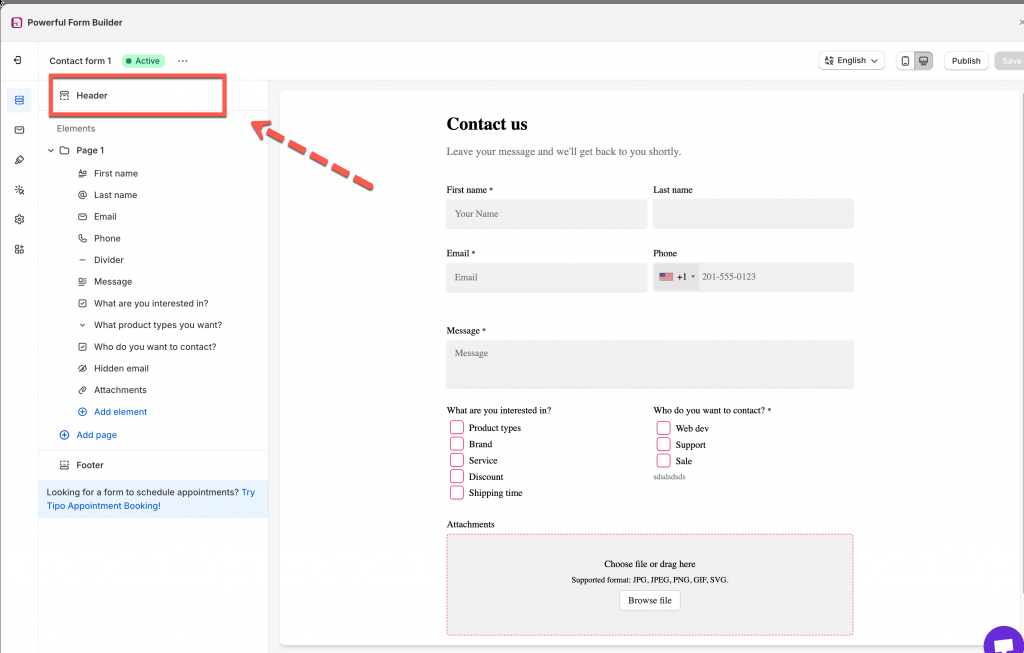
2. In **Elements** section, click **Header**
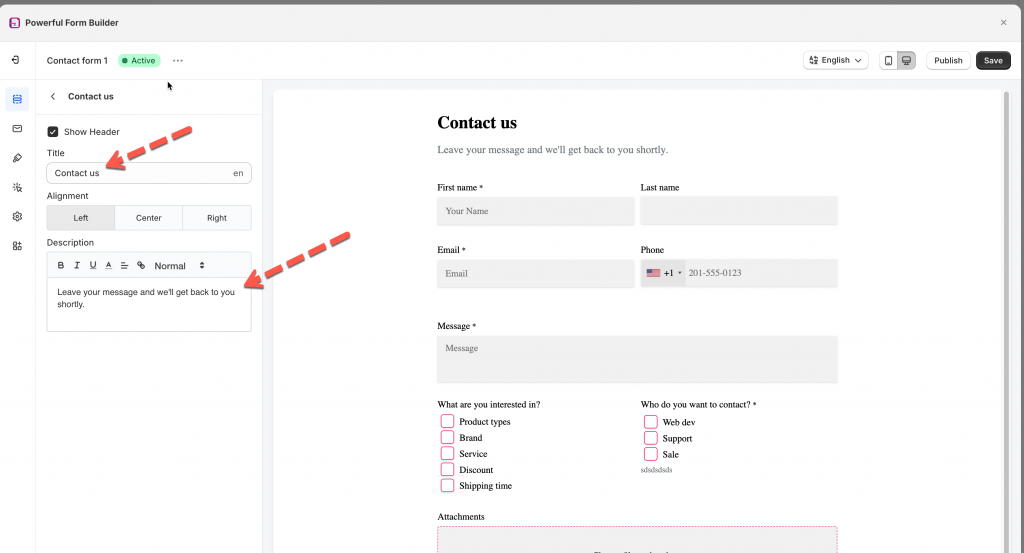
3. Edit the text in **Title** and **Description** fields
4. Click **Save**
***
### ✏️ Hide the form Header
1. Open the Form Builder app > click **Forms** > open the form you want to edit
2. In **Elements** section, click **Header**
3. Untick checkbox **Show header**
4. Click **Save**
###