> For the complete documentation index, see [llms.txt](https://docs.powerfulform.com/llms.txt). Markdown versions of documentation pages are available by appending `.md` to page URLs; this page is available as [Markdown](https://docs.powerfulform.com/~/revisions/KRfi0fHdeAFeAhiPrH7G/form-setup/get-embed-code-of-a-form.md).
# Get embed code of a form
This guide shows you how to get the embed code (shortcode) for your form so you can place it on any page of your Shopify store.
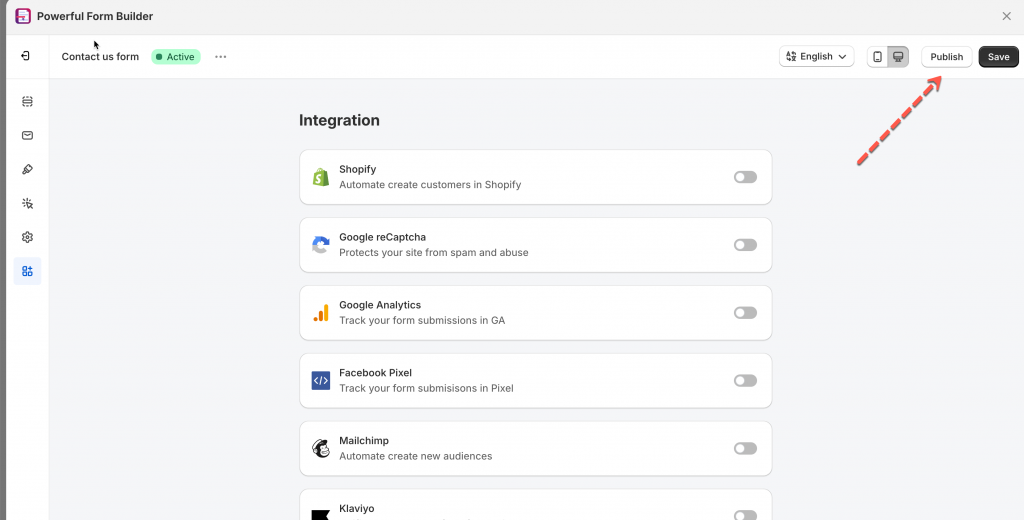
1\. Open the app > click **Forms** > open a form you want
2\. Click **Publish** button on the right corner
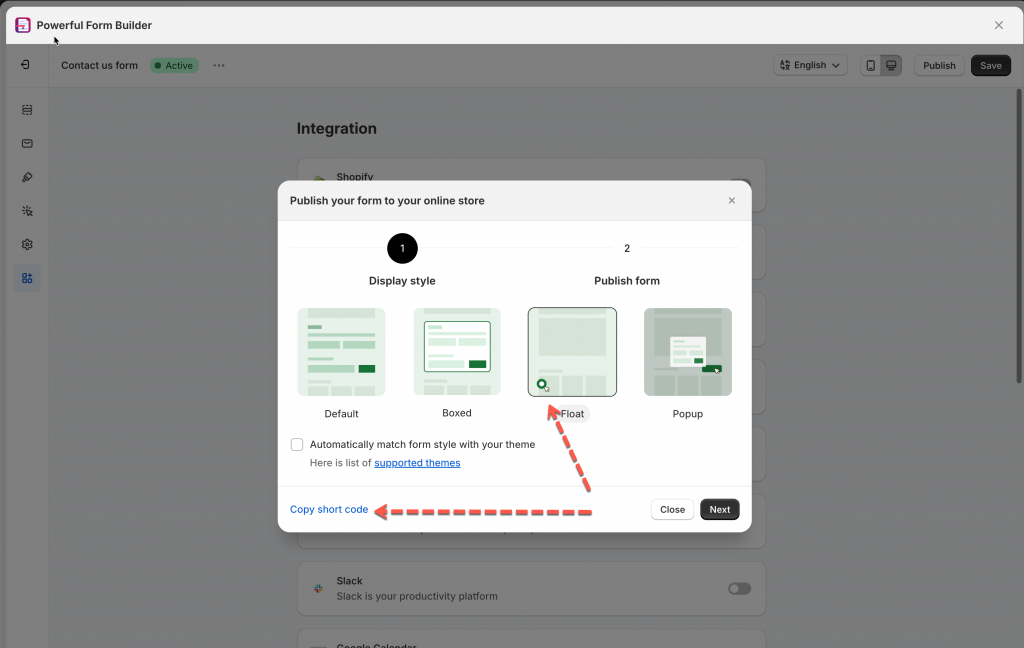
4\. Select the form layout and click **Copy short code**
**Example shortcode:**
* Form shortcode for default/floating/boxed form: (xxx is form ID)
```
```
* Form shortcode for popup-button form: (xxx is form ID)
Then paste the copied shortcode into the page, theme template, or section where you want the form to appear
[Learn more](/~/revisions/KRfi0fHdeAFeAhiPrH7G/form-setup/display-a-form-on-a-specific-page.md)