> For the complete documentation index, see [llms.txt](https://docs.powerfulform.com/llms.txt). Markdown versions of documentation pages are available by appending `.md` to page URLs; this page is available as [Markdown](https://docs.powerfulform.com/~/revisions/A6iqcSvm9LlSNOeSiGON/form-setup/get-embed-code-of-a-form.md).
# Get embed code of a form
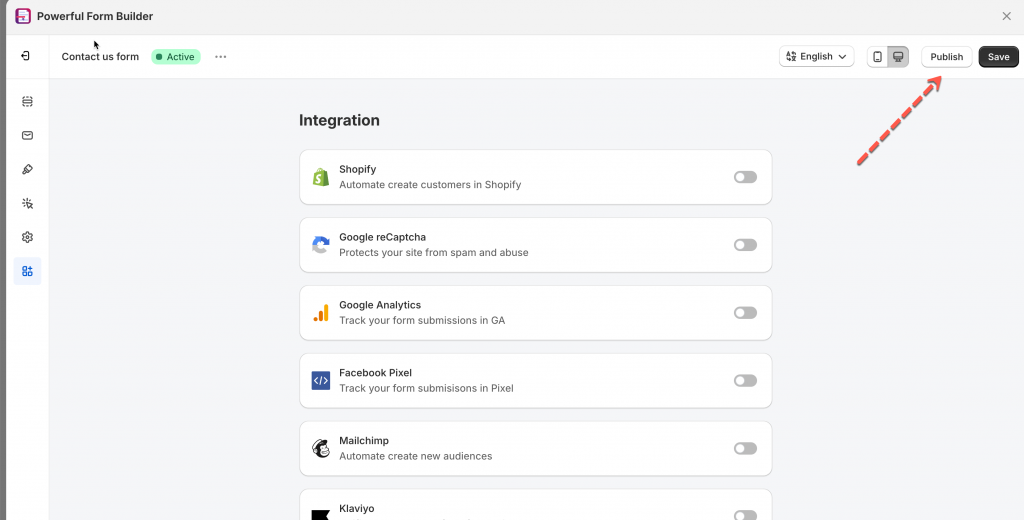
1\. Open the app > click **Forms** > open a form you want
2\. Click **Publish** button on the right corner
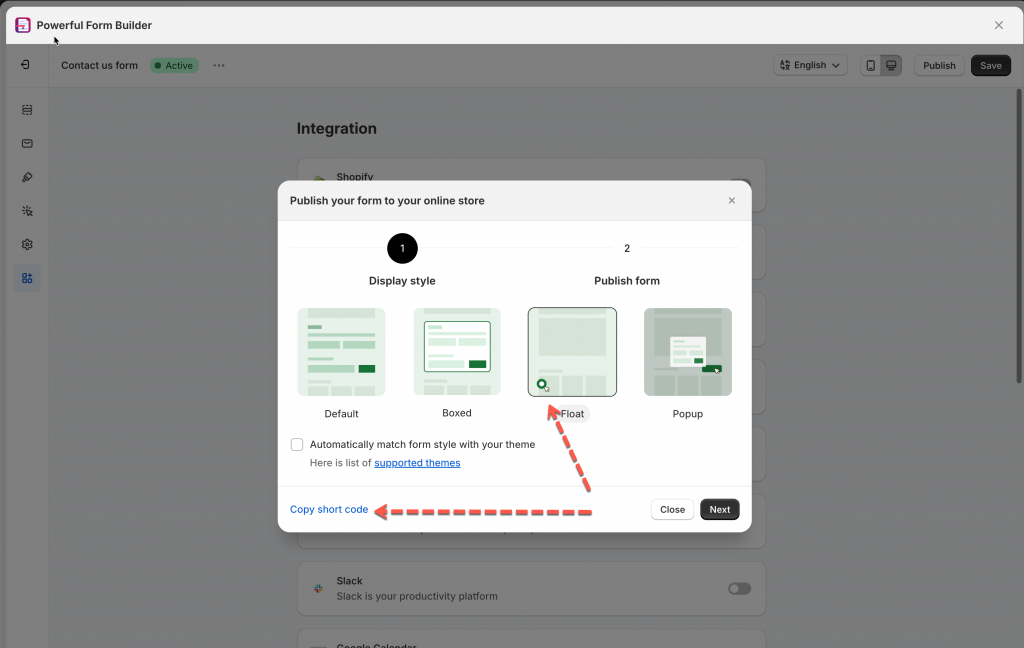
4\. Select the form layout and click **Copy short code**
**Example shortcode:**
* Form shortcode for default/floating/boxed form: (xxx is form ID)
```
```
* Form shortcode for popup-button form: (xxx is form ID)
Then paste the copied shortcode into the page, theme template, or section where you want the form to appear
[Learn more](/~/revisions/A6iqcSvm9LlSNOeSiGON/form-setup/display-a-form-on-a-specific-page.md)
***
#### Need More Help?
If you still need assistance, please contact us at [**support@powerfulform.com**](mailto:support@powerfulform.com). Our team will be happy to help you resolve any issues or guide you further.