> For the complete documentation index, see [llms.txt](https://docs.powerfulform.com/llms.txt). Markdown versions of documentation pages are available by appending `.md` to page URLs; this page is available as [Markdown](https://docs.powerfulform.com/troubleshooting/customer-already-exists.md).
# Error: Customer already exists
Fix the 'customer already exists' error on a registration form.
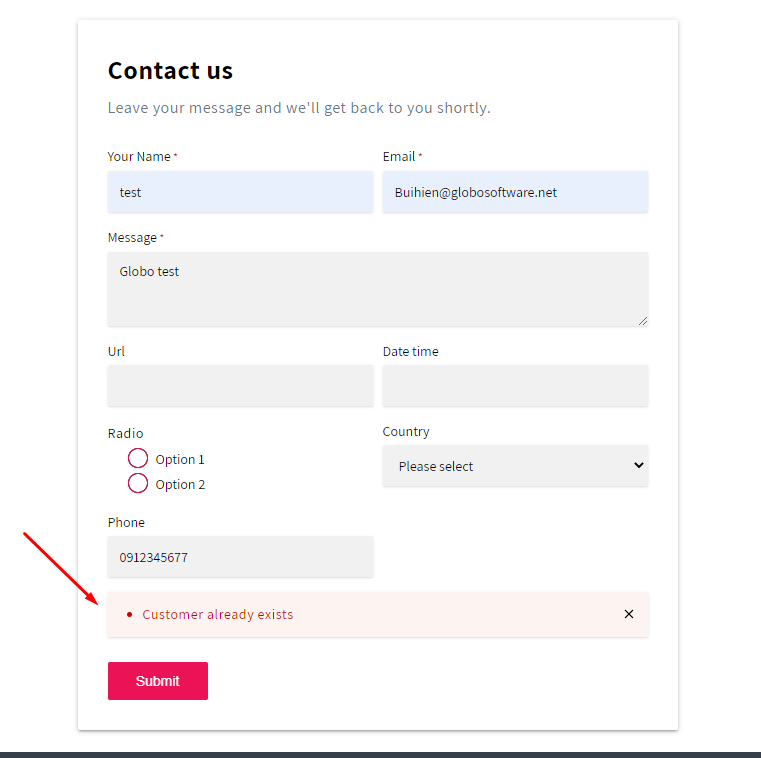
This error usually appears when your form is trying to create a new customer account in Shopify, but Shopify finds that the email (or phone) already belongs to an existing customer.
✅ Good news: nothing is broken! Shopify is just preventing duplicate customer accounts.
## 🔍 Why This Happens
This is Shopify's own validation, not an app bug. When a registration form submits an **Email** (or Phone), Shopify checks whether that customer already exists in your store. If it finds a match, it blocks the new account and returns:
> *"Customer already exists."*
✅ **Nothing is broken** — Shopify is just preventing duplicate customer accounts.
Example:
> Anna registered on your store last month with `anna@gmail.com`.
>
> She later fills in your wholesale application form using the same email.
>
> Shopify sees that email already belongs to a customer, blocks the new account, and returns the error — even though nothing on your form or in the app is wrong.
## 🔧 How to solve
Set the form to update the existing customer instead of trying to create a new one.
**Steps**
{% stepper %}
{% step %}
Open the app > click **Forms** > open the form you want to edit
{% endstep %}
{% step %}
Click the **Integration** icon on the left side > enable **Shopify** > click on **Shopify** option to open the setting
{% endstep %}
{% step %}
Find **If customer already exists** > select **Continue and update customer information**
{% endstep %}
{% step %}
**Save** form
{% endstep %}
{% endstepper %}
## 🔄 What Changes
Before
After
Matching email → error, submission blocked
Matching email → no error, existing customer updated
New email → account created
New email → account created (unchanged)
**Same example, after the fix:** Anna submits the wholesale form with `anna@gmail.com`. Since the email matches her existing account, no error appears — her existing customer record is updated with the new form data instead.
✅ **Result:** Customers can submit the form as many times as needed without errors, and their info stays current.
> **💡 Test it:** Submit the form yourself using an email you know already exists as a customer, and confirm no error appears.
## Next steps
* [Shopify Customers integration](/customers-and-registration/customer-fields.md) — the integration that creates the customer.
* [Error: Phone already taken](/troubleshooting/phone-already-taken.md) — the same class of error.
* [Contact support](/help/contact-support.md) — if the problem is still there.