> For the complete documentation index, see [llms.txt](https://docs.powerfulform.com/llms.txt). Markdown versions of documentation pages are available by appending `.md` to page URLs; this page is available as [Markdown](https://docs.powerfulform.com/submissions/one-submission-per-customer.md).
# Limit to one submission per customer
Make sure each user can submit your form only once — ideal for giveaways, surveys, or restricted offers.
{% hint style="info" %}
**Limit to one submit per user** is available on Pro plans and above. See [Plans and billing](/settings/plans-and-billing.md).
{% endhint %}
Use this setting to make sure each user can submit your form only once. Perfect for giveaways, surveys, or restricted offers.
You can restrict users to a single submission based on their email address or phone number.
## Step to enable
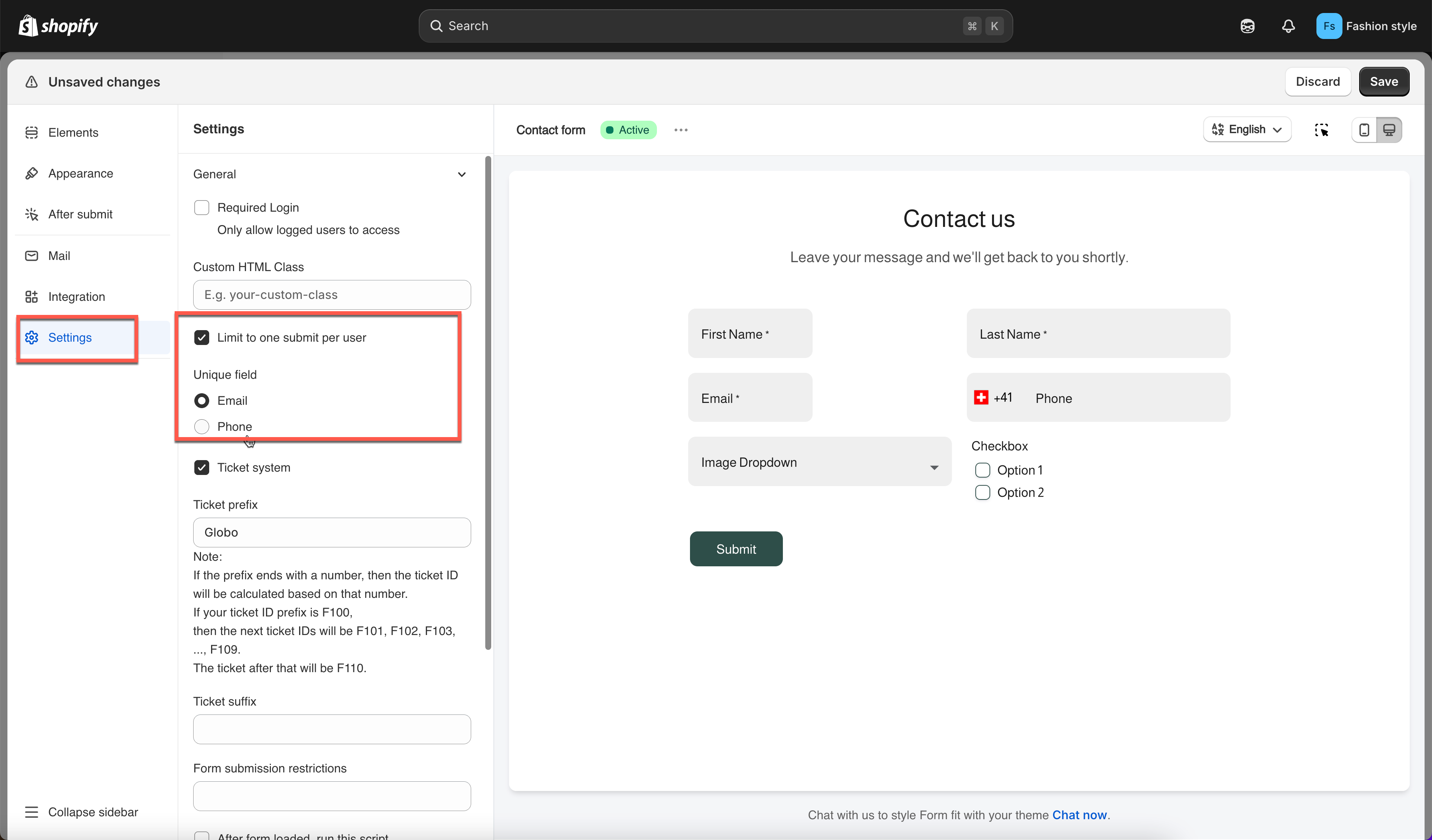
1. Open the app > click **Forms** > open a form
2. Click setting icon on the left side > click **General**
3. Tick on checkbox **Limit to one submit per user** > select option to identify the customers: **email** or **phone**
4. Click **Save**
***
## How it works
Once **Limit to one submit per user** is enabled, the app checks for duplicate entries based on the **email address** or **phone number** entered in the form.
#### When a user tries to submit again
If someone attempts to submit the form more than once using the same email or phone number, the form will block the submission and show an error message such as:
> **"Data already exists"**
This message informs the user that they have already submitted the form.
***
## Use cases
When we should enable this option?
* Contests or giveaways: limit to one entry per user
* Exclusive offers or coupons: avoid duplicate uses
* Customer feedback or surveys: ensure one response per customer
* Membership applications: one submission per applicant
***
## Next steps
* [Edit error messages](/build-your-form/error-messages.md) — rewrite **Data already exists** in your own words.
* [Require login to submit](/customers-and-registration/require-login.md) — tie entries to real customer accounts.
* [View submissions](/submissions/view-submissions.md) — confirm only one entry per person is arriving.
* [Prevent spam submissions](/troubleshooting/prevent-spam.md) — the separate problem of automated entries.