> For the complete documentation index, see [llms.txt](https://docs.powerfulform.com/llms.txt). Markdown versions of documentation pages are available by appending `.md` to page URLs; this page is available as [Markdown](https://docs.powerfulform.com/submissions/form-insights.md).

# Form insights

Measure how your forms perform — views, submissions, completion and where your respondents come from — for one form or all of them.

Reading individual submissions tells you what people said. The analytics view in **Powerful Contact Form Builder** tells you how the form itself is doing: how many people saw it, how many finished it, and what devices, sources and countries they came from.

The same screen comes in two variants, and the difference is only the scope.

| Variant             | How you open it                                           | Scope                    |
| ------------------- | --------------------------------------------------------- | ------------------------ |
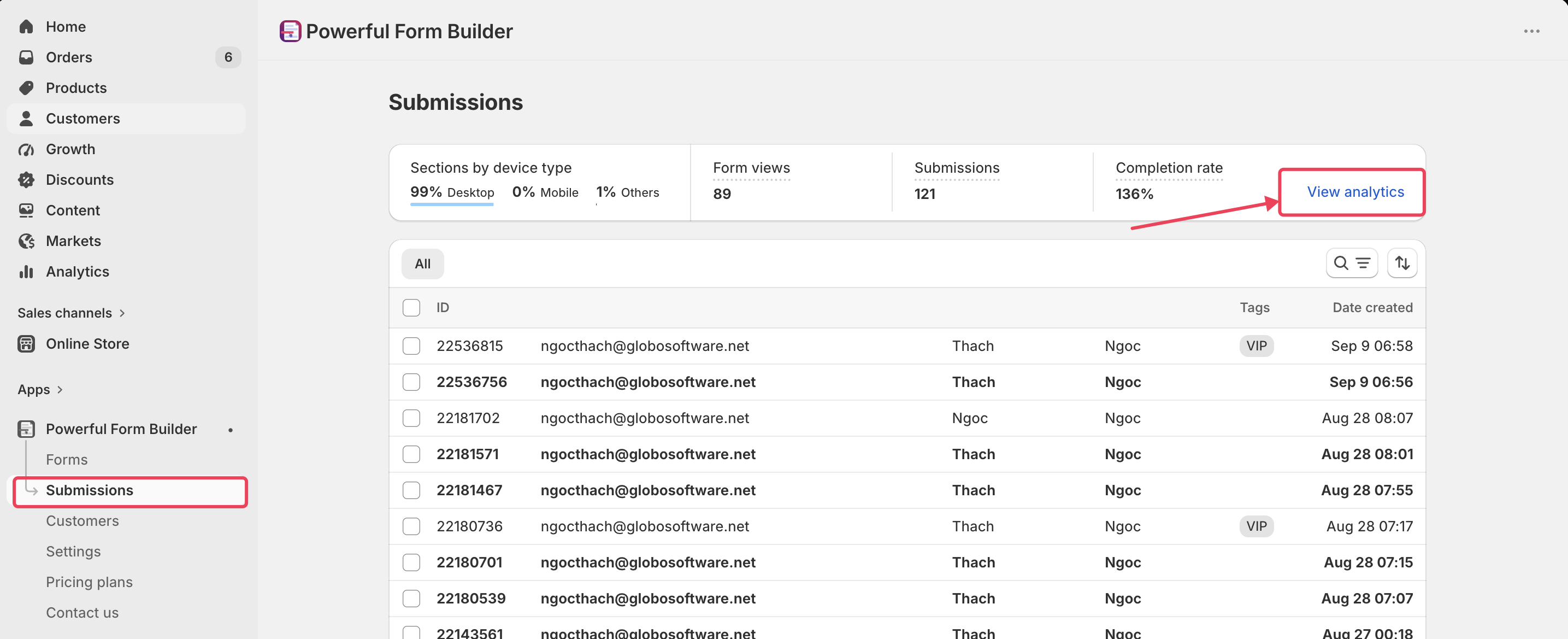
| All-forms analytics | **Submissions** > **View analytics** on the summary strip | Every form in your store |
| Single-form insight | **Forms** > **View insight** at the end of a form's row   | That one form            |

The all-forms variant is titled **Submissions** and has a back link to the submissions list.

<figure><img src="https://2907469752-files.gitbook.io/~/files/v0/b/gitbook-x-prod.appspot.com/o/spaces%2FehM2rz7MmKkWcJmgvJOe%2Fuploads%2Fgit-blob-ccab5ba89a1d948cfbee9e774920dc61b86b1e46%2FScreenshot%202026-09-14%20at%2017-30-49.png?alt=media" alt=""><figcaption></figcaption></figure>

The single-form variant is titled with the form's name, subtitled with its number, has a back link to **Forms**, and carries an **Edit form** button in the header. Everything below the header is identical.

<figure><img src="https://2907469752-files.gitbook.io/~/files/v0/b/gitbook-x-prod.appspot.com/o/spaces%2FehM2rz7MmKkWcJmgvJOe%2Fuploads%2Fgit-blob-ccdd50b7dfe3727bedd96fdb69084063bd4540aa%2FScreenshot%202026-09-14%20at%2017-30-12.png?alt=media" alt=""><figcaption></figcaption></figure>

{% hint style="info" %}
Analytics is available in our **PRO** plan or higher. See [Plans and billing](/settings/plans-and-billing.md).
{% endhint %}

## The metric cards

<figure><img src="https://2907469752-files.gitbook.io/~/files/v0/b/gitbook-x-prod.appspot.com/o/spaces%2FehM2rz7MmKkWcJmgvJOe%2Fuploads%2Fgit-blob-5b843a1cd8811b5ff48d0923eea85cef6e16fdee%2FScreenshot%202026-09-14%20at%2017-34-07.png?alt=media" alt=""><figcaption></figcaption></figure>

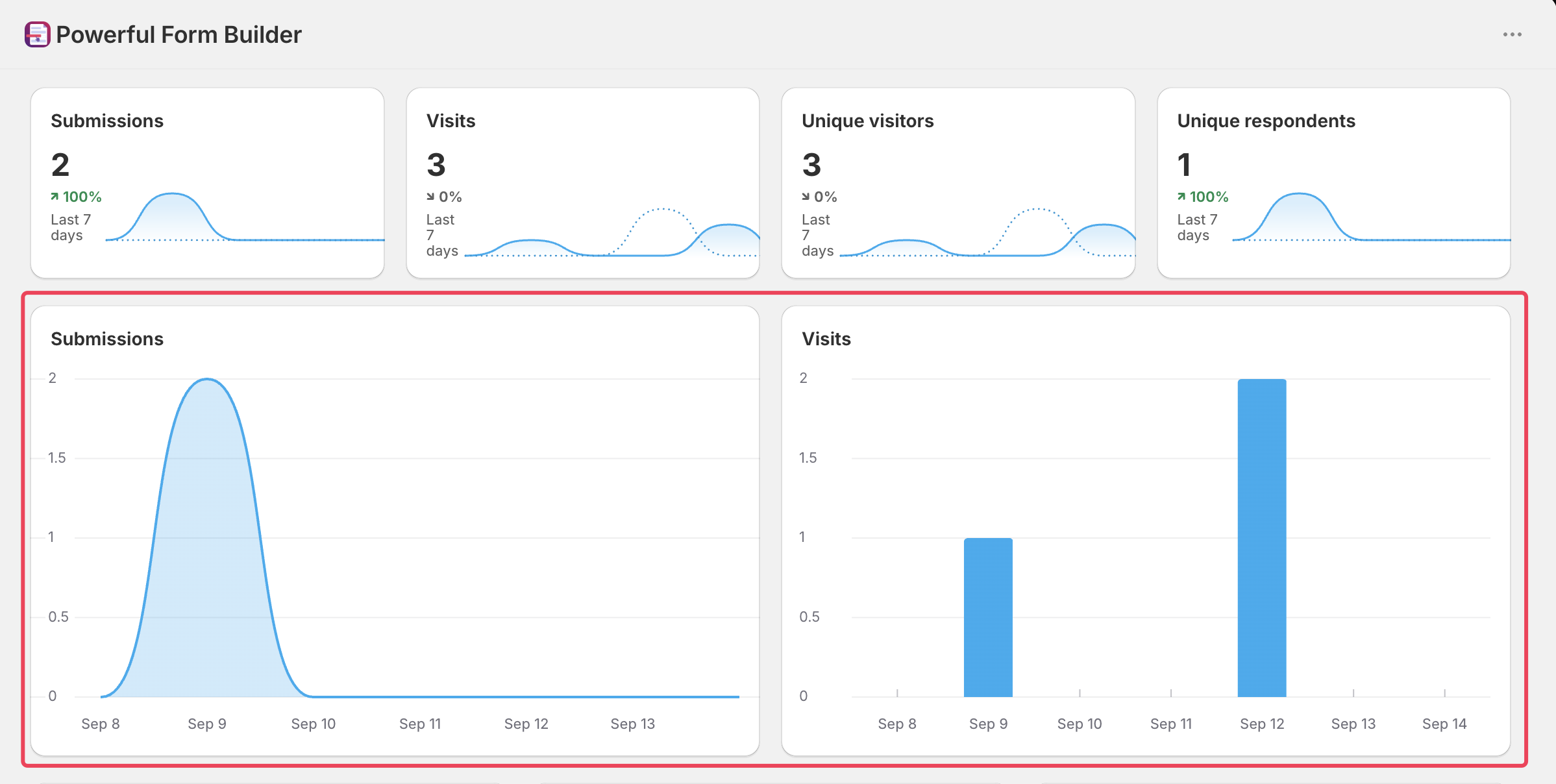
Four cards sit under the date button. Each shows the total for the period, a percentage trend against the equivalent period immediately before it, and a small sparkline comparing the two periods.

<table><thead><tr><th width="203.199951171875">Card</th><th>What it counts</th></tr></thead><tbody><tr><td><strong>Submissions</strong></td><td>Submissions received in the period.</td></tr><tr><td><strong>Visits</strong></td><td>Form views in the period. One visitor loading the page twice counts twice.</td></tr><tr><td><strong>Unique visitors</strong></td><td>Distinct visitors who saw a form in the period.</td></tr><tr><td><strong>Unique respondents</strong></td><td>Distinct visitors who submitted a form in the period.</td></tr></tbody></table>

## The charts

<figure><img src="https://2907469752-files.gitbook.io/~/files/v0/b/gitbook-x-prod.appspot.com/o/spaces%2FehM2rz7MmKkWcJmgvJOe%2Fuploads%2Fgit-blob-803b16efb2f3cddbd0fa2a801d47e255ba738860%2FScreenshot%202026-09-14%20at%2017-36-01.png?alt=media" alt=""><figcaption></figcaption></figure>

Two day-by-day charts sit under the cards: **Submissions**, an area chart of submissions per day, and **Visits**, a bar chart of form views per day. Use them to spot the shape behind a total — a single spike from a campaign looks very different from steady daily traffic, even when the totals match.

## The breakdowns

<figure><img src="https://2907469752-files.gitbook.io/~/files/v0/b/gitbook-x-prod.appspot.com/o/spaces%2FehM2rz7MmKkWcJmgvJOe%2Fuploads%2Fgit-blob-113c6cdd8da6f4d2b6e837b0fc5e0c22ff4726f7%2Fscreenshot-data-form-insight-breakdowns.png?alt=media" alt="The breakdown section of the insight view showing the Devices donut with its legend, plus Browsers, UTM sources, Countries, Operating systems, Languages and Time zones"><figcaption></figcaption></figure>

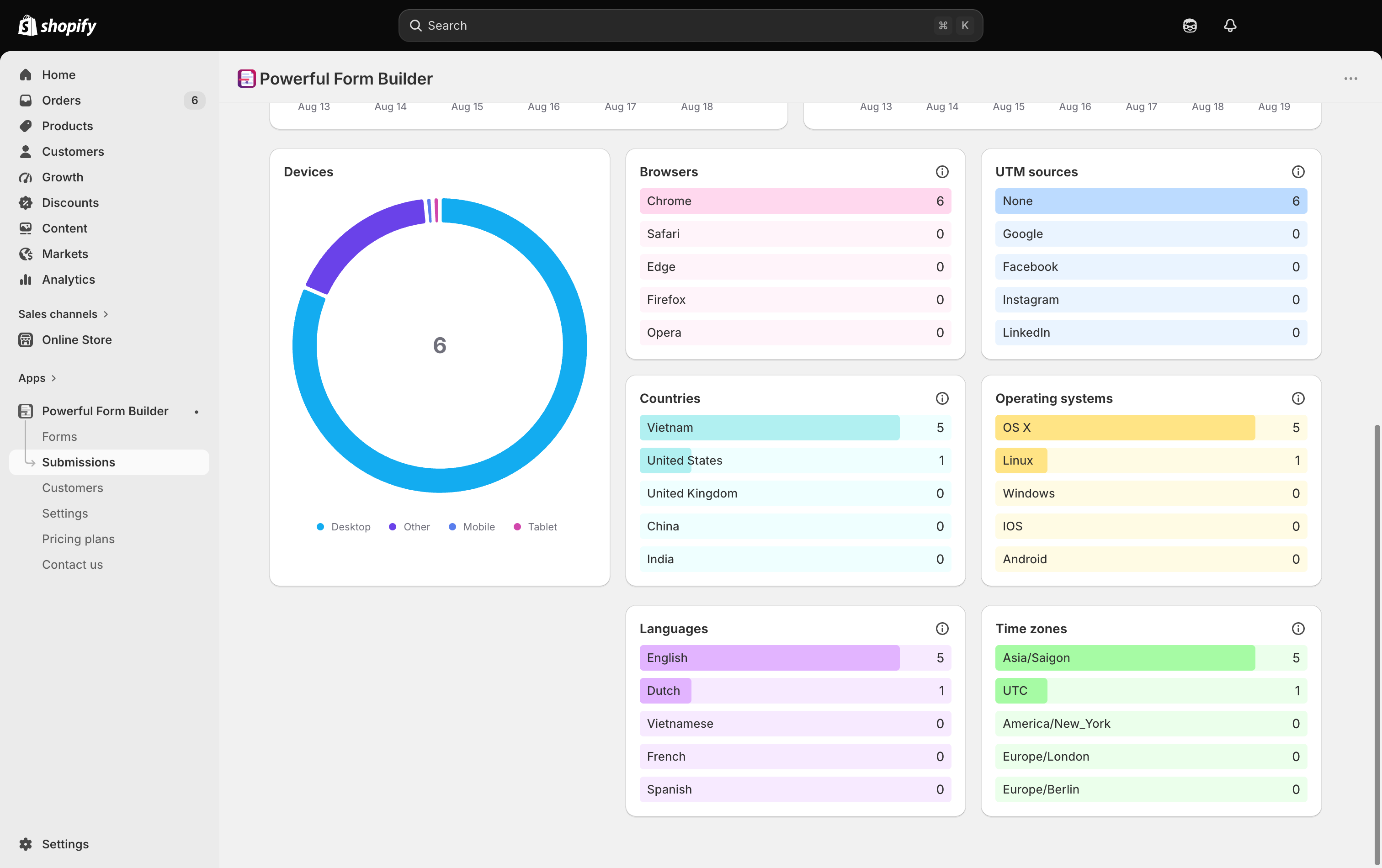
Below the charts, a set of cards splits the period's activity by audience. Each list shows the top five values, and the info icon on a card explains it — for example **These are the top 5 Browsers with the highest number of submissions**.

<table><thead><tr><th width="193.433349609375">Card</th><th>What it tells you</th></tr></thead><tbody><tr><td><strong>Devices</strong></td><td>A donut chart splitting activity across <strong>Desktop</strong>, <strong>Mobile</strong>, <strong>Tablet</strong> and <strong>Other</strong>, with the values in the legend.</td></tr><tr><td><strong>Browsers</strong></td><td>The five browsers producing the most submissions.</td></tr><tr><td><strong>UTM sources</strong></td><td>The five traffic sources producing the most submissions. Traffic arriving without a UTM source is listed as <strong>None</strong>.</td></tr><tr><td><strong>Countries</strong></td><td>The five countries producing the most submissions, by country name. Values that cannot be identified are listed as <strong>Unknown</strong>.</td></tr><tr><td><strong>Operating systems</strong></td><td>The five operating systems producing the most submissions.</td></tr><tr><td><strong>Languages</strong></td><td>The five storefront languages your respondents used, by language name.</td></tr><tr><td><strong>Time zones</strong></td><td>The five time zones your respondents are in.</td></tr></tbody></table>

## What to do with what you find

<details>

<summary>Mobile is most of my traffic</summary>

Check the form on a phone rather than a narrow browser window. Long dropdowns, wide tables and side-by-side fields are the usual problems. See [Fonts, size and spacing](/design-your-form/fonts-and-sizing.md).

</details>

<details>

<summary>Countries shows traffic I did not expect, with no submissions</summary>

Views without submissions from unexpected places are often bots. Turn on a CAPTCHA. See [Prevent spam submissions](/troubleshooting/prevent-spam.md).

</details>

<details>

<summary>A form has submissions but the charts look empty</summary>

Check the period first — the view opens on **Last 7 days**, so an older campaign will not appear until you widen the range.

</details>

<br>

## Next steps

* [View submissions](/submissions/view-submissions.md) — the summary strip and the table the numbers come from.
* [Multi-step forms](/build-your-form/special-form-types/multi-step-forms.md) — a common fix when views are high and submissions are low.
* [Prevent spam submissions](/troubleshooting/prevent-spam.md) — when the numbers are inflated by bots.