> For the complete documentation index, see [llms.txt](https://docs.powerfulform.com/llms.txt). Markdown versions of documentation pages are available by appending `.md` to page URLs; this page is available as [Markdown](https://docs.powerfulform.com/settings/customer-account.md).

# Submissions & Metafields on Account page

Let logged-in customers see their own past submissions and metafields, right on their Shopify account page.

> **⚠️ Requires:** PRO plan or above, and Shopify's **new customer accounts** (not legacy). See [Upgrading to customer accounts](https://help.shopify.com/en/manual/customers/customer-accounts/upgrade).

## 🔧 How to Set It Up

{% stepper %}
{% step %}

### Open the settings

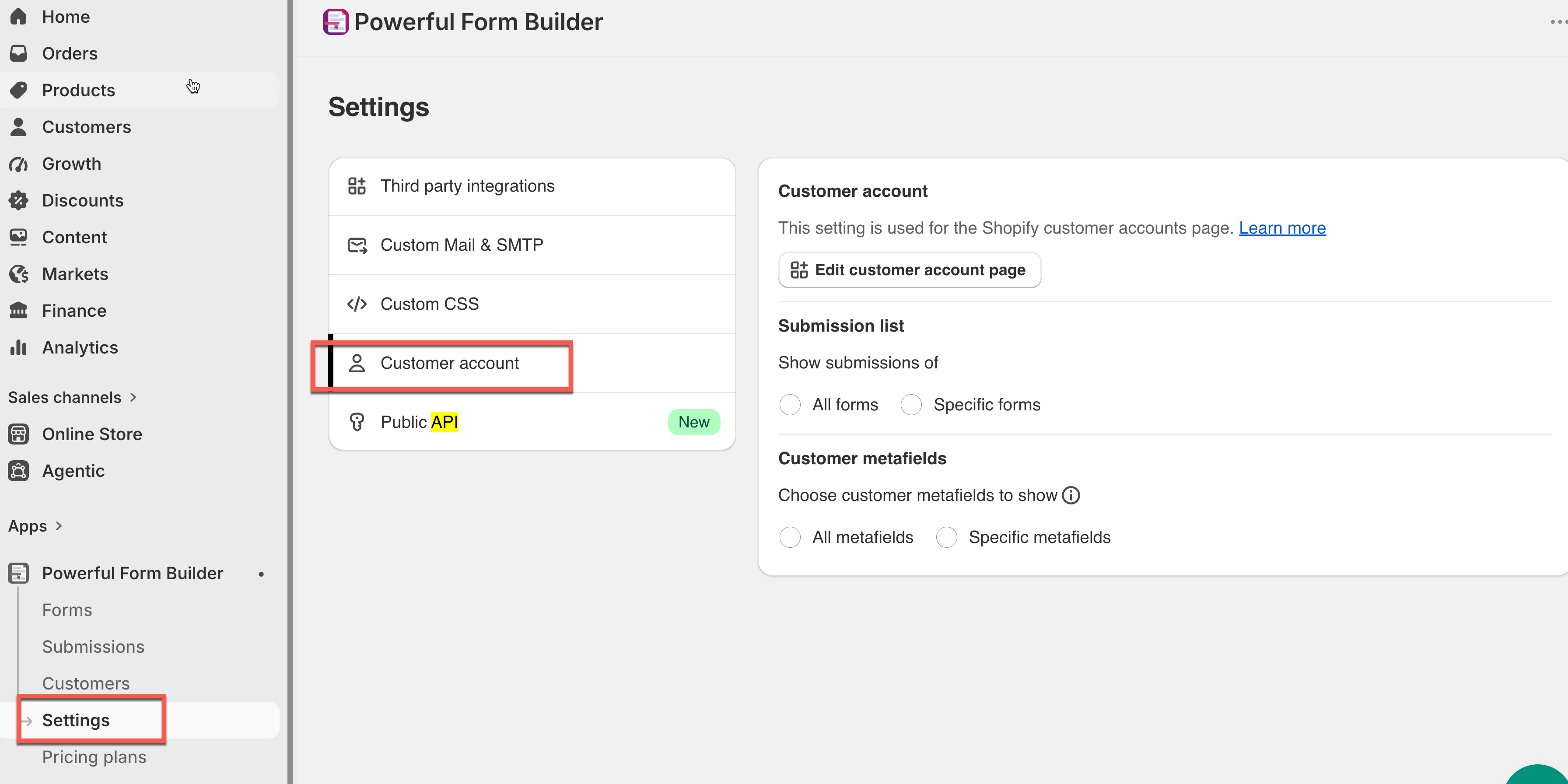
Open the form app > app **Settings** > **Customer account**

<figure><img src="https://2907469752-files.gitbook.io/~/files/v0/b/gitbook-x-prod.appspot.com/o/spaces%2FehM2rz7MmKkWcJmgvJOe%2Fuploads%2Fgit-blob-948a11fba269b3042c222ea9cc58713467204823%2F2026-09-30_16-48-01.png?alt=media" alt=""><figcaption></figcaption></figure>
{% endstep %}

{% step %}

### **Choose which submissions to show**

Under **Submission list**:

<table><thead><tr><th width="165.5999755859375">Option</th><th>Shows</th></tr></thead><tbody><tr><td><strong>All forms</strong></td><td>Every form the customer has submitted</td></tr><tr><td><strong>Specific forms</strong></td><td>Only the forms you select</td></tr></tbody></table>
{% endstep %}

{% step %}

### Choose which metafields to show

Under **Customer metafields**:

| Option                  | Shows                           |
| ----------------------- | ------------------------------- |
| **All metafields**      | Every metafield on the customer |
| **Specific metafields** | Only the ones you select        |
| {% endstep %}           |                                 |

{% step %}

### (Optional) Let customers edit metafield

Tick **And allow edit** — this applies to whichever metafields you chose above (all of them, or just the specific ones). Leave it off and metafields display as **read-only**.

<figure><img src="https://2907469752-files.gitbook.io/~/files/v0/b/gitbook-x-prod.appspot.com/o/spaces%2FehM2rz7MmKkWcJmgvJOe%2Fuploads%2Fgit-blob-b5e3638bb154d1f4a2b36d83599804be3dc38741%2F2026-09-30_16-50-08.png?alt=media" alt=""><figcaption></figcaption></figure>
{% endstep %}

{% step %}

### Add the blocks to the account page

Click **Edit customer account page** (or open the **Theme Editor** > **Customer account** page directly)

<figure><img src="https://2907469752-files.gitbook.io/~/files/v0/b/gitbook-x-prod.appspot.com/o/spaces%2FehM2rz7MmKkWcJmgvJOe%2Fuploads%2Fgit-blob-ba350cd751d461c5c67465ac1602d7424f7ac3c4%2F2026-09-30_17-15-46.png?alt=media" alt=""><figcaption></figcaption></figure>
{% endstep %}

{% step %}

### Add block (+) > choose

<table><thead><tr><th width="240.9666748046875">Block</th><th>What It Adds</th></tr></thead><tbody><tr><td><strong>Customer metafields</strong></td><td>Shows the metafields on the Profile page</td></tr><tr><td><strong>View submissions (profile)</strong></td><td>A link on Profile leading to submissions</td></tr><tr><td><strong>Submission list</strong></td><td>A dedicated page listing all submissions</td></tr></tbody></table>

<figure><img src="https://2907469752-files.gitbook.io/~/files/v0/b/gitbook-x-prod.appspot.com/o/spaces%2FehM2rz7MmKkWcJmgvJOe%2Fuploads%2Fgit-blob-9a8f390b405297b9153dfdb97cff38d7bb444edb%2Fimage%20(52).png?alt=media" alt=""><figcaption></figcaption></figure>
{% endstep %}

{% step %}

### Save in the theme editor.

{% endstep %}
{% endstepper %}

## 🔄 How It Works

**1. Customer logs in** at `/account`.\
**2. Submissions show automatically** — based on your **All forms / Specific forms** choice, with dates and a details/preview option.\
**3. Metafields show too** — based on your **All / Specific** choice, editable only if **And allow edit** is on.

<figure><img src="https://2907469752-files.gitbook.io/~/files/v0/b/gitbook-x-prod.appspot.com/o/spaces%2FehM2rz7MmKkWcJmgvJOe%2Fuploads%2Fgit-blob-4a0f12f118e501153e78fe74c7fc1cdcfdc17c9a%2Fscreenshot-imported-customer-fields-display-submission-list-in-account-page-8.png?alt=media" alt=""><figcaption></figcaption></figure>

<figure><img src="https://2907469752-files.gitbook.io/~/files/v0/b/gitbook-x-prod.appspot.com/o/spaces%2FehM2rz7MmKkWcJmgvJOe%2Fuploads%2Fgit-blob-84f80c522c7ab34c595e825236003c81f89a0a38%2F2026-09-30_17-44-48.png?alt=media" alt=""><figcaption></figcaption></figure>

## Next steps

* [Edit customer account page](/customers-and-registration/account-page.md) — the other customer-account setting.
* [Customer metafield](/customers-and-registration/customer-metafields.md) — fill the metafields this page shows.
* [Contact support](/help/contact-support.md) — if the list does not appear.
