> For the complete documentation index, see [llms.txt](https://docs.powerfulform.com/llms.txt). Markdown versions of documentation pages are available by appending `.md` to page URLs; this page is available as [Markdown](https://docs.powerfulform.com/reference/permissions-and-data.md).

# Permissions and data

See exactly which Shopify permissions the app asks for and why, what it stores about your customers, and what happens to that data when you uninstall.

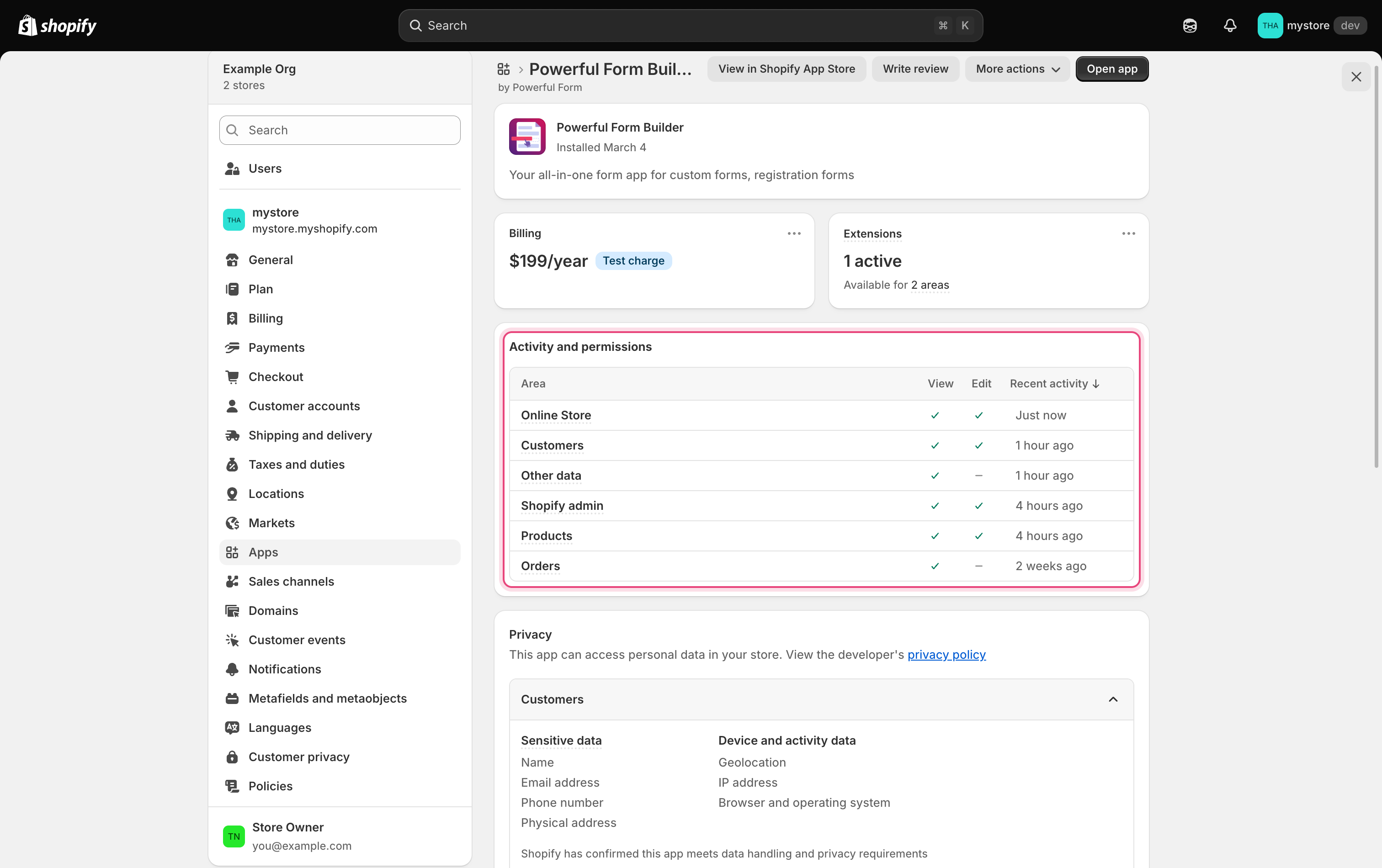
When you install **Powerful Contact Form Builder**, Shopify shows a list of permissions to approve. You can review them any time under **Settings** > **Apps and sales channels** > **Powerful Contact Form Builder**.

## Permissions the app requests

| Permission                                 | Why the app needs it                                                  |
| ------------------------------------------ | --------------------------------------------------------------------- |
| Read products                              | List products for the **Product** field and the bulk order table.     |
| Write products                             | Add and remove the form's snippet in a product description.           |
| Read inventory                             | Check stock levels so a visitor cannot over-order.                    |
| Read customers                             | Recognize a signed-in customer and link their submissions.            |
| Write customers                            | Create a customer from a registration form, with tags and metafields. |
| Read content                               | List your pages and blog articles in the **Publish** window.          |
| Write content                              | Add and remove the form's snippet in a page's content.                |
| Read files                                 | Pick an image already in your Shopify Files.                          |
| Write files                                | Upload images from a form's design into your Shopify Files.           |
| Read themes                                | List themes, check the app embed, count **Form** app blocks.          |
| Read locales                               | See which languages your store publishes, for translations.           |
| Read orders                                | Match a cart form's answers to its order.                             |
| App proxy                                  | Serve your forms from your own store's domain.                        |
| Read published product listings (optional) | Show live price, image and availability on a product field.           |

<figure><img src="https://2907469752-files.gitbook.io/~/files/v0/b/gitbook-x-prod.appspot.com/o/spaces%2FehM2rz7MmKkWcJmgvJOe%2Fuploads%2Fgit-blob-4d4114bb51560a679de4e28bb747aab707416916%2Fscreenshot-reference-shopify-app-permissions.png?alt=media" alt="The Shopify admin app detail page for Powerful Contact Form Builder under Settings > Apps and sales channels, with the app&#x27;s permissions list expanded. Highlight the permissions section."><figcaption><p>The Shopify admin app detail page for Powerful Contact Form Builder under Settings > Apps and sales channels, with the app's permissions list expanded.</p></figcaption></figure>

{% hint style="info" %}
Permissions describe what the app is allowed to do, not what it does. The app writes to your store only when you ask it to.
{% endhint %}

## What the app stores

### Your forms

Every form lives in the app: its fields, wording, styling, email templates, integration settings and translations. None of it is stored in your theme.

### Submissions

For each submission the app stores:

* The answers the visitor entered, and any files they uploaded.
* The page it was submitted from, the date and time, and a ticket number if that system is on.
* Tags and notes added afterwards, and a link to the Shopify customer when the visitor was signed in.

{% hint style="warning" %}
Do not build forms that collect payment card numbers, bank details or passwords. Use Shopify checkout for payments, and a registration form when a customer needs a password.
{% endhint %}

### Uploaded files

Files attached through a **File Upload** field are held in the app's own storage, not your Shopify Files, and count toward your plan's **Storage size** limit. See [Uploaded files and storage](/troubleshooting/file-storage.md).

Images *you* add while designing a form go to your Shopify Files and stay there even if the form is deleted.

## Getting your data out

| You want to                          | Do this                                                                                      |
| ------------------------------------ | -------------------------------------------------------------------------------------------- |
| A copy of all submissions for a form | Export them to a spreadsheet. See [Export submissions](/submissions/export-submissions.md).  |
| A backup of the form itself          | Export the form. See [Import and export forms](/getting-started/import-and-export-forms.md). |

Export before you delete anything.

## What happens when you uninstall

When you remove the app from your Shopify admin:

* Your forms, their settings and your submissions are deleted, along with the uploaded files.
* Your store's billing for the app stops.
* The app embed and any **Form** app blocks stay in your theme, rendering nothing.
* Snippets the app wrote into a page or a product description stay there. See [Remove old embed code](/troubleshooting/delete-old-code.md).
* Anything already created in your store — customers, tags, notes, metafields, orders — is untouched, and anything already sent to another service stays there.

{% hint style="danger" %}
Export your submissions before uninstalling. Reinstalling gives you a clean install, not your old data back.
{% endhint %}

## Privacy requests from Shopify

Shopify sends these when the matching event happens in your store; you never trigger them yourself.

<details>

<summary>Customer data request</summary>

A shopper has asked for a copy of the personal data your store holds about them.

**What it means for you:** you answer the shopper. For what the app holds, filter **Submissions** to that person's email address and export the matching entries.

</details>

<details>

<summary>Customer redact</summary>

A shopper has asked you to erase their personal data, or you deleted the customer in Shopify.

**What it means for you:** delete that person's submissions in the app, so their answers and uploaded files go too. Deleting the customer in Shopify does not clear what they typed into a form.

</details>

## Policies

* Privacy policy: <https://powerfulform.com/pages/privacy-policy>
* Terms and conditions: <https://powerfulform.com/pages/term-and-conditions>

<br>

## Next steps

* [Export submissions](/submissions/export-submissions.md) — keep your own copy.
* [Uploaded files and storage](/troubleshooting/file-storage.md) — how storage is measured.
