> For the complete documentation index, see [llms.txt](https://docs.powerfulform.com/llms.txt). Markdown versions of documentation pages are available by appending `.md` to page URLs; this page is available as [Markdown](https://docs.powerfulform.com/public-api/api-keys.md).

# Create an API key

Issue an API key in the app, pick the permissions it carries, and revoke it when an integration is retired.

Every request to the Public API is authenticated with an API key. Keys are issued from inside the app, one per integration, each carrying only the permissions that integration needs.

## Issue a key

{% stepper %}
{% step %}

### Open the Public API settings

In the app, click **Settings**, then **Public API**.

<figure><img src="https://2907469752-files.gitbook.io/~/files/v0/b/gitbook-x-prod.appspot.com/o/spaces%2FehM2rz7MmKkWcJmgvJOe%2Fuploads%2Fgit-blob-ac1a1c07c1b9687f3c3d936c38c1ceea17fd0be3%2FScreenshot%202026-09-18%20at%2011-15-55.png?alt=media" alt=""><figcaption></figcaption></figure>
{% endstep %}

{% step %}

### Click Create new API key

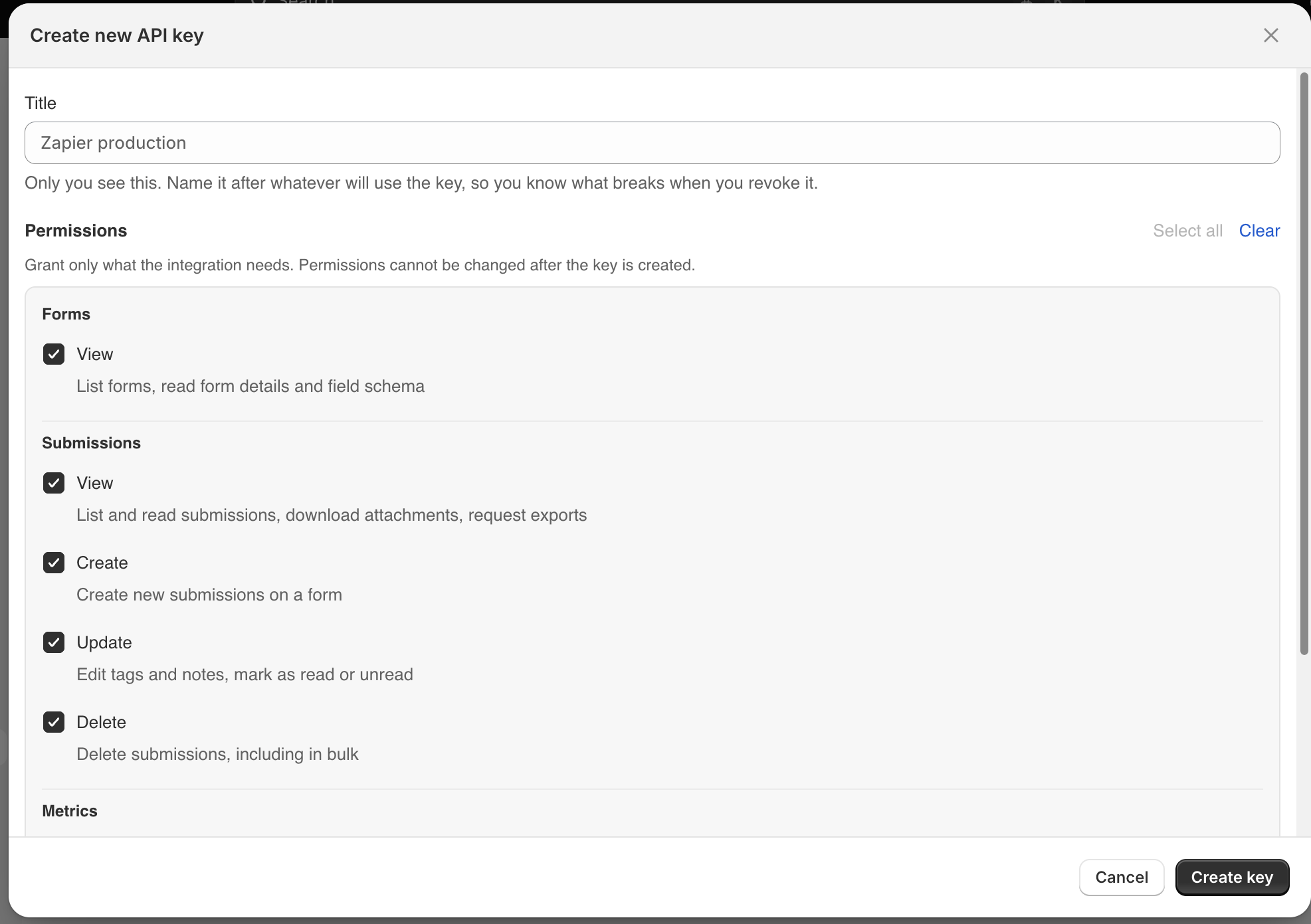
Give the key a **Title**. Only you see it — name it after whatever will use the key, so you know what breaks when you revoke it. *Zapier production*, *Nightly CRM sync*, *Staging*.
{% endstep %}

{% step %}

### Choose the permissions

Tick only what the integration actually needs. Permissions **cannot be changed after the key is created** — to widen or narrow them, revoke the key and issue a new one.

<figure><img src="https://2907469752-files.gitbook.io/~/files/v0/b/gitbook-x-prod.appspot.com/o/spaces%2FehM2rz7MmKkWcJmgvJOe%2Fuploads%2Fgit-blob-c29755b1deb9bd7fad64d9c6265dec6d7ef0e587%2FScreenshot%202026-09-18%20at%2011-17-06.png?alt=media" alt=""><figcaption></figcaption></figure>
{% endstep %}

{% step %}

### Set an expiry

**Never expires**, or 30 / 90 / 180 / 365 days, or a custom number of days up to 3650. An expiring key limits the damage if it ever leaks.
{% endstep %}

{% step %}

### Copy the key

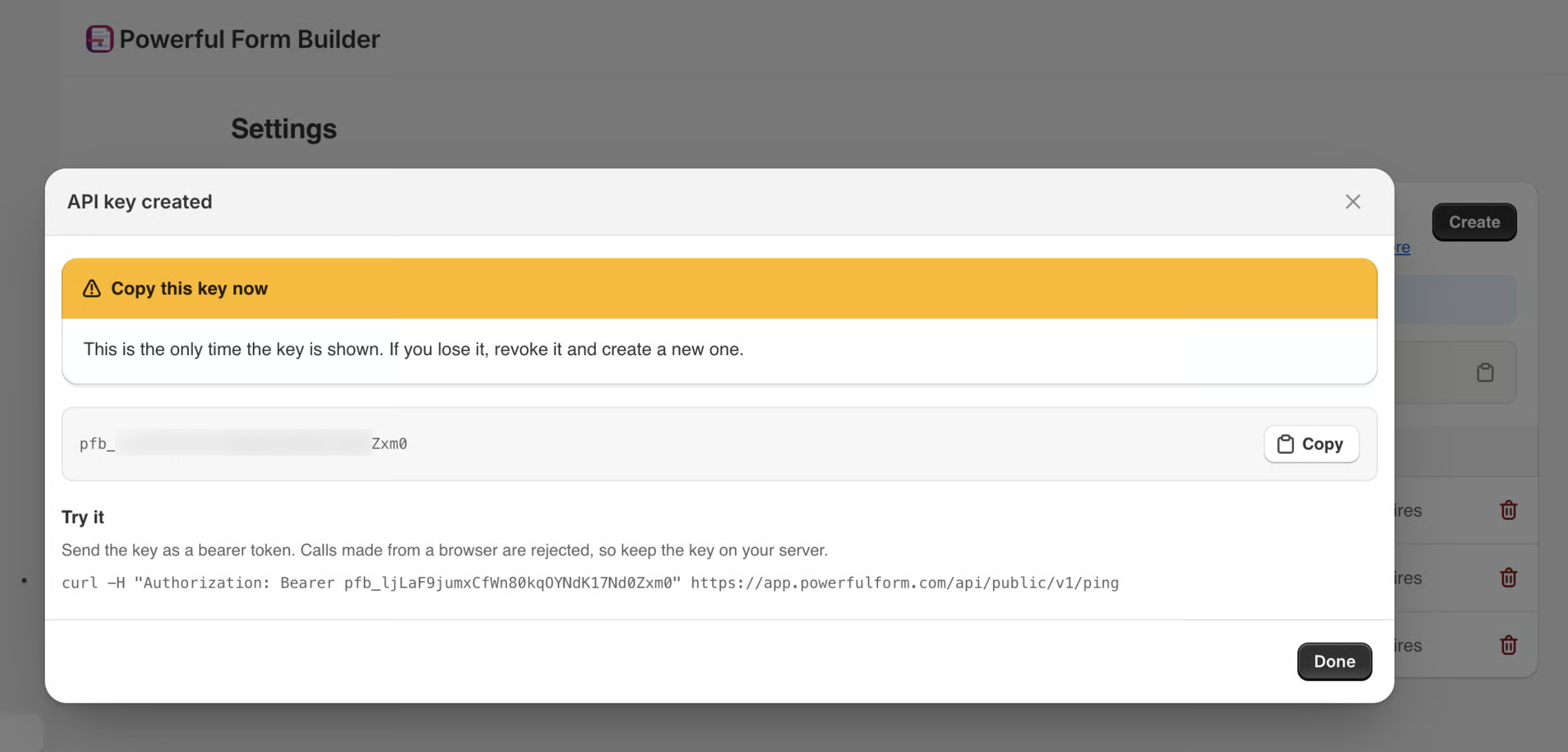
The key appears once, and only once. Copy it straight into your secret store. If you lose it, revoke it and create a new one — there is no way to read it again.

<figure><img src="https://2907469752-files.gitbook.io/~/files/v0/b/gitbook-x-prod.appspot.com/o/spaces%2FehM2rz7MmKkWcJmgvJOe%2Fuploads%2Fgit-blob-eff91311940539c9d2bc3d2b252db9dce6c5da47%2FScreenshot%202026-09-18%20at%2023-21-22.png?alt=media" alt=""><figcaption></figcaption></figure>
{% endstep %}
{% endstepper %}

Keys start with `pfb_`. After creation the app only ever shows the last four characters.

{% hint style="danger" %}
Treat the key like a password. It grants its permissions over every form and submission in your store, and it is not tied to a Shopify staff account — anyone holding it has that access until you revoke it.
{% endhint %}

## Permissions

A key carries one or more **scopes**. Calling an endpoint without its scope returns `403 insufficient_scope` and names the missing one.

<table><thead><tr><th width="220">Scope</th><th>What it allows</th></tr></thead><tbody><tr><td><code>forms:read</code></td><td>List forms, read form details and the field schema.</td></tr><tr><td><code>submissions:read</code></td><td>List and read submissions, and download attachments.</td></tr><tr><td><code>submissions:create</code></td><td>Create a submission on a form.</td></tr><tr><td><code>submissions:update</code></td><td>Edit tags and notes, mark read or unread.</td></tr><tr><td><code>submissions:delete</code></td><td>Delete submissions, including bulk delete.</td></tr><tr><td><code>metrics:read</code></td><td>Read view and submission counts.</td></tr></tbody></table>

Each action is its own scope rather than a single "manage" permission, because most integrations need exactly one thing: a lead-capture Zap only needs `submissions:create`, a reporting job only needs `metrics:read`, a cleanup cron only needs `submissions:delete`.

{% hint style="warning" %}
The **Create new API key** button is only available on **Advanced** and above. On a lower plan the screen says the Public API is not included in your plan. See [Plans and billing](/settings/plans-and-billing.md).
{% endhint %}

{% hint style="info" %}
The permissions list may show entries marked **Coming soon**. Those cannot be selected — the endpoints behind them are not live yet.
{% endhint %}

## How many keys you can have

A store can hold **5 active keys** at a time. Issuing a sixth returns `too_many_keys` — revoke one first.

## Revoke a key

On **Settings → Public API**, open the **Actions** menu on the key and choose **Revoke key**.

Revoking takes effect immediately: the next call made with that key returns `401 invalid_api_key`. It cannot be undone, and anything still calling the API with that key stops working, which is why the title matters.

The key row is retired rather than erased — if you ever need to investigate a leak, the record of when it was last used, and from which IP, is still there.

{% hint style="warning" %}
Rotate by overlap, not by gap: issue the new key, deploy it, confirm traffic has moved, and only then revoke the old one.
{% endhint %}

## Send the key

Put the key in the `X-PFB-API-KEY` header:

```bash
curl https://app.powerfulform.com/api/public/v1/ping \
  -H "X-PFB-API-KEY: pfb_your_key_here"
```

`Authorization: Bearer` works too, so tools that only speak bearer tokens — Postman, generated OpenAPI clients, the HTTP modules in Zapier and Make — need no special setup:

```bash
curl https://app.powerfulform.com/api/public/v1/ping \
  -H "Authorization: Bearer pfb_your_key_here"
```

{% hint style="danger" %}
The key is **never** accepted in the query string. URLs end up in access logs, error reports and browser history, which makes a query-string key the fastest way to leak one.
{% endhint %}

<br>

## Next steps

* [Make your first call](/public-api/quickstart.md) — check the key, the store and the scopes in one request.
* [Requests and responses](/public-api/requests-and-responses.md) — headers, envelope, pagination and rate limits.
* [Errors](/public-api/errors.md) — what each error code means and what to do about it.
