> For the complete documentation index, see [llms.txt](https://docs.powerfulform.com/llms.txt). Markdown versions of documentation pages are available by appending `.md` to page URLs; this page is available as [Markdown](https://docs.powerfulform.com/integrations/slack.md).

# Slack integration

Post every form submission into a Slack channel with an incoming webhook.

## How to set it up

{% stepper %}
{% step %}

### Get Slack Webhook URL

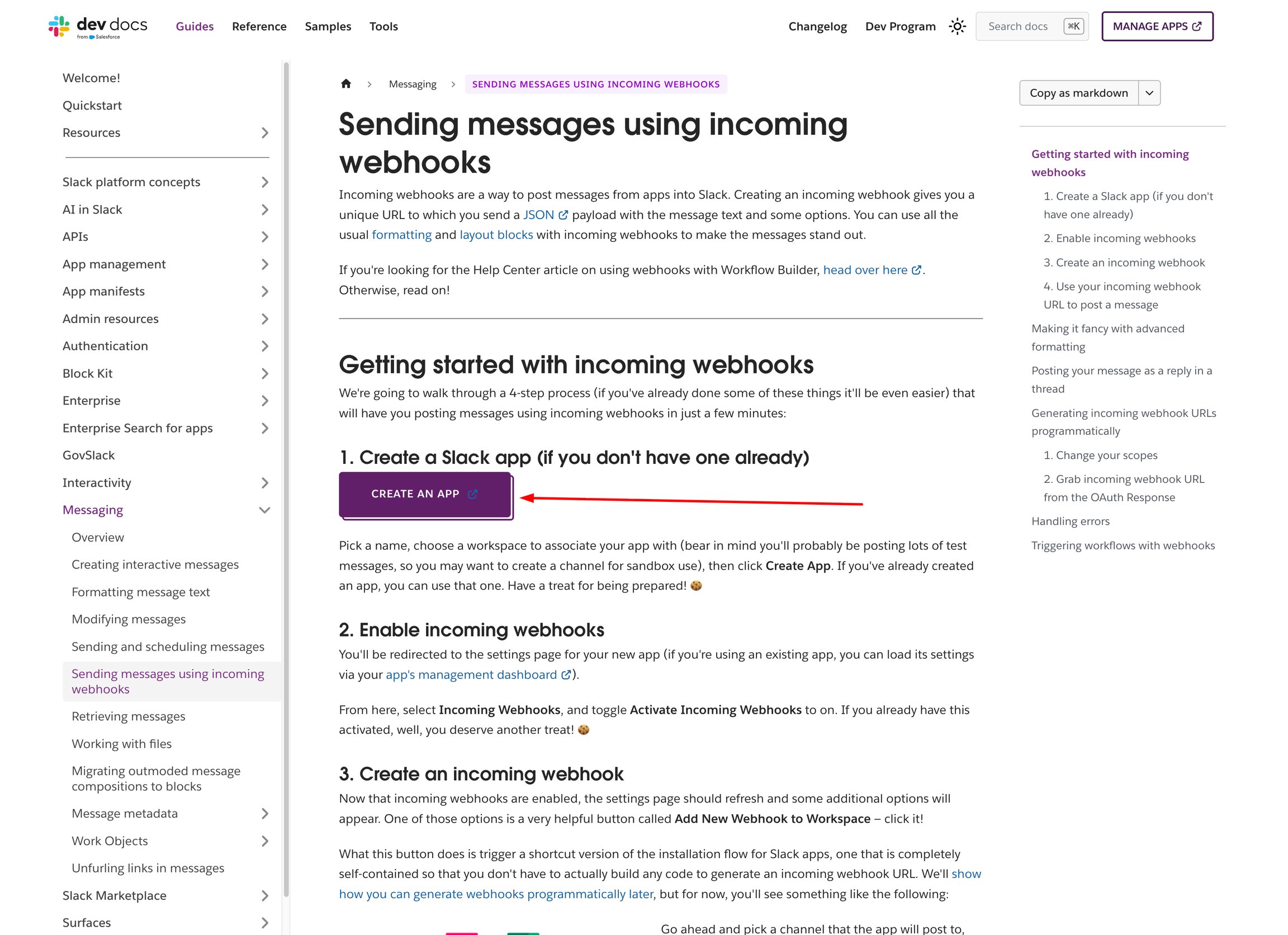
1. Open the Slack guide <https://docs.slack.dev/messaging/sending-messages-using-incoming-webhooks/> > then click **Create an App**.

<figure><img src="https://2907469752-files.gitbook.io/~/files/v0/b/gitbook-x-prod.appspot.com/o/spaces%2FehM2rz7MmKkWcJmgvJOe%2Fuploads%2Fgit-blob-cf2c528c17a6a31164e0f67680a9c8aca12c725b%2Fscreenshot-integration-slack-integration-1.png?alt=media" alt=""><figcaption></figcaption></figure>

2. Click **Create New App** > select your Slack workspace > enter your app name > click **Create App**

<figure><img src="https://2907469752-files.gitbook.io/~/files/v0/b/gitbook-x-prod.appspot.com/o/spaces%2FehM2rz7MmKkWcJmgvJOe%2Fuploads%2Fgit-blob-ddda00f208ec82641373049b44f63f0be884854d%2Fscreenshot-integration-slack-integration-2.png?alt=media" alt=""><figcaption></figcaption></figure>

<figure><img src="https://2907469752-files.gitbook.io/~/files/v0/b/gitbook-x-prod.appspot.com/o/spaces%2FehM2rz7MmKkWcJmgvJOe%2Fuploads%2Fgit-blob-ae9c750106459e157a7c3f29fc18cd19983c84bb%2Fscreenshot-integration-slack-integration-3.png?alt=media" alt=""><figcaption></figcaption></figure>

3. Enable Incoming Webhooks

* In the left sidebar, open **Incoming Webhooks**
* Turn on **Activate Incoming Webhooks**

<figure><img src="https://2907469752-files.gitbook.io/~/files/v0/b/gitbook-x-prod.appspot.com/o/spaces%2FehM2rz7MmKkWcJmgvJOe%2Fuploads%2Fgit-blob-c5eb18f12d048bea3bc7d39325b62fb3dddc5b3f%2Fscreenshot-integration-slack-integration-4.png?alt=media" alt=""><figcaption></figcaption></figure>

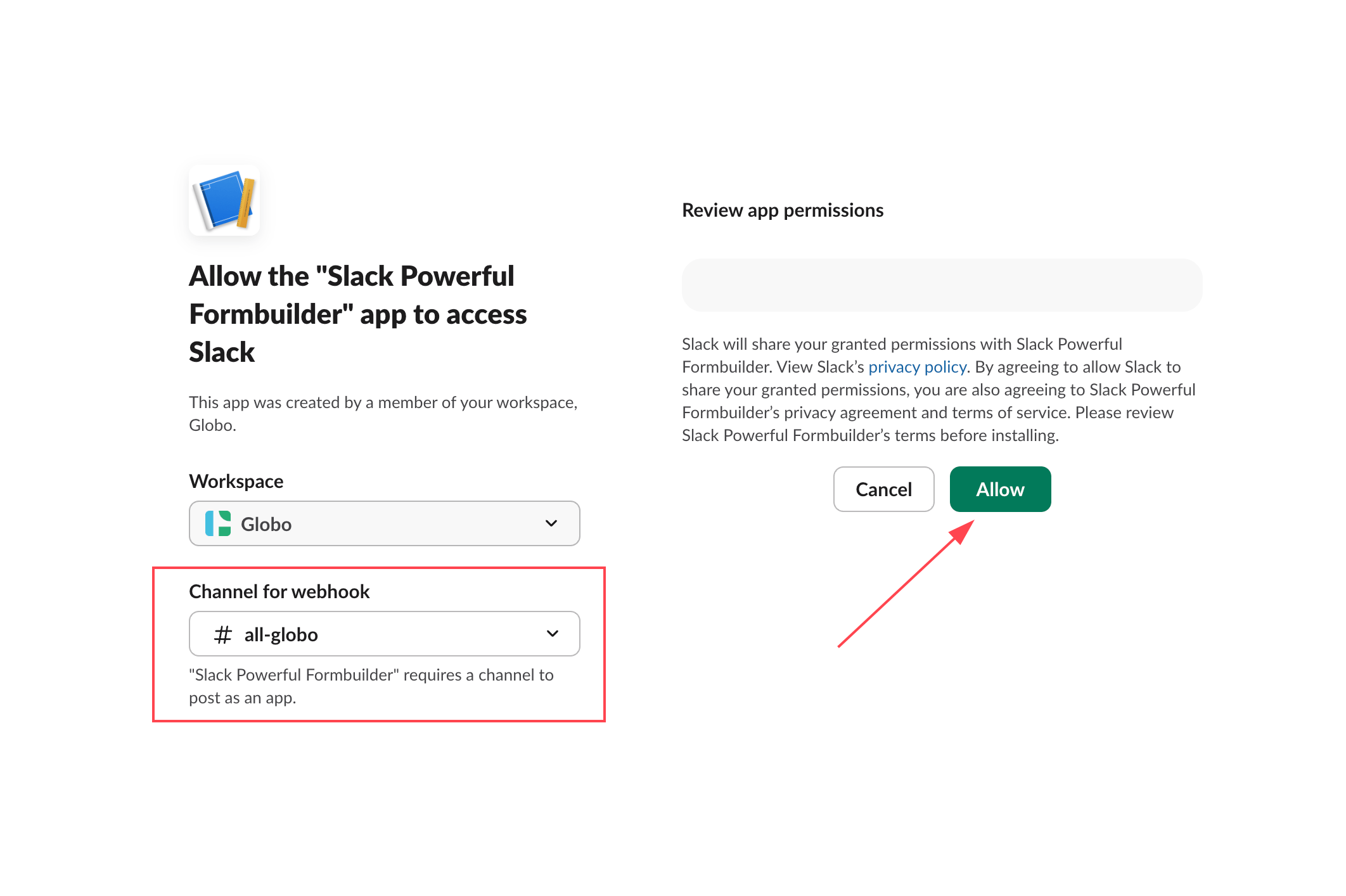
4. Click **Add New Webhook >** select the Slack channel you want to receive notifications in > click **Allow**

Slack will generate a Webhook URL.

<figure><img src="https://2907469752-files.gitbook.io/~/files/v0/b/gitbook-x-prod.appspot.com/o/spaces%2FehM2rz7MmKkWcJmgvJOe%2Fuploads%2Fgit-blob-accc59d844d86116ad94bad037425c9372016928%2Fscreenshot-integration-slack-integration-5.png?alt=media" alt=""><figcaption></figcaption></figure>

5. Copy the generated Webhook URL

<figure><img src="https://2907469752-files.gitbook.io/~/files/v0/b/gitbook-x-prod.appspot.com/o/spaces%2FehM2rz7MmKkWcJmgvJOe%2Fuploads%2Fgit-blob-32a1bdfbeeb4ab1f9d70de5b03c39b3c4b4ff70d%2Fscreenshot-integration-slack-integration-6.png?alt=media" alt=""><figcaption></figcaption></figure>
{% endstep %}

{% step %}

### Add Webhook to Form App & Test

1. Open the app > click Forms > open the form
2. Navigate to the **Slack Integration** section > turn on the **Slack** option

<figure><img src="https://2907469752-files.gitbook.io/~/files/v0/b/gitbook-x-prod.appspot.com/o/spaces%2FehM2rz7MmKkWcJmgvJOe%2Fuploads%2Fgit-blob-cacf0fd710be5f0a13cee919fa678f59a581ba33%2Fscreenshot-integration-slack-integration-7.png?alt=media" alt=""><figcaption></figcaption></figure>

3. Paste the Slack **Webhook URL** into the webhook field

<figure><img src="https://2907469752-files.gitbook.io/~/files/v0/b/gitbook-x-prod.appspot.com/o/spaces%2FehM2rz7MmKkWcJmgvJOe%2Fuploads%2Fgit-blob-58b855bbd95efc15c854fa04e127cef33cde68e7%2Fscreenshot-integration-slack-integration-8.png?alt=media" alt=""><figcaption></figcaption></figure>

3. Add the variables of the form fields to the slack message
4. Click **Save** to enable the integration
5. Submit a test form entry.

If setup is correct, the submission notification will appear in your selected Slack channel.

<figure><img src="https://2907469752-files.gitbook.io/~/files/v0/b/gitbook-x-prod.appspot.com/o/spaces%2FehM2rz7MmKkWcJmgvJOe%2Fuploads%2Fgit-blob-d5a6152f798698efb2359583149ab3de6fc5951b%2Fscreenshot-integration-slack-integration-9.png?alt=media" alt=""><figcaption></figcaption></figure>
{% endstep %}
{% endstepper %}

<br>

## Next steps

* [Admin email notification](/email-notifications/admin-notification.md) — get notified by email as well.
* [How integrations work](/integrations/how-integrations-work.md) — what a connection does and where it is configured.
* [Contact support](/help/contact-support.md) — if the connection still does not work.