> For the complete documentation index, see [llms.txt](https://docs.powerfulform.com/llms.txt). Markdown versions of documentation pages are available by appending `.md` to page URLs; this page is available as [Markdown](https://docs.powerfulform.com/integrations/google/google-sheets.md).
# Google Sheets integration
Send every new submission to a Google Sheet as a new row.
## How to set it up
{% stepper %}
{% step %}
### Connect the app with Google
Please follow this [guide](/integrations/google.md#connect-your-google-account) to complete this step.
{% endstep %}
{% step %}
### Connect form data to Google Sheets
1\. Open the app > click **Forms** > open the form you want to edit
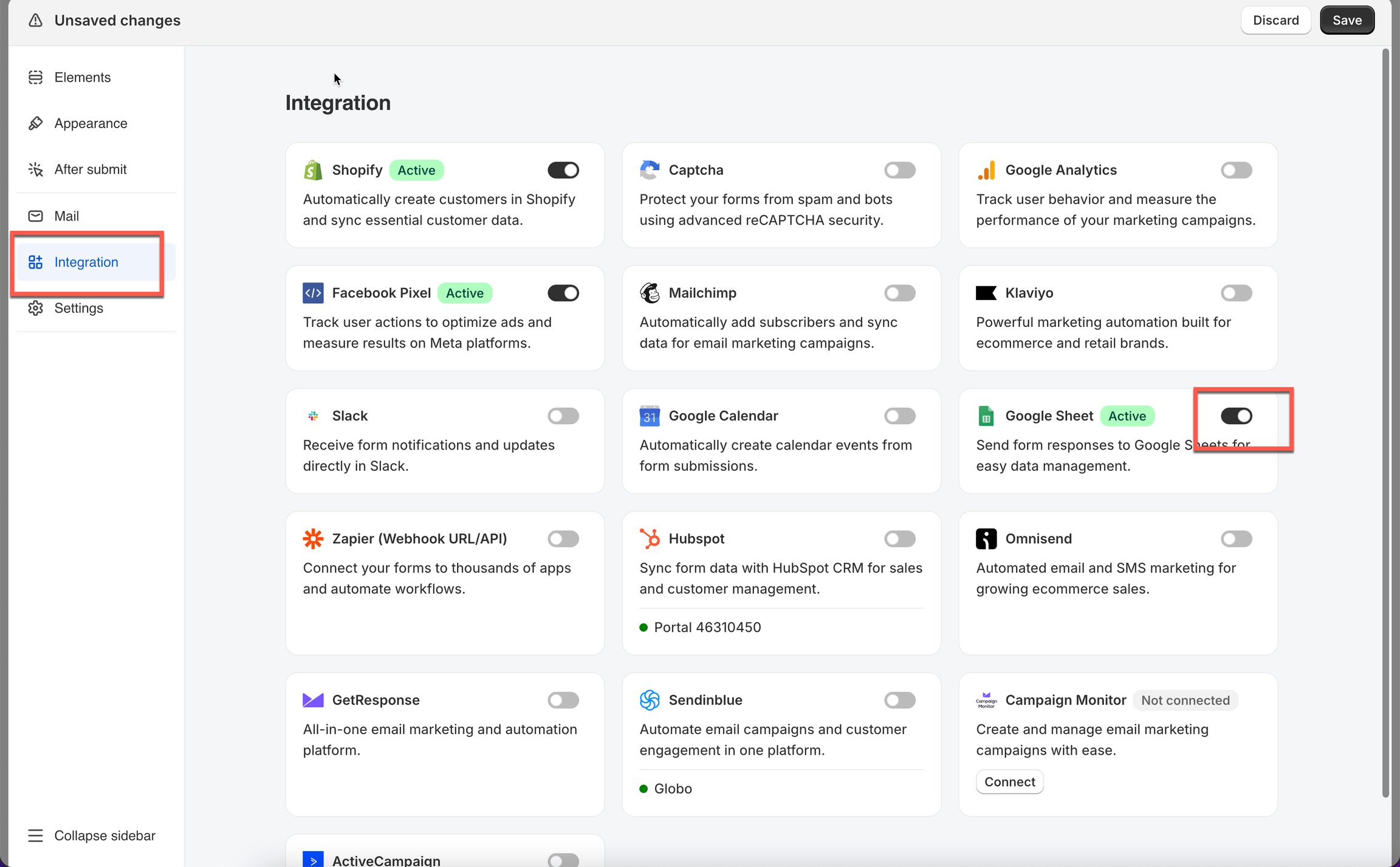
2\. Click **Integration** icon on the left side bar > enable **Google Sheet** > click on Google Sheets option
3. Create a new sheet file
Type `Contact Form` to create a new spreadsheet with this name. A new file will be generated automatically inside your Google Sheets.
4. Select your worksheet > select fields of form that you want to show on Google sheets
5. Click **Save.**
{% endstep %}
{% endstepper %}
## How it works
When someone submits your form:
* A new row is added to your selected Google Sheet.
* Each checked field will appear as a column.
* Data is synced instantly.
**Important Notes**
* Do not modify the structure of the selected worksheet (e.g., changing column headers, colors, or formatting), as this may disrupt the data synchronization process.
* Only use the worksheet to receive data; avoid manual edits to prevent potential issues.
## Troubleshooting
“My Google account isn’t showing any sheets.”
Try these:
* Make sure you connected the correct Google account.
* Refresh the page after connecting.
* Ensure your sheet is not in Trash or Restricted folders.
* Ensure you have at least *View* or *Edit* permissions.
“New submissions are not appearing in the sheet.”
Try:
* Confirm the worksheet tab still exists (Sheet1, Sheet2, etc.)
* Check that you selected the correct fields to sync.
* Disconnect → reconnect Google, then save again.
* The sheet is manually edited ⇒ the structure is changed.
## ❓ FAQs
Can I sync multiple forms to the same Google Sheet?
Yes! Each form can sync to the same spreadsheet by selecting different worksheets.
Can I change the spreadsheet later?
Yes! Just reopen Google settings and select another sheet.
Will old submissions sync after setup?
No. Only **new submissions** are sent to Google Sheets.
Can I disconnect Google at any time?
Yes. It will simply stop sending new submissions.
## Next steps
* [Connect your Google account](/integrations/google.md#connect-your-google-account) — the sign-in this integration needs.
* [Google Drive integration](/integrations/google/google-drive.md) — send uploaded files to Drive as well.
* [Export submissions](/submissions/export-submissions.md) — a one-off spreadsheet instead of a live one.
* [Contact support](/help/contact-support.md) — if rows stop appearing.