> For the complete documentation index, see [llms.txt](https://docs.powerfulform.com/llms.txt). Markdown versions of documentation pages are available by appending `.md` to page URLs; this page is available as [Markdown](https://docs.powerfulform.com/getting-started/manage-your-forms.md).

# Manage your forms

Find, sort and act on the forms in your store from the Forms list in Powerful Form Builder.

The **Forms** page lists every form in your store and is where you open, activate, duplicate, export and delete them. This page explains each column, status, filter and bulk action on it.

Open it from **Forms** in the app menu in your Shopify admin sidebar. Click any row to open that form in the form editor.

<figure><img src="https://2907469752-files.gitbook.io/~/files/v0/b/gitbook-x-prod.appspot.com/o/spaces%2FehM2rz7MmKkWcJmgvJOe%2Fuploads%2Fgit-blob-f17285b840e5d74cad4473251e7665fa182f0ca5%2Fscreenshot-getting-started-forms-list.png?alt=media" alt="The Forms list with the All, Active and Draft tabs, and rows showing each form’s Id, Title, Status, Date created and View insight action"><figcaption><p>Every form in your store appears here, newest first.</p></figcaption></figure>

## 📝 The columns

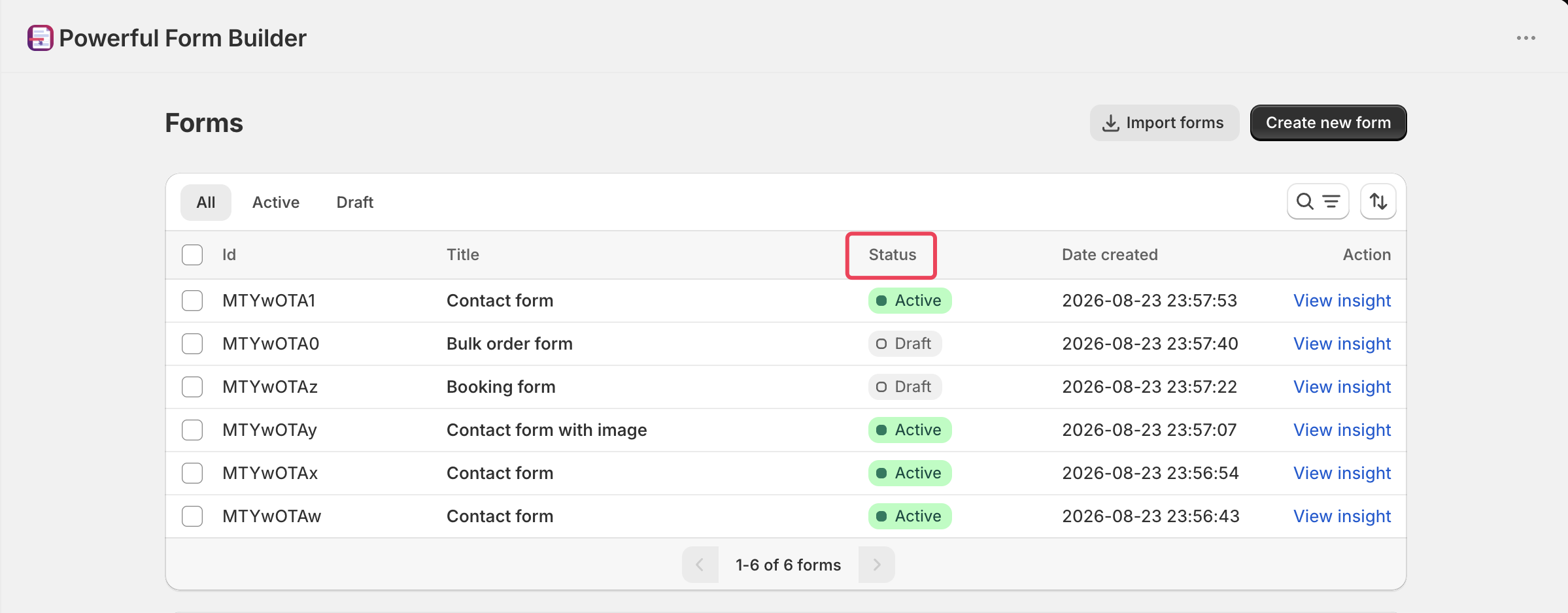
<table><thead><tr><th width="144.6666259765625">Column</th><th>What it shows</th></tr></thead><tbody><tr><td><strong>Id</strong></td><td>The form's ID. On some stores this is shown as a code rather than a plain number.</td></tr><tr><td><strong>Title</strong></td><td>The form's title. A warning icon can appear beside it — hover it for an offer of help checking that form's setup.</td></tr><tr><td><strong>Status</strong></td><td><strong>Active</strong>, <strong>Draft</strong> or <strong>Limited</strong>.</td></tr><tr><td><strong>Date created</strong></td><td>When the form was created, in your store's time zone.</td></tr><tr><td><strong>Action</strong></td><td>Holds the <strong>View insight</strong> button for that row.</td></tr></tbody></table>

## 📝 The three statuses

<figure><img src="https://2907469752-files.gitbook.io/~/files/v0/b/gitbook-x-prod.appspot.com/o/spaces%2FehM2rz7MmKkWcJmgvJOe%2Fuploads%2Fgit-blob-7a70acd7c662be5bb011440ac5bd3109a5b9dd86%2Fscreenshot-forms-status.png?alt=media" alt="Form statuses"><figcaption></figcaption></figure>

<table><thead><tr><th width="138.64990234375">Status</th><th>What it means</th></tr></thead><tbody><tr><td><strong>Active</strong></td><td>The form is available to show on your online store.</td></tr><tr><td><strong>Draft</strong></td><td>The form is hidden from your online store. It still exists in the app and keeps its past submissions.</td></tr><tr><td><strong>Limited</strong></td><td>The form is beyond your plan's form allowance and cannot be used until you move to a higher plan. Hovering it shows "You've reached form limit." with an <strong>Upgrade now</strong> link.</td></tr></tbody></table>

{% hint style="info" %}
The free plan allows one usable form. Forms you create beyond that are saved but marked **Limited**. Paid plans allow unlimited forms. See [Plans and billing](/settings/plans-and-billing.md).
{% endhint %}

## ⚡ View insight

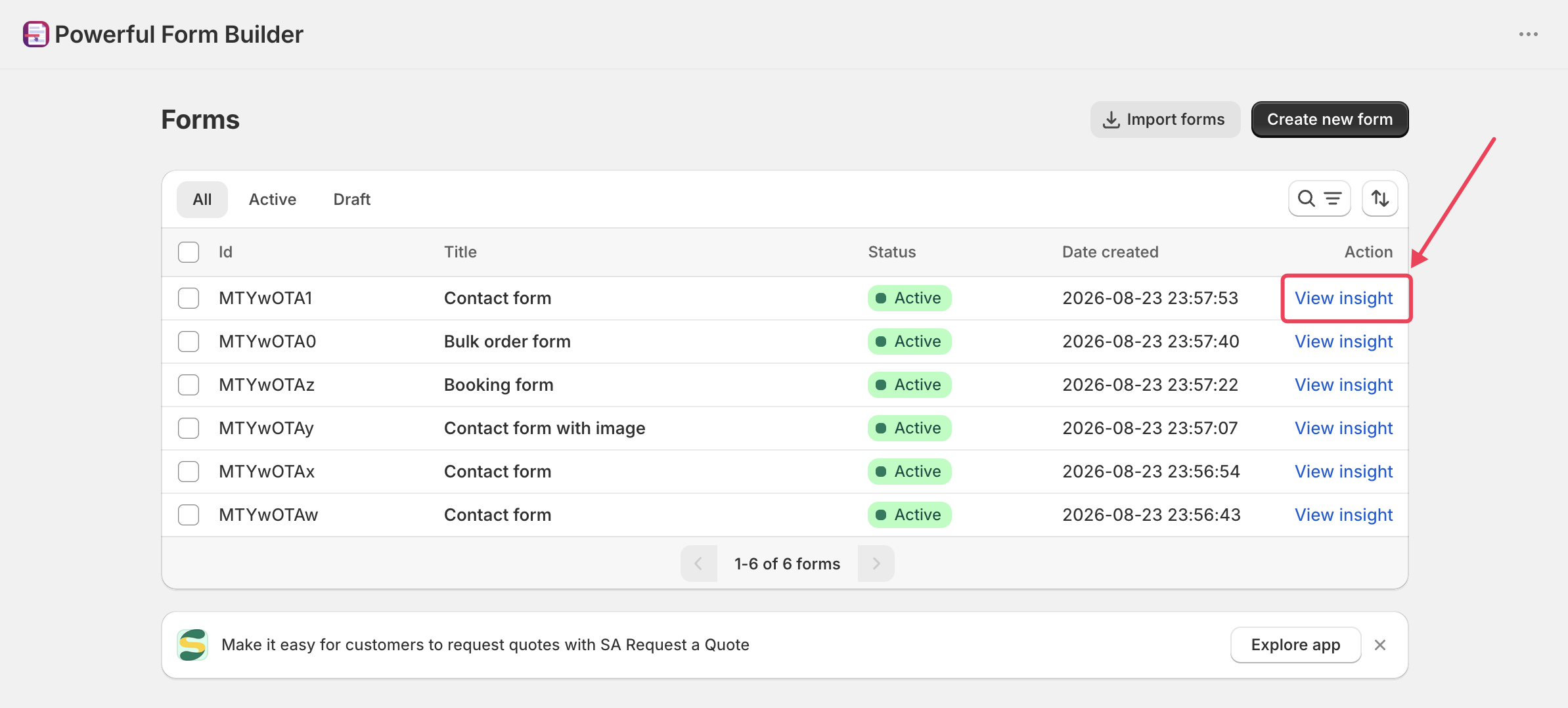
**View insight** opens that form's insights page, with figures such as views and completion rate.

<figure><img src="https://2907469752-files.gitbook.io/~/files/v0/b/gitbook-x-prod.appspot.com/o/spaces%2FehM2rz7MmKkWcJmgvJOe%2Fuploads%2Fgit-blob-1469d1c74897474702623a297731908f313a241a%2Fscreenshot-forms-view-insight-btn.png?alt=media" alt="View insight button"><figcaption></figcaption></figure>

{% hint style="info" %}
Form insights are only available from the PRO plan upward. On lower plans the button is disabled and shows "You need to upgrade your plan to view this feature" with an **Upgrade now** link. See [Plans and billing](/settings/plans-and-billing.md).
{% endhint %}

## 📝 Find a form

#### **Tabs**

* **All** is selected by default.
* **Active**
* **Draft**

<figure><img src="https://2907469752-files.gitbook.io/~/files/v0/b/gitbook-x-prod.appspot.com/o/spaces%2FehM2rz7MmKkWcJmgvJOe%2Fuploads%2Fgit-blob-8dbae135fc527300f7b03abfdc88690d8ef66a74%2Fscreenshot-forms-tabs.png?alt=media" alt="Form tabs"><figcaption></figcaption></figure>

#### **Search**

The field labeled **Filter forms** matches part of a form's title, or an exact form ID. Results update a moment after you stop typing.

<figure><img src="https://2907469752-files.gitbook.io/~/files/v0/b/gitbook-x-prod.appspot.com/o/spaces%2FehM2rz7MmKkWcJmgvJOe%2Fuploads%2Fgit-blob-b9f4bb0f4b16f6591e03ef3ff1775c3622519782%2Fscreenshot-forms-search.png?alt=media" alt="Form search"><figcaption></figcaption></figure>

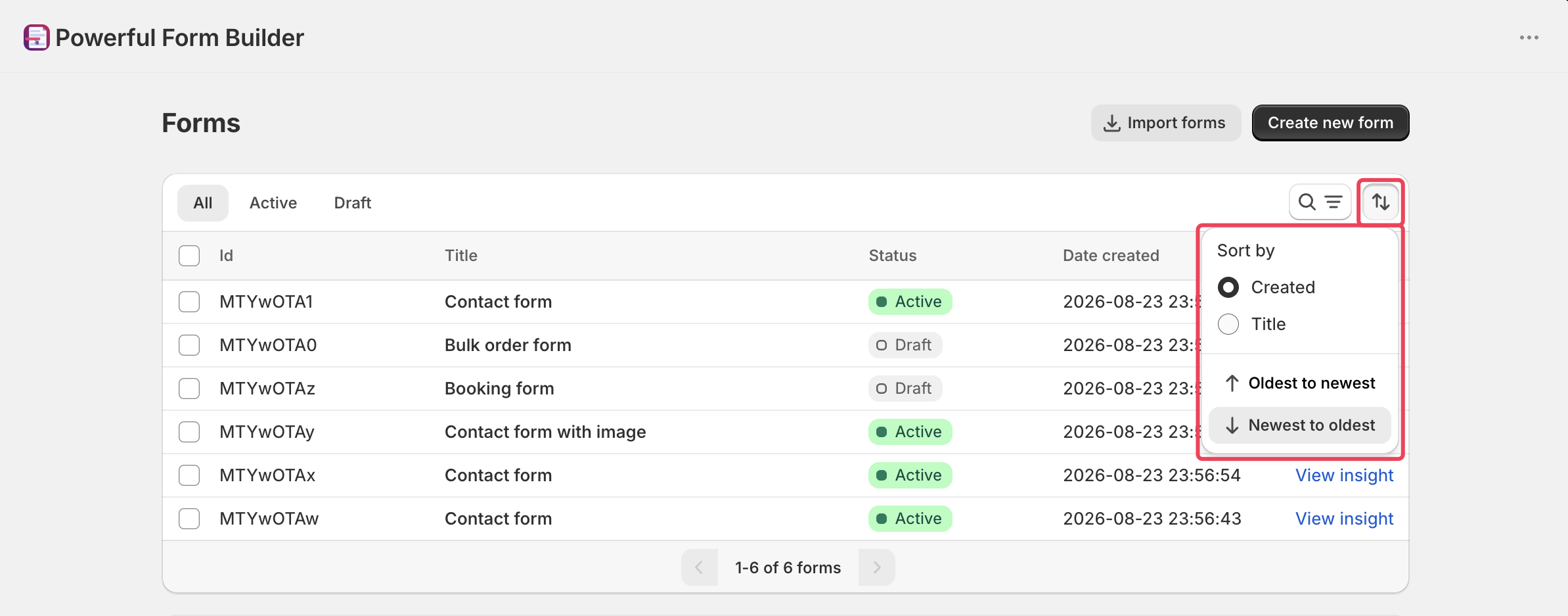
#### **Sort**

The sort control offers four options:

<figure><img src="https://2907469752-files.gitbook.io/~/files/v0/b/gitbook-x-prod.appspot.com/o/spaces%2FehM2rz7MmKkWcJmgvJOe%2Fuploads%2Fgit-blob-b970eacf53b37051d05a89e5d80f0d62da7e4766%2Fscreenshot-forms-sort.png?alt=media" alt="Form sort"><figcaption></figcaption></figure>

* **Created — Newest to oldest** (the default)
* **Created — Oldest to newest**
* **Title — A-Z**
* **Title — Z-A**

## ⚡ Bulk actions

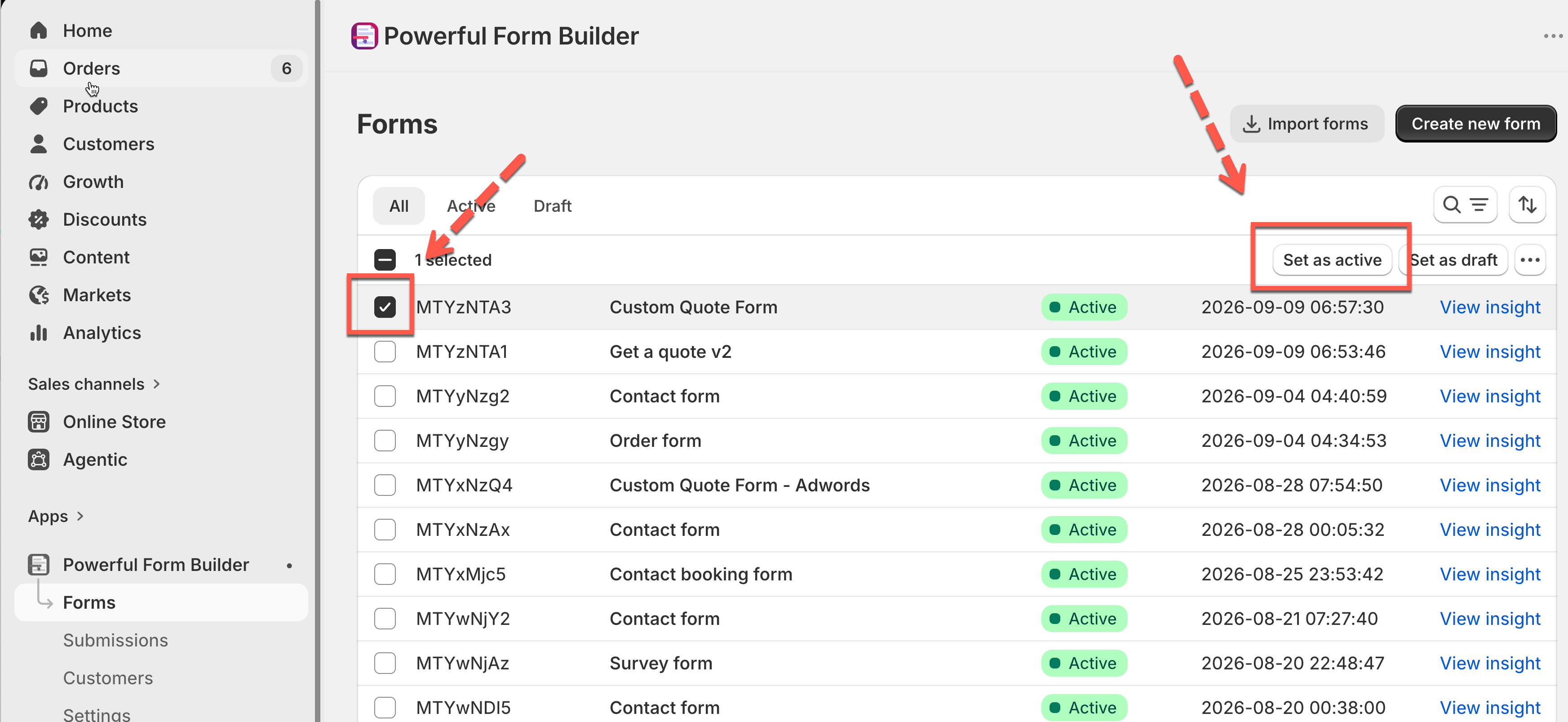
Tick the checkbox on one or more rows. A bar appears above the table with the actions below. Each one applies to every form you selected.

<figure><img src="https://2907469752-files.gitbook.io/~/files/v0/b/gitbook-x-prod.appspot.com/o/spaces%2FehM2rz7MmKkWcJmgvJOe%2Fuploads%2Fgit-blob-32b18e214defbf2461e41a8f48f2356d2540c76b%2Fscreenshot-forms-bulk-actions.png?alt=media" alt="Form bulk actions"><figcaption></figcaption></figure>

<table><thead><tr><th width="252.5499267578125">Action</th><th>What it does</th></tr></thead><tbody><tr><td><strong>Set as active</strong></td><td>Makes the selected forms available to show on your online store.</td></tr><tr><td><strong>Set as draft</strong></td><td>Hides the selected forms from your online store.</td></tr><tr><td><strong>Duplicate selected form(s)</strong></td><td>Creates and saves a copy of each selected form.</td></tr><tr><td><strong>Export selected form(s)</strong></td><td>Downloads the selected forms as a file you can import into another store.</td></tr><tr><td><strong>Delete selected form(s)</strong></td><td>Permanently deletes the selected forms and their submissions.</td></tr></tbody></table>

Renaming, duplicating and deleting are only available this way. There is no per-row menu — select the row's checkbox instead.

### Set as active

The form is in active status, it means the form is always ready to be displayed on the site.

<figure><img src="https://2907469752-files.gitbook.io/~/files/v0/b/gitbook-x-prod.appspot.com/o/spaces%2FehM2rz7MmKkWcJmgvJOe%2Fuploads%2Fgit-blob-83d3d23bef627f9c865b382e24d2070cc9b5a794%2F2026-09-14_10-01-23.png?alt=media" alt=""><figcaption></figcaption></figure>

### Set as draft

Use this to take a form off your store temporarily without deleting it. Submissions already collected are kept.

<figure><img src="https://2907469752-files.gitbook.io/~/files/v0/b/gitbook-x-prod.appspot.com/o/spaces%2FehM2rz7MmKkWcJmgvJOe%2Fuploads%2Fgit-blob-390b3759e8494a2803a860a21f694c55296bf5e8%2F2026-09-14_10-01-23%20(1).png?alt=media" alt=""><figcaption></figcaption></figure>

### Duplicate

"Duplicating selected form(s) will create and save a new form(s).

Duplicating is the safe way to try a big change: copy the form, change the copy, publish the copy when you are happy.

<figure><img src="https://2907469752-files.gitbook.io/~/files/v0/b/gitbook-x-prod.appspot.com/o/spaces%2FehM2rz7MmKkWcJmgvJOe%2Fuploads%2Fgit-blob-9d47aed95a79af335a22836b858adcaed8a006f8%2F2026-09-14_10-02-51.png?alt=media" alt=""><figcaption></figcaption></figure>

### Export

Downloads the selected forms as a file named `FormsExport.json` and confirms with a message telling you how many forms were exported. There is no confirmation window.

See [Import and export forms](/getting-started/import-and-export-forms.md).

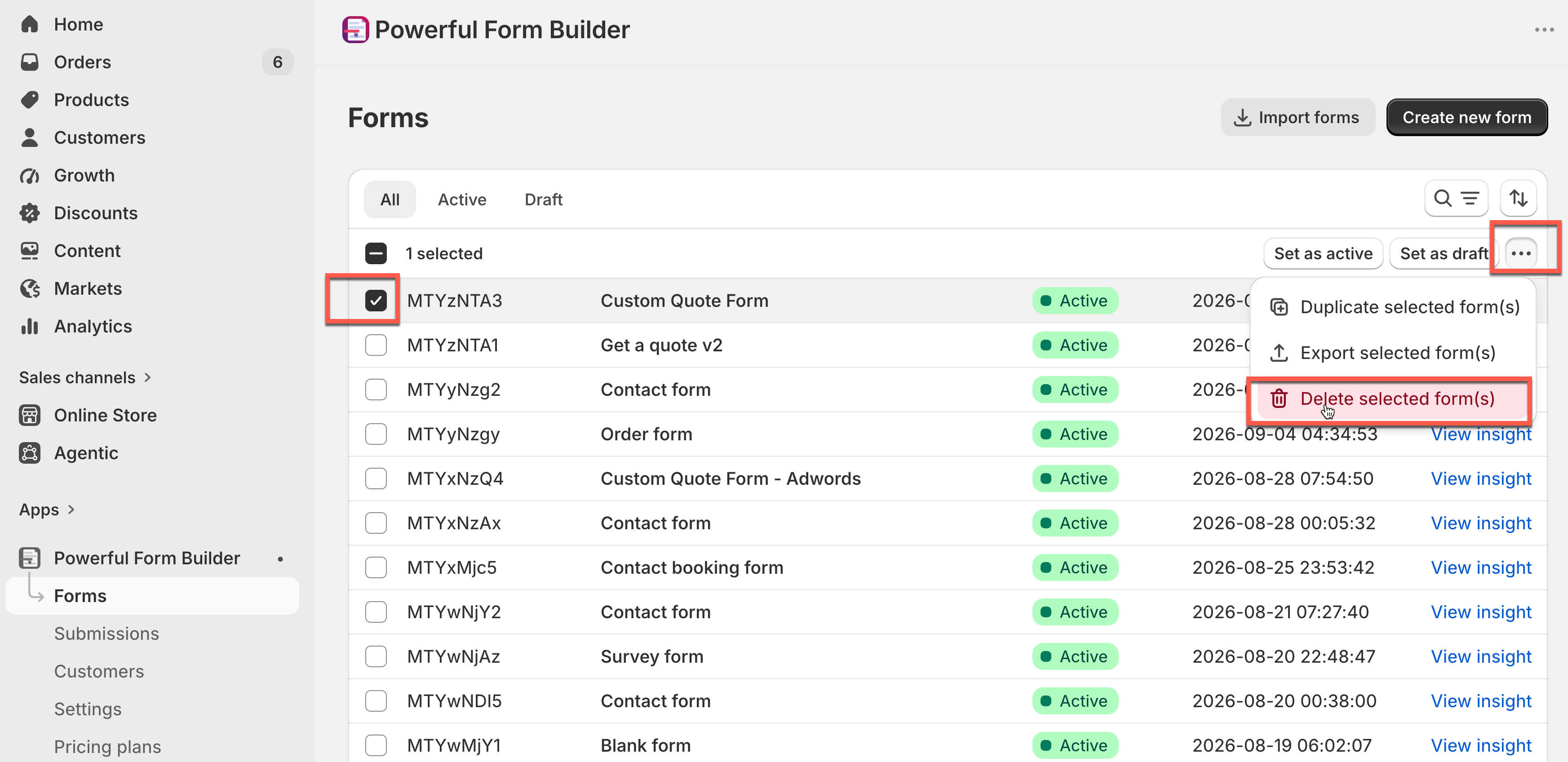
### Delete

{% hint style="danger" %}
**Deleting a form is permanent.** No way to revert the deleted data back.

Your submissions and uploaded files in these submissions will be removed ( even in the submission exported link).

Be sure to save any exported files and uploaded content in your library before proceed."

Export the submissions and download any uploaded files you need **before** you confirm.
{% endhint %}

If you only want a form off your store, use **Set as draft** instead of deleting it.

<figure><img src="https://2907469752-files.gitbook.io/~/files/v0/b/gitbook-x-prod.appspot.com/o/spaces%2FehM2rz7MmKkWcJmgvJOe%2Fuploads%2Fgit-blob-d7c2557205a8e6aa763d3fe6fd7b7541d6c2572d%2F2026-09-14_10-03-50.png?alt=media" alt=""><figcaption></figcaption></figure>

## Next steps

* [Import and export forms](/getting-started/import-and-export-forms.md) — move forms between stores.
* [Publish your form](/getting-started/quickstart/publish-the-form.md) — put a form on your store.
* [Form insights](/submissions/form-insights.md) — what the View insight page shows.
* [Export submissions](/submissions/export-submissions.md) — save your data before deleting anything.