> For the complete documentation index, see [llms.txt](https://docs.powerfulform.com/llms.txt). Markdown versions of documentation pages are available by appending `.md` to page URLs; this page is available as [Markdown](https://docs.powerfulform.com/field-types/text-fields/text.md).

# Text

Add a single-line text box for short answers that don't have a format of their own — an order number, a company name, or the name a customer wants engraved on a gift.

## 🔧 How to Set It

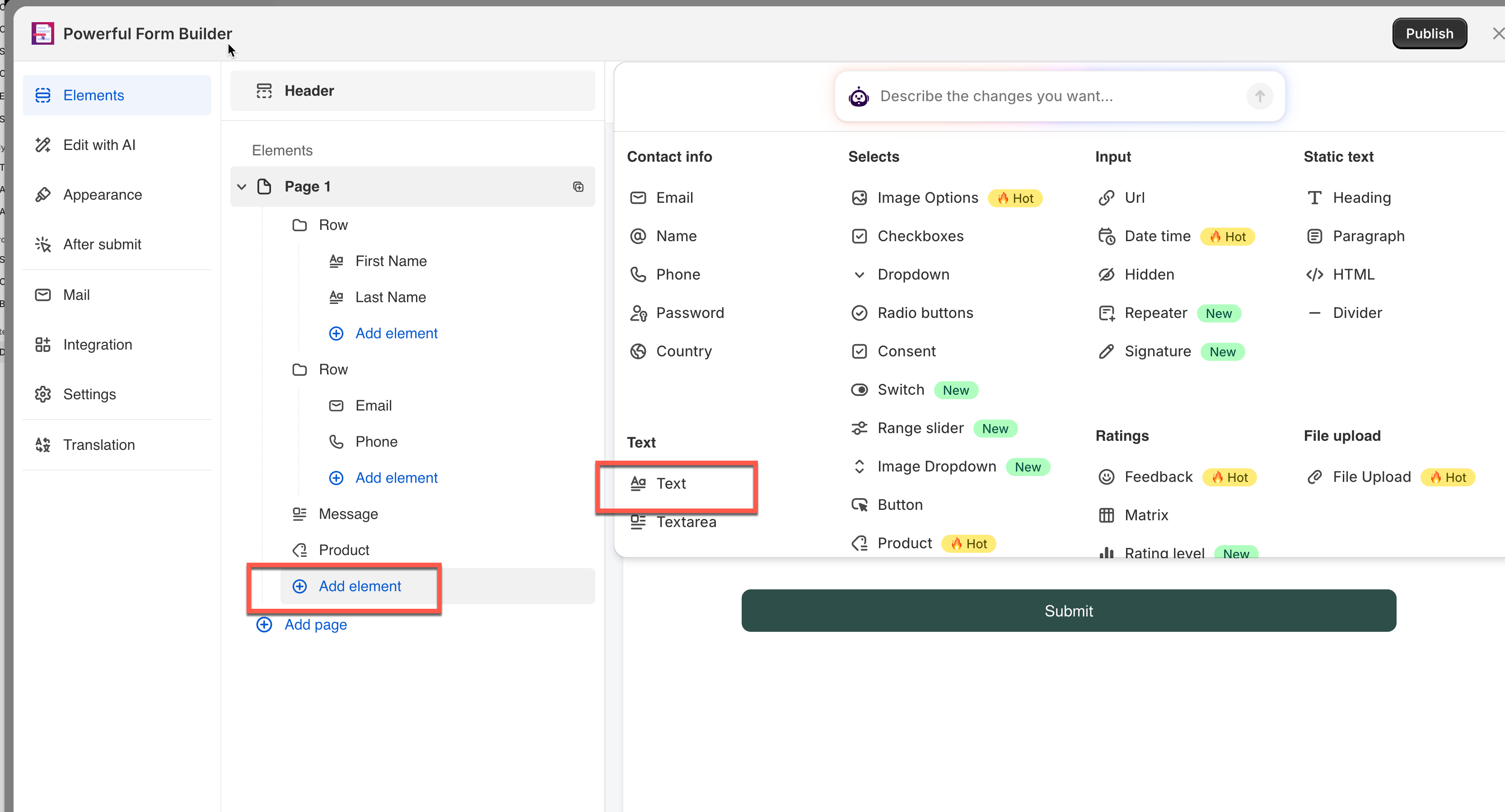
In the form editor, click **Add element**, open the **Text** category and pick **Text**. The field is added and its settings open on the left.

<figure><img src="https://2907469752-files.gitbook.io/~/files/v0/b/gitbook-x-prod.appspot.com/o/spaces%2FehM2rz7MmKkWcJmgvJOe%2Fuploads%2Fgit-blob-7f1c1d4d49aa7deb02fa2b0cc1cf44111e769b93%2F2026-10-02_10-48-53.png?alt=media" alt=""><figcaption></figcaption></figure>

<figure><img src="https://2907469752-files.gitbook.io/~/files/v0/b/gitbook-x-prod.appspot.com/o/spaces%2FehM2rz7MmKkWcJmgvJOe%2Fuploads%2Fgit-blob-9e03d035500d9ea594dc735ba97476c82b11fe7f%2F2026-10-02_10-50-09.png?alt=media" alt=""><figcaption></figcaption></figure>

{% hint style="info" %}
See [Add and arrange elements](/build-your-form/add-and-arrange-elements.md) for the other ways to add a field and how to reorder them.
{% endhint %}

## 🔧 Settings

Only the settings specific to this field are listed here. **Label**, **Placeholder**, **Description**, **Required**, **Hide label**, **Column width**, **Conditional display** and the rest of the shared settings work the same on every field.

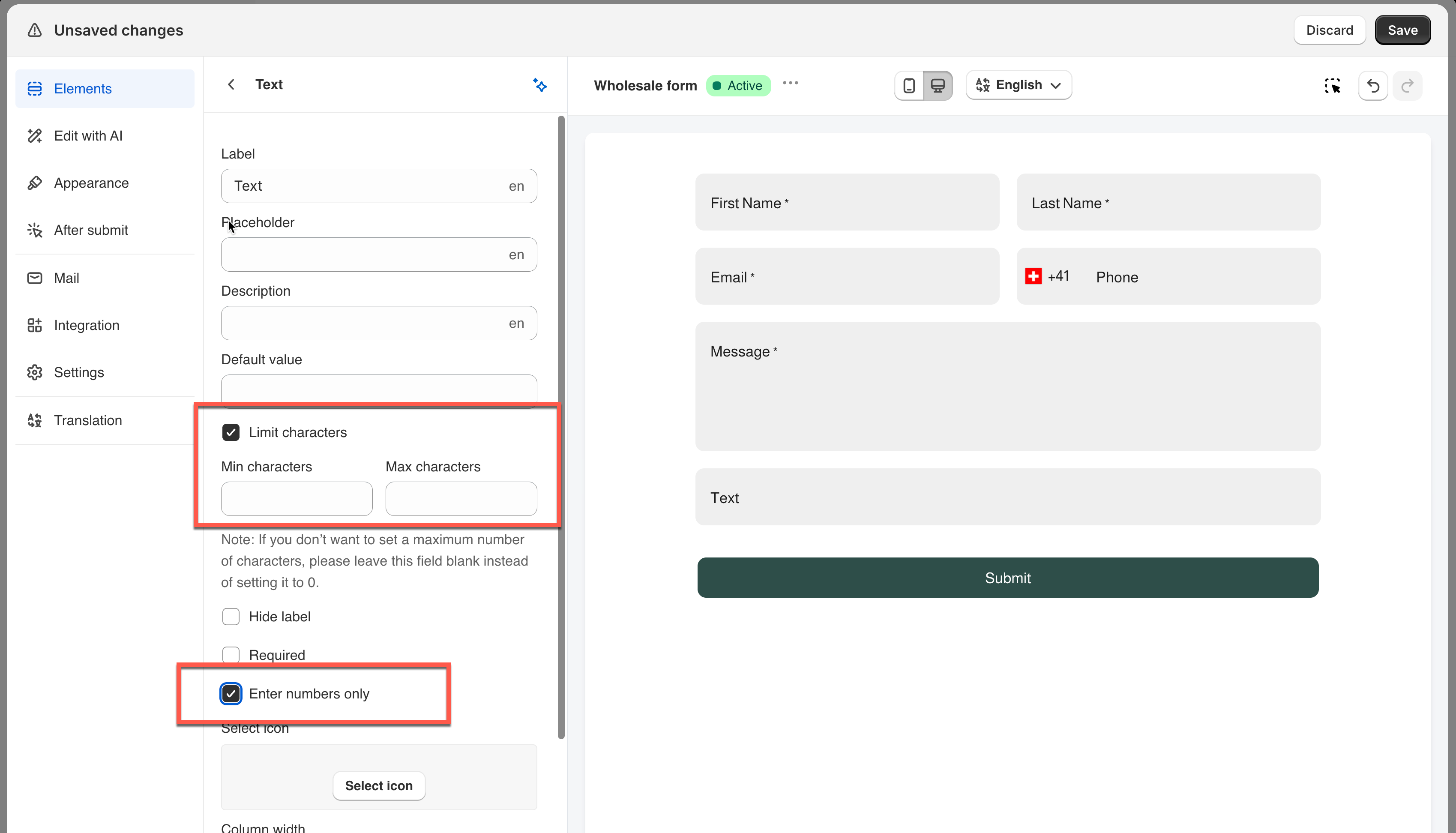
<figure><img src="https://2907469752-files.gitbook.io/~/files/v0/b/gitbook-x-prod.appspot.com/o/spaces%2FehM2rz7MmKkWcJmgvJOe%2Fuploads%2Fgit-blob-0d563e028372ce6ec6aa2db928ddec02f14af631%2F2026-10-02_15-54-33.png?alt=media" alt=""><figcaption></figcaption></figure>

### Enter numbers only

Restricts what the visitor can type to digits. Off by default.

> **⚠️ Note:** This only restricts what can be typed — the answer is still stored as text, not a real number. Need min/max value checking on a genuine number? Use [**Number**](https://globosoftware.gitbook.io/globosoftware-docs/field-types/number-fields) instead.

### Limit characters

Turns on **Min characters** and **Max characters**. Off by default.

Exampl&#x65;**:** A gift-engraving form sets **Max characters** to `20` to fit the item, and an order-reference form turns on **Enter numbers only** so the field only accepts digits.

> **📌 Note:** Leave **Max characters** blank instead of typing `0` — setting it to `0` is treated as a real limit and blocks all typing.

## 🔄 How It Works

**What the visitor sees:** A one-line box with your label above, placeholder inside while empty, and description beside it. Leaving a required field empty blocks submission, with your error message shown underneath.

**What's saved:** The text is stored exactly as typed. It shows up in **Submissions**, your admin and autoresponder emails, exports, and any connected integration.

## ⚠️ Limits & Notes

<table><thead><tr><th width="155.433349609375"></th><th></th></tr></thead><tbody><tr><td><strong>Line breaks</strong></td><td>Not supported — the answer always stays on one line</td></tr><tr><td><strong>Character limit</strong></td><td>None by default — a visitor can type as much as they want, unless you turn on <strong>Limit characters</strong></td></tr><tr><td><strong>"Numbers only"</strong></td><td>Restricts typing, but doesn't make it a real number — use <strong>Number</strong> for actual numeric validation</td></tr></tbody></table>

> **📌 Note:** Need a longer reply with paragraphs or line breaks? Use [**Textarea**](https://globosoftware.gitbook.io/globosoftware-docs/field-types/text-fields/textarea) instead — Text can't display or save line breaks under any setting.

## 🔁 Compare

<table><thead><tr><th width="265.0001220703125">Use</th><th>When</th></tr></thead><tbody><tr><td><strong>Text</strong></td><td>A short, one-line answer</td></tr><tr><td><strong>Textarea</strong></td><td>A longer reply that needs line breaks</td></tr><tr><td><strong>Number</strong></td><td>A genuinely numeric answer with min/max value checks</td></tr><tr><td><strong>Name</strong></td><td>Specifically a person's name — letters only</td></tr></tbody></table>

## Next steps

* [Textarea](/field-types/text-fields/textarea.md) — the multi-line version for longer answers.
* [Number](/field-types/number-fields/number.md) — for answers that are genuinely numeric.
* [Show or hide fields with conditional logic](/build-your-form/conditional-logic.md) — ask this question only when it applies.
