> For the complete documentation index, see [llms.txt](https://docs.powerfulform.com/llms.txt). Markdown versions of documentation pages are available by appending `.md` to page URLs; this page is available as [Markdown](https://docs.powerfulform.com/field-types/file-upload.md).

# File Upload

Let visitors attach a file to their submission — a resale certificate, damage photos, custom artwork.

The **File Upload** field lets a visitor attach a file to their submission — a resale certificate on a wholesale application, photos of a damaged item on a claim, or the artwork for a custom order.

## 🔧 How to Set It

* Open the form in the app
* Click **Add element**
* Select the **File upload**

See [Add and arrange elements](/build-your-form/add-and-arrange-elements.md) for the other ways to add a field and how to reorder them.

<figure><img src="https://2907469752-files.gitbook.io/~/files/v0/b/gitbook-x-prod.appspot.com/o/spaces%2FehM2rz7MmKkWcJmgvJOe%2Fuploads%2Fgit-blob-a4d5f98a40e3e86d2490cb4caa86898e346d3f0e%2Fimage%20(49).png?alt=media" alt=""><figcaption></figcaption></figure>

<figure><img src="https://2907469752-files.gitbook.io/~/files/v0/b/gitbook-x-prod.appspot.com/o/spaces%2FehM2rz7MmKkWcJmgvJOe%2Fuploads%2Fgit-blob-e57e7884bcc10d4445d9996b85beb22bb83010d3%2Fimage%20(50).png?alt=media" alt=""><figcaption></figcaption></figure>

## 🔧 Settings

<table><thead><tr><th width="209.5999755859375">Setting</th><th width="466.699951171875">What It Does</th><th>Default</th></tr></thead><tbody><tr><td><strong>Button text</strong></td><td>Text on the upload button</td><td>Browse file</td></tr><tr><td><strong>Hint</strong></td><td>Small text under the drop area — doesn't auto-update if you change extensions</td><td>Supported format: JPG, JPEG, PNG, GIF, SVG</td></tr><tr><td><strong>Allowed extensions</strong></td><td>Which file types are accepted</td><td>JPG, JPEG, PNG, GIF, SVG</td></tr><tr><td><strong>Allow multiple</strong></td><td>Visitor can attach more than one file</td><td>Off</td></tr><tr><td><strong>Number of files limit</strong></td><td>Max files, only matters if Allow multiple is on</td><td>Empty</td></tr><tr><td><strong>File size limit</strong></td><td>Max size per submission, not per file, in MB</td><td>Empty</td></tr><tr><td><strong>Access policy</strong></td><td>Public or Private</td><td>Public</td></tr><tr><td><strong>Also upload to third party storage</strong></td><td>Mirror the file to Google Drive</td><td>None</td></tr></tbody></table>

## 🔄 How It Works

**1. Visitor uploads** — clicks **Browse file** or drags a file onto the drop area.\
**2. File is checked** — wrong extension or over the size limit gets rejected before submit.\
**3. Form is submitted** — the file travels with it.

<figure><img src="https://2907469752-files.gitbook.io/~/files/v0/b/gitbook-x-prod.appspot.com/o/spaces%2FehM2rz7MmKkWcJmgvJOe%2Fuploads%2Fgit-blob-b57613467109ca151542a5783373a1913b5bbe79%2F2026-09-30_15-28-35.png?alt=media" alt=""><figcaption></figcaption></figure>

**Where it shows up:**

<table><thead><tr><th width="192.1666259765625">Location</th><th>What You See</th></tr></thead><tbody><tr><td><strong>Submissions</strong></td><td>File preview (images show a thumbnail) with a <strong>Download</strong> link</td></tr><tr><td><strong>Email</strong></td><td>A clickable link to the file</td></tr></tbody></table>

<figure><img src="https://2907469752-files.gitbook.io/~/files/v0/b/gitbook-x-prod.appspot.com/o/spaces%2FehM2rz7MmKkWcJmgvJOe%2Fuploads%2Fgit-blob-35cff8462a32390841b6df0a8cd8196f9f0c16e8%2Fimage%20(51).png?alt=media" alt=""><figcaption></figcaption></figure>

## 💡 Example

* **Damage photos on a claim** ⇒ **Allow multiple** on, extensions `JPG, PNG`
* **Resale certificate on a wholesale form** ⇒ extensions `PDF`, **Access policy** Private
* **Custom artwork** ⇒ raise **File size limit**, and mirror the file to Google Drive with **Also upload to third party storage**

<br>

## ⚠️ Limits & Notes

### File Size limit

**File size limit** is set in MB. The limit applies to the whole submission's total, not each file individually.

<figure><img src="https://2907469752-files.gitbook.io/~/files/v0/b/gitbook-x-prod.appspot.com/o/spaces%2FehM2rz7MmKkWcJmgvJOe%2Fuploads%2Fgit-blob-ed4e136be7099b85b0423b45b03cf85955fb8a00%2F2026-09-30_15-35-01.png?alt=media" alt=""><figcaption></figcaption></figure>

**Example — Free plan (20MB total per submission):**

| Scenario                                                | Result                          |
| ------------------------------------------------------- | ------------------------------- |
| Visitor uploads **one** 15MB file                       | ✅ Accepted                      |
| Visitor uploads **two** files, 12MB + 10MB (22MB total) | ❌ Rejected — total exceeds 20MB |
| Visitor uploads **one** 25MB file                       | ❌ Rejected — over the limit     |

<table><thead><tr><th width="203.566650390625">Plan</th><th>File Size Limit</th></tr></thead><tbody><tr><td><strong>Free</strong></td><td>20 MB <em>(total per submission)</em></td></tr><tr><td><strong>Premium</strong></td><td>30 MB <em>(total per submission)</em></td></tr><tr><td><strong>Pro</strong></td><td>100 MB <em>(total per submission)</em></td></tr><tr><td><strong>Advanced</strong></td><td>250 MB <em>(total per submission)</em></td></tr></tbody></table>

See [Plans and billing ](https://globosoftware.gitbook.io/globosoftware-docs/settings/plans-and-billing)for full plan details.

### **Storage**

**Storage size** is not a monthly allowance — it's **cumulative**. Every file uploaded across every form stays counted against your total, until it's deleted.

<table><thead><tr><th width="296.75">Plan</th><th>Storage Size</th></tr></thead><tbody><tr><td><strong>Free</strong></td><td>200 MB</td></tr><tr><td><strong>Premium</strong></td><td>5 GB</td></tr><tr><td><strong>Pro</strong></td><td>20 GB</td></tr><tr><td><strong>Advanced</strong></td><td>50 GB</td></tr></tbody></table>

> **📌 Note:** More submissions with files = more storage used, permanently, not reset each month. If you're approaching your limit, delete old submissions with attachments you no longer need, or upgrade your plan.
>
> More detail [here](https://globosoftware.gitbook.io/globosoftware-docs/troubleshooting/file-storage#storage-full-two-ways-to-fix-it)

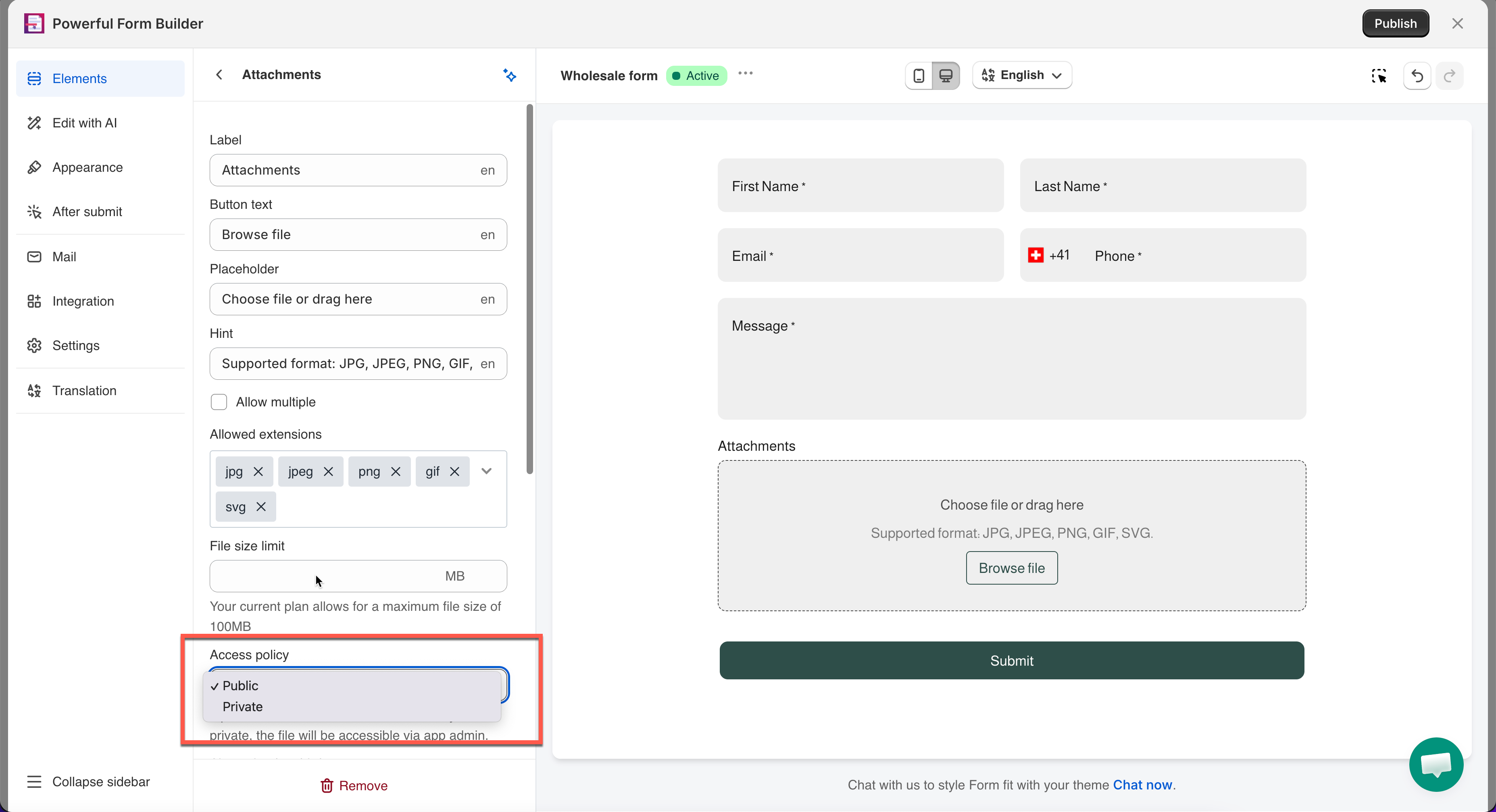
### Public vs. Private

**Access policy** decides who can open an uploaded file.

<figure><img src="https://2907469752-files.gitbook.io/~/files/v0/b/gitbook-x-prod.appspot.com/o/spaces%2FehM2rz7MmKkWcJmgvJOe%2Fuploads%2Fgit-blob-dd9dce99a17ff67ae55057709b664e8a2bb79153%2F2026-09-30_15-54-52.png?alt=media" alt=""><figcaption></figcaption></figure>

<table><thead><tr><th width="145.933349609375">Option</th><th>Who can open the file</th></tr></thead><tbody><tr><td><strong>Public</strong></td><td>Anyone with the file's link</td></tr><tr><td><strong>Private</strong></td><td>Only visible via the app admin — not directly by link</td></tr></tbody></table>

> **💡 Use Private for:** ID documents, signed agreements, medical forms — anything a customer wouldn't want shared.

> **⚠️ Warning:** Changing this setting only affects files uploaded **after** the change. Files already collected keep their original setting — check them individually if you need them private.

## ❓ FAQs

<details>

<summary>How long are files stored?</summary>

As long as the submission or form exists in the app. Deleting a submission or a form deletes its files too — they're not kept separately.

</details>

<details>

<summary>Can visitors upload multiple files?</summary>

Yes, if **Allow multiple** is turned on. Set **Number of files limit** to cap how many. Without it, only one file is accepted.

</details>

<details>

<summary>Is the file size limit per file or per submission?</summary>

Per submission — it's the combined size of everything the visitor uploads in that one submission, not each file counted separately.

</details>

<details>

<summary>What happens if I lower the file size limit after files are already uploaded?</summary>

Already-uploaded files aren't affected. The new limit only applies to submissions made after the change.

</details>

<details>

<summary>What happens when I hit my storage limit?</summary>

New file uploads may fail once you're at your plan's cap. Delete old submissions with attachments, or upgrade your plan. See [Plans and billing](https://globosoftware.gitbook.io/globosoftware-docs/settings/plans-and-billing).

</details>

<details>

<summary>Can I restrict which file types are accepted?</summary>

Yes, under **Allowed extensions** — tick only the types you want to accept. Anything else is rejected before submit.

</details>

<details>

<summary>Are uploaded files private by default?</summary>

No, **Access policy** defaults to **Public**. Set it to **Private** for anything sensitive, like an ID or signed agreement.

> **Still stuck?** Contact [**support@powerfulform.com**](mailto:support@powerfulform.com).

</details>

## Next steps

* [Open a submission](/submissions/view-submissions.md#open-a-submission) to find the files a customer sent.
* [Uploaded files and storage](/troubleshooting/file-storage.md) for how long files are kept and what to do about large ones.
* [Signature](/field-types/input-fields/signature.md) if you need a signed agreement rather than an attachment.