> For the complete documentation index, see [llms.txt](https://docs.powerfulform.com/llms.txt). Markdown versions of documentation pages are available by appending `.md` to page URLs; this page is available as [Markdown](https://docs.powerfulform.com/field-types/contact-info/name.md).

# Name

Collect the visitor's name on a single line, and lay it out beside your other contact fields.

The **Name** field is a plain box for a person's name. Use one field for a full name, or two side by side when you need the first and last name apart — for instance on a form that creates Shopify customers.

## 🔧 How to Set It

Open the form in the app > click **Add element** > select **Name**.

Open the element. Its settings open on the left.

<figure><img src="https://2907469752-files.gitbook.io/~/files/v0/b/gitbook-x-prod.appspot.com/o/spaces%2FehM2rz7MmKkWcJmgvJOe%2Fuploads%2Fgit-blob-ec9ebe7a9d5d8bbde8bdb6f4f4cd0a59c8a28212%2F2026-10-01_09-45-49.png?alt=media" alt=""><figcaption></figcaption></figure>

<figure><img src="https://2907469752-files.gitbook.io/~/files/v0/b/gitbook-x-prod.appspot.com/o/spaces%2FehM2rz7MmKkWcJmgvJOe%2Fuploads%2Fgit-blob-548a49faa827fd32a340dc3c08bd64ebb6bacfec%2F2026-10-01_09-46-09.png?alt=media" alt=""><figcaption></figcaption></figure>

## 🔧 Settings

**Name** has no field-specific settings. Only the shared ones apply — **Label**, **Placeholder**, **Description**, **Required**, **Hide label**, **Column width**, **Conditional display** and the rest.

## 🔄 How It Works

Letters only — numbers and other characters are rejected

* **For a full name:** add one **Name** field, label it "Full Name."
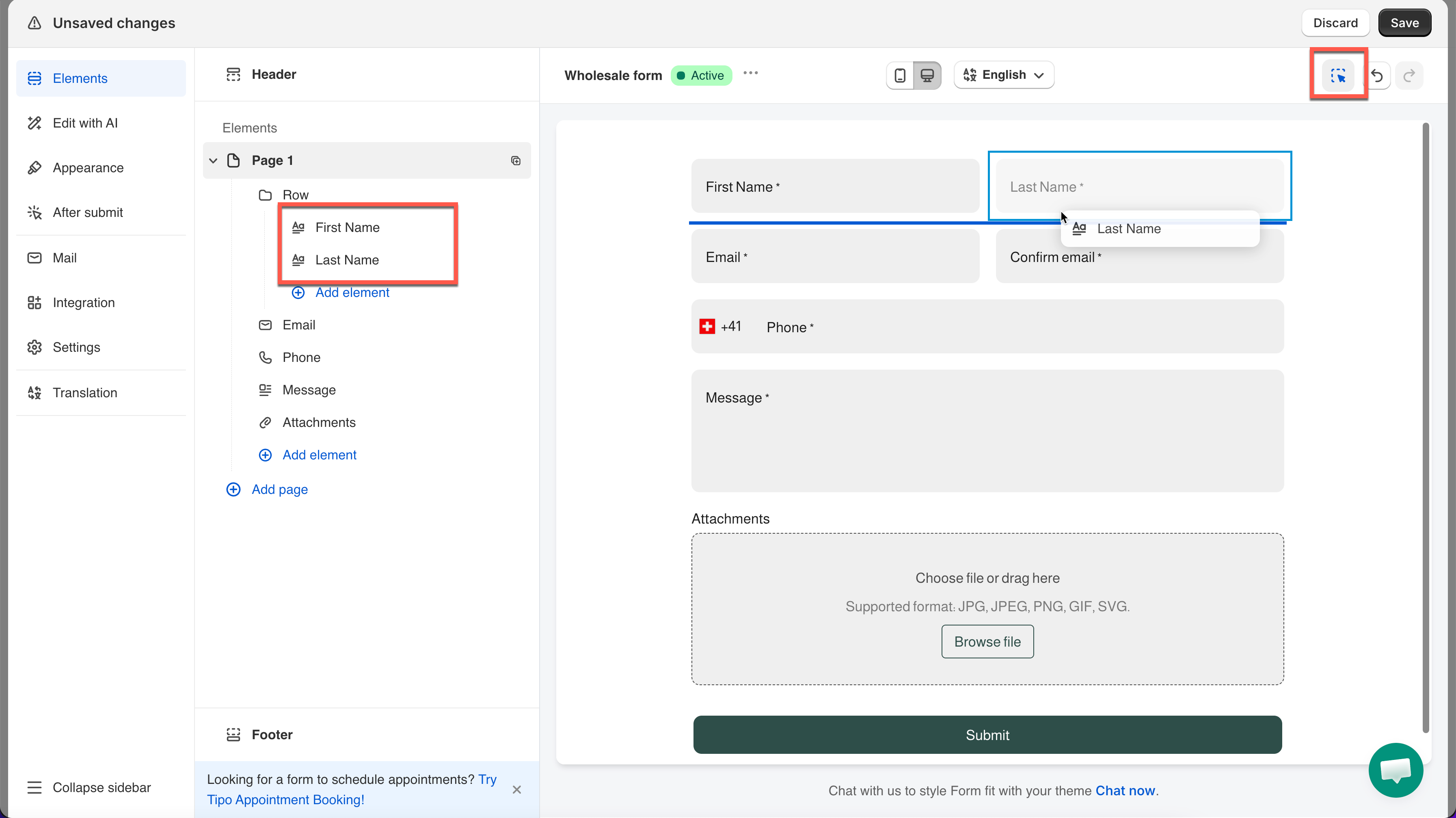
* **For first + last separately:** add two **Name** fields, label them "First Name" and "Last Name," then place them side by side.

**Example:** A contact form adds two Name fields, sets both to **50% Column width**, and drags them onto the same row.

<figure><img src="https://2907469752-files.gitbook.io/~/files/v0/b/gitbook-x-prod.appspot.com/o/spaces%2FehM2rz7MmKkWcJmgvJOe%2Fuploads%2Fgit-blob-00937c3da20a253bbafdd131d6c72443b22eeb6f%2F2026-10-01_09-47-17.png?alt=media" alt=""><figcaption></figcaption></figure>

<br>

## ⚠️ Limits & Notes

<table><thead><tr><th width="235.5"></th><th></th></tr></thead><tbody><tr><td><strong>Validation</strong></td><td>A rejected entry shows <strong>Invalid name</strong>, editable under <a href="https://globosoftware.gitbook.io/globosoftware-docs/build-your-form/error-messages">Edit error messages</a></td></tr><tr><td><strong>Characters allowed</strong></td><td>Letters only — numbers and other characters are rejected</td></tr><tr><td><strong>Limit characters</strong></td><td>Turn on to require more than an initial, or cap the length</td></tr><tr><td><strong>Shopify customer mapping</strong></td><td>Answers map to the customer record when you set up <a href="https://globosoftware.gitbook.io/globosoftware-docs/customers-and-registration/customer-fields#enable-the-shopify-integration">Create Shopify customers </a>from a form</td></tr></tbody></table>

## Next steps

* [Email](/field-types/contact-info/email.md) — the other half of a contact block.
* [Create Shopify customers from a form](/customers-and-registration/create-shopify-customers.md) — turn a submission into a customer account.
