> For the complete documentation index, see [llms.txt](https://docs.powerfulform.com/llms.txt). Markdown versions of documentation pages are available by appending `.md` to page URLs; this page is available as [Markdown](https://docs.powerfulform.com/field-types/contact-info/email.md).

# Email

Collect a valid email address — the field your autoresponder replies to and most integrations use to identify a contact.

The **Email** field collects an address and checks the format before the form goes through. It is the field your customer autoresponder replies to, and the one most integrations use to identify a contact.

## 🔧 How to Set It

Open the form in the app > click **Add element** > select **Email.**

Open the field. The field is added and its settings open on the left.

<figure><img src="https://2907469752-files.gitbook.io/~/files/v0/b/gitbook-x-prod.appspot.com/o/spaces%2FehM2rz7MmKkWcJmgvJOe%2Fuploads%2Fgit-blob-93307661920599e30d8adf828981135f6e6fc93b%2F2026-10-01_09-25-24.png?alt=media" alt=""><figcaption></figcaption></figure>

<figure><img src="https://2907469752-files.gitbook.io/~/files/v0/b/gitbook-x-prod.appspot.com/o/spaces%2FehM2rz7MmKkWcJmgvJOe%2Fuploads%2Fgit-blob-3acdfd3250bd644dd33ba7fe00d64163ff9bf0ac%2F2026-10-01_09-33-26.png?alt=media" alt=""><figcaption></figcaption></figure>

{% hint style="info" %}
See [Add and arrange elements](/build-your-form/add-and-arrange-elements.md) for the other ways to add a field and how to reorder them.
{% endhint %}

## 🔧 Settings

> Only the settings specific to this field are listed here. **Label**, **Placeholder**, **Description**, **Required**, **Hide label**, **Column width**, **Conditional display** and the rest of the shared settings work the same on every field.

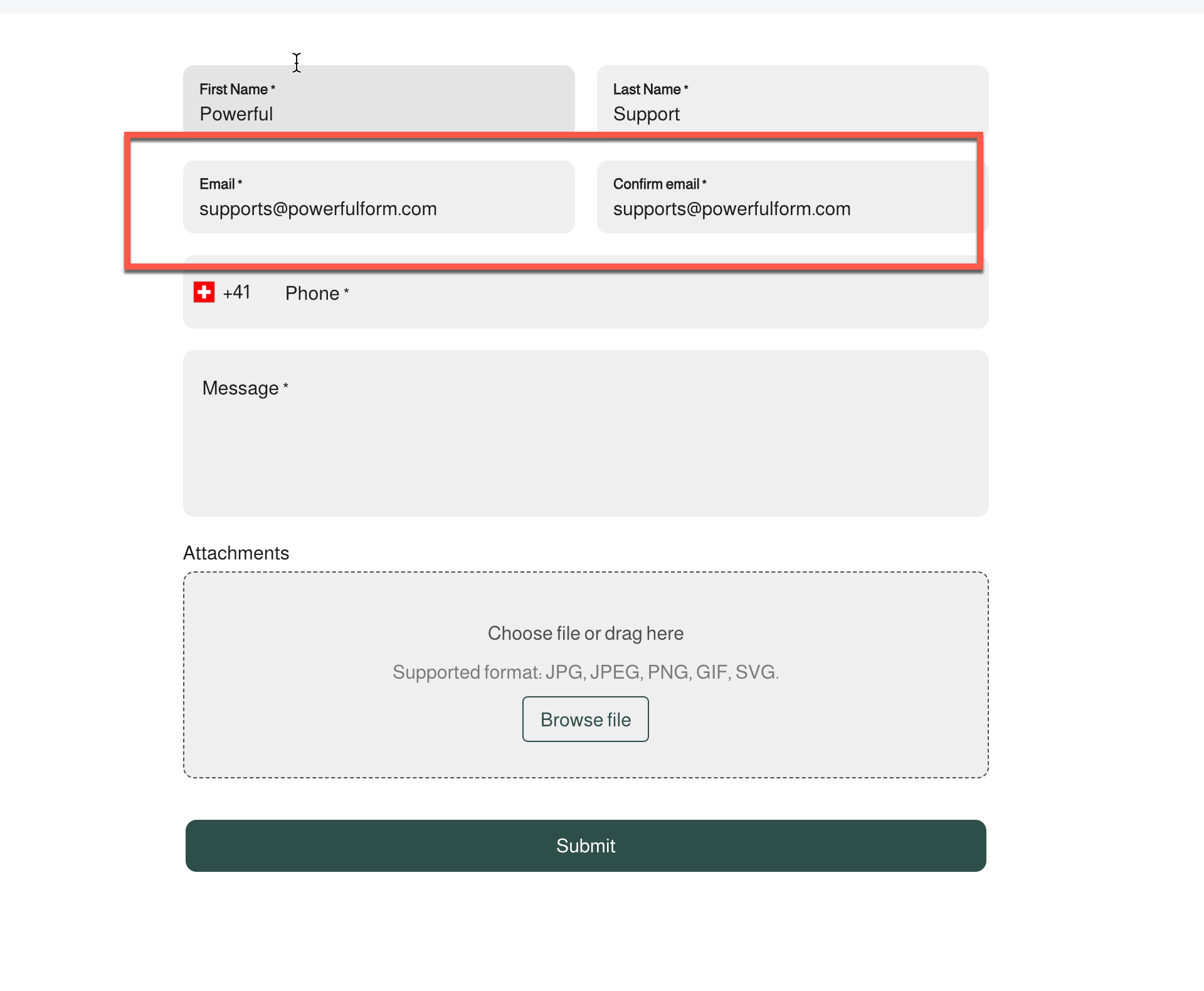
<table><thead><tr><th>Setting</th><th width="388.5">What It Does</th><th>Default</th></tr></thead><tbody><tr><td><strong>Also create confirm email input</strong></td><td>Adds a second box to re-type the address</td><td>Off</td></tr><tr><td><strong>Label confirm</strong> / <strong>Placeholder confirm</strong> / <strong>Description confirm</strong></td><td>Wording for that second box</td><td>"Confirm email" / "Confirm your email" / empty</td></tr></tbody></table>

## 🔄 How It Works

**1. Visitor types an email** — the app checks it's a valid format before submit.\
**2. (If confirm is on)** the two boxes must match, or the visitor sees *"Confirmed email doesn't match."*\
**3. Form submits** — the address is saved and becomes what your autoresponder replies to.<br>

**Example:** A wholesale form turns on **Also create confirm email input** so a mistyped address doesn't block the applicant from getting your quote.

<figure><img src="https://2907469752-files.gitbook.io/~/files/v0/b/gitbook-x-prod.appspot.com/o/spaces%2FehM2rz7MmKkWcJmgvJOe%2Fuploads%2Fgit-blob-c5ec896b4cfd5439e7384fe2be3116af58617f47%2F2026-10-01_09-35-41.png?alt=media" alt=""><figcaption></figcaption></figure>

> **💡 Tip:** Format checking only confirms the address *looks* real, not that it exists.

## ⚠️ Limits & Notes

<table><thead><tr><th width="207.5"></th><th></th></tr></thead><tbody><tr><td><strong>No Email field on the form</strong></td><td>The autoresponder can't send, and mailing-list integrations have nothing to subscribe</td></tr><tr><td><strong>Confirm box</strong></td><td>Only a check — not stored separately from the main answer</td></tr><tr><td><strong>Wrong format on submit</strong></td><td>Shows the <strong>Invalid email</strong> message, editable under <a href="https://globosoftware.gitbook.io/globosoftware-docs/build-your-form/error-messages">Edit error messages</a></td></tr></tbody></table>

## Next steps

* [Customer autoresponder](/email-notifications/customer-autoresponder.md) — reply to the address the visitor entered.
* [Email verification](/customers-and-registration/email-verification.md) — make registrants prove the address is real.
* [Edit error messages](/build-your-form/error-messages.md) — reword the invalid and mismatch messages.