> For the complete documentation index, see [llms.txt](https://docs.powerfulform.com/llms.txt). Markdown versions of documentation pages are available by appending `.md` to page URLs; this page is available as [Markdown](https://docs.powerfulform.com/field-types/contact-info/country.md).
# Country
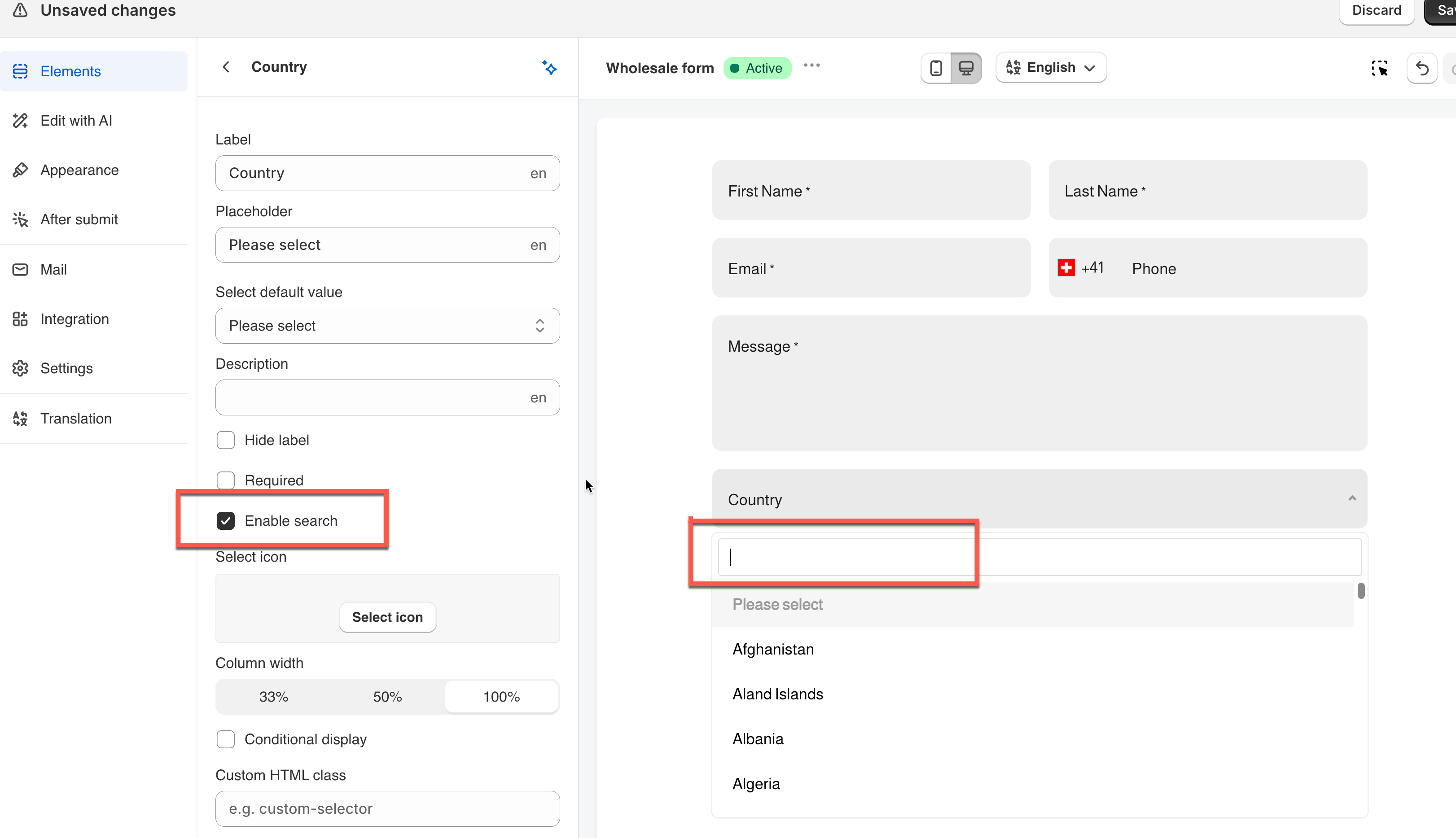
A dropdown pre-filled with Shopify's full country list — ready to use, with no list to edit.
## 🔧 How to Set It
In the form editor, click **Add element** > pick **Country**.
Open the filed and its settings open on the left.
The Country field offers a ready-made list of countries.
{% hint style="info" %}
See [Add and arrange elements](/build-your-form/add-and-arrange-elements.md) for the other ways to add a field and how to reorder them.
{% endhint %}
## 🔧 Settings
Only the settings specific to this field are listed here. **Label**, **Placeholder**, **Description**, **Required**, **Hide label**, **Column width**, **Conditional display** and the rest of the shared settings work the same on every field.
### 🔍 Enable Search
Adds a search box inside the open dropdown, so the visitor can type a few letters instead of scrolling through nearly 200 rows. Off by default.
> **💡 Tip:** Since the list can't be trimmed, turning this on is the main way to keep the field usable.
### 🔤 Select Default Value
Which country is already selected when the form loads. Defaults to **Please select**, which leaves the field empty.
**Example:** A store where most customers are in Switzerland sets this to "Switzerland" — everyone else can still change it, and most visitors save a step.
\
🔄 How It Works
---------------
**What's saved:** The field stores the chosen country's standard value, shown under **Submissions**, in notification emails, exports, and connected integrations.
## ⚠️ Note
Unlike other select fields, Country has no editable Options list. It's always the complete Shopify country list, and countries can't be renamed, reordered, or removed.
**Need a trimmed or custom list instead? C**reate a **Dropdown** field and use **Bulk add Option** to add only the countries you want — see [Dropdown](https://globosoftware.gitbook.io/globosoftware-docs/field-types/selects/dropdown).
####
## Next steps
* [Dropdown](/field-types/selects/dropdown.md) — the general-purpose single-select field.
* [Phone](/field-types/contact-info/phone.md) — collect a dialing code alongside the country.
* [Show or hide fields with conditional logic](/build-your-form/conditional-logic.md) — ask different questions per country.