> For the complete documentation index, see [llms.txt](https://docs.powerfulform.com/llms.txt). Markdown versions of documentation pages are available by appending `.md` to page URLs; this page is available as [Markdown](https://docs.powerfulform.com/display-and-placement/specific-page.md).

# Form on a specific page

Place a form on one specific page of your store rather than on every page.

## 🔍 Pick a Method

<table data-header-hidden><thead><tr><th width="214.5"></th><th width="324.333251953125"></th><th></th></tr></thead><tbody><tr><td>Method</td><td>Best For</td><td>Needs Code?</td></tr><tr><td><strong>App auto-assign</strong></td><td>Quick setup, standard pages</td><td>❌ No</td></tr><tr><td><strong>Embed shortcode</strong></td><td>Custom pages, blog posts</td><td>✅ Basic HTML paste</td></tr><tr><td><strong>App block</strong></td><td>Theme-integrated, reusable sections</td><td>✅ Theme editor</td></tr></tbody></table>

## 🚀 Method 1 — App Auto-Assign (Easiest)

Use this when you want the form to appear on a specific page (e.g. Contact page, Support page) without editing code.

{% stepper %}
{% step %}

#### Open the Publish window

Open the app > **Forms** > open your form > click **Publish** (top right).

<figure><img src="https://2907469752-files.gitbook.io/~/files/v0/b/gitbook-x-prod.appspot.com/o/spaces%2FehM2rz7MmKkWcJmgvJOe%2Fuploads%2FO8J5Oc8BU8bnssTs1JbZ%2F2026-10-21_17-51-17.png?alt=media&amp;token=9478cef2-155a-4b45-8760-188e28c88584" alt=""><figcaption></figcaption></figure>

{% endstep %}

{% step %}

#### **Choose Specific page**

Under **Where should customers find this form?**, click **Specific page**.\
Pick your page

<figure><img src="https://2907469752-files.gitbook.io/~/files/v0/b/gitbook-x-prod.appspot.com/o/spaces%2FehM2rz7MmKkWcJmgvJOe%2Fuploads%2FirY7xFTPXuOHN60FYaNA%2F2026-10-21_17-54-31.png?alt=media&amp;token=1a199bbc-9d23-46fe-9eaf-44a5e6ee95eb" alt=""><figcaption></figcaption></figure>
{% endstep %}

{% step %}

#### Choose the position

{% endstep %}

{% step %}

#### Click Add form

Click **Add form to \[page name]**. The form is added for you, and it shows right away.

<figure><img src="https://2907469752-files.gitbook.io/~/files/v0/b/gitbook-x-prod.appspot.com/o/spaces%2FehM2rz7MmKkWcJmgvJOe%2Fuploads%2FgmynAgwOKlp4523EABrI%2F2026-10-21_17-55-15.png?alt=media&amp;token=4b4f97c9-1d91-4a7c-9e2c-0b18311ff47a" alt=""><figcaption></figcaption></figure>
{% endstep %}
{% endstepper %}

Only the page you choose gets the form. Other pages that use the same template stay as they are.<br>

## 🧩 Method 2 — Shortcode Embed

**Best for:** when you need to embed a form inside custom content, blog posts, or any page where you can edit HTML.

{% stepper %}
{% step %}

### Copy embedded code of the form

In the Publish window, click **Paste the form code yourself**, then copy the form code.

<figure><img src="https://2907469752-files.gitbook.io/~/files/v0/b/gitbook-x-prod.appspot.com/o/spaces%2FehM2rz7MmKkWcJmgvJOe%2Fuploads%2FXMt1VLRQVWIbbbkyAVyc%2F2026-10-21_17-56-29.png?alt=media&amp;token=3e87fe34-41bc-40d5-8c5a-fad2071c05cb" alt=""><figcaption></figcaption></figure>
{% endstep %}

{% step %}

### Add embedded code to the page/section you want

For example: I would like to add the form to contact page

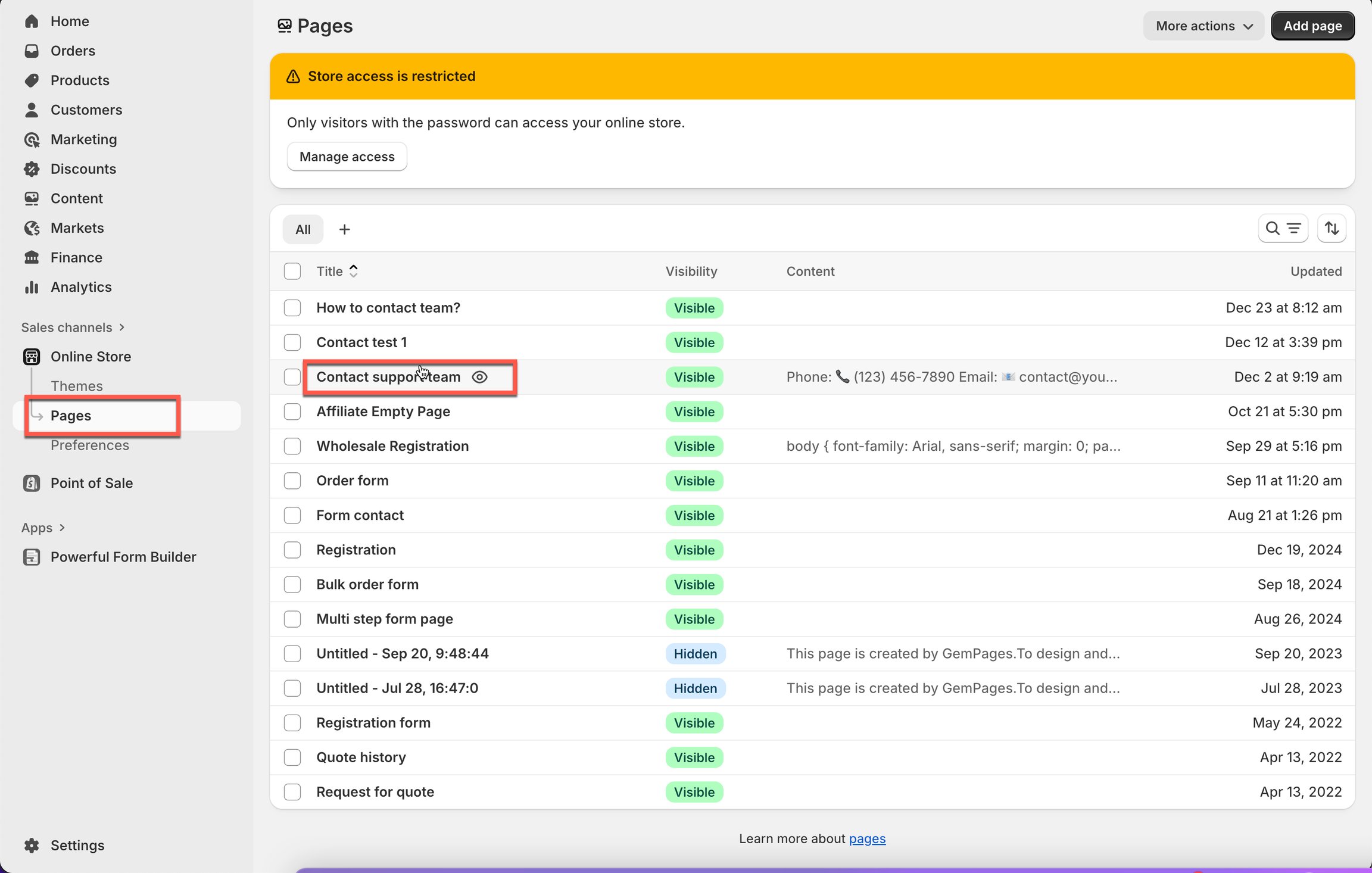
* Form Shopify admin page > click **Sale channels** > **Online stores**
* Click **Pages** > open a page you want

<figure><img src="https://2907469752-files.gitbook.io/~/files/v0/b/gitbook-x-prod.appspot.com/o/spaces%2FehM2rz7MmKkWcJmgvJOe%2Fuploads%2Fgit-blob-d85d43eb545d698b541d3f21f41124c12a202a86%2Fscreenshot-imported-display-and-placement-display-a-form-on-a-specific-page-6.png?alt=media" alt=""><figcaption></figcaption></figure>

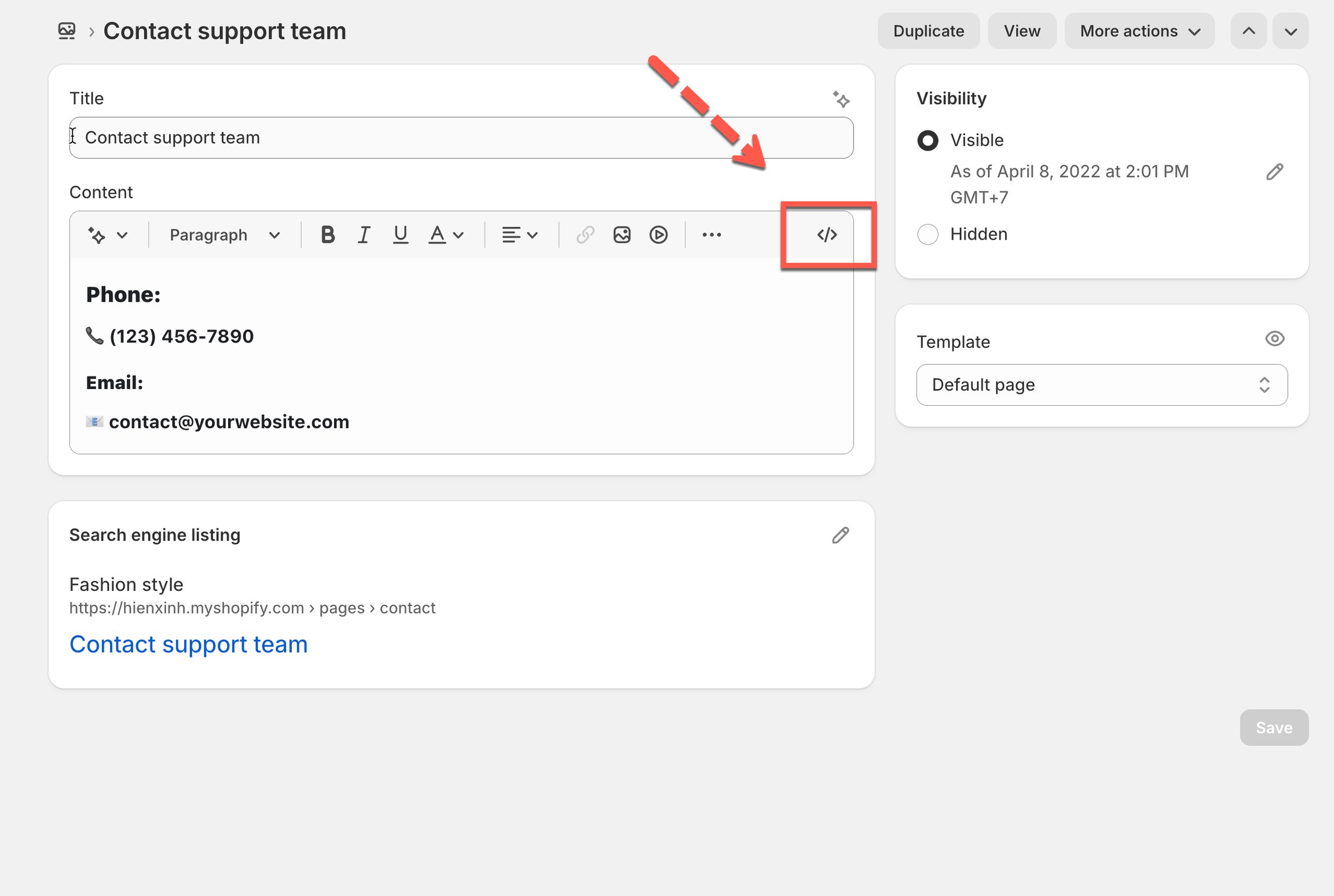
* Click icon **\</>** to show **HTML** content of the page

<figure><img src="https://2907469752-files.gitbook.io/~/files/v0/b/gitbook-x-prod.appspot.com/o/spaces%2FehM2rz7MmKkWcJmgvJOe%2Fuploads%2Fgit-blob-9d021d286cc796939e17043b1cb394536818de25%2Fscreenshot-imported-display-and-placement-display-a-form-on-a-specific-page-7.png?alt=media" alt=""><figcaption></figcaption></figure>

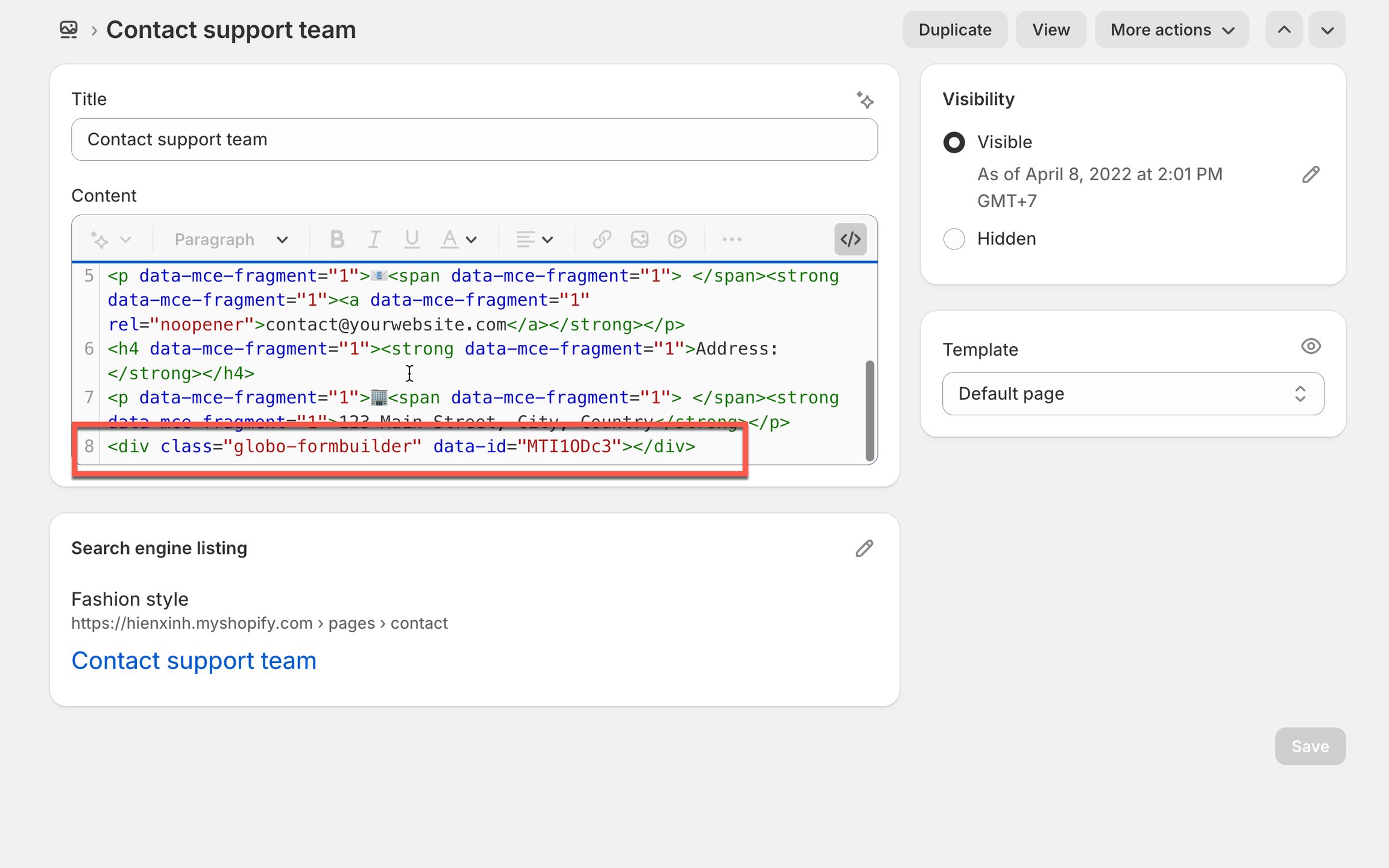
* Paste the embedded code of the form here

<figure><img src="https://2907469752-files.gitbook.io/~/files/v0/b/gitbook-x-prod.appspot.com/o/spaces%2FehM2rz7MmKkWcJmgvJOe%2Fuploads%2Fgit-blob-73502e456dcfbdc516094151b83da6672b7cbe13%2Fscreenshot-imported-display-and-placement-display-a-form-on-a-specific-page-8.png?alt=media" alt=""><figcaption></figcaption></figure>

* Click **Save**
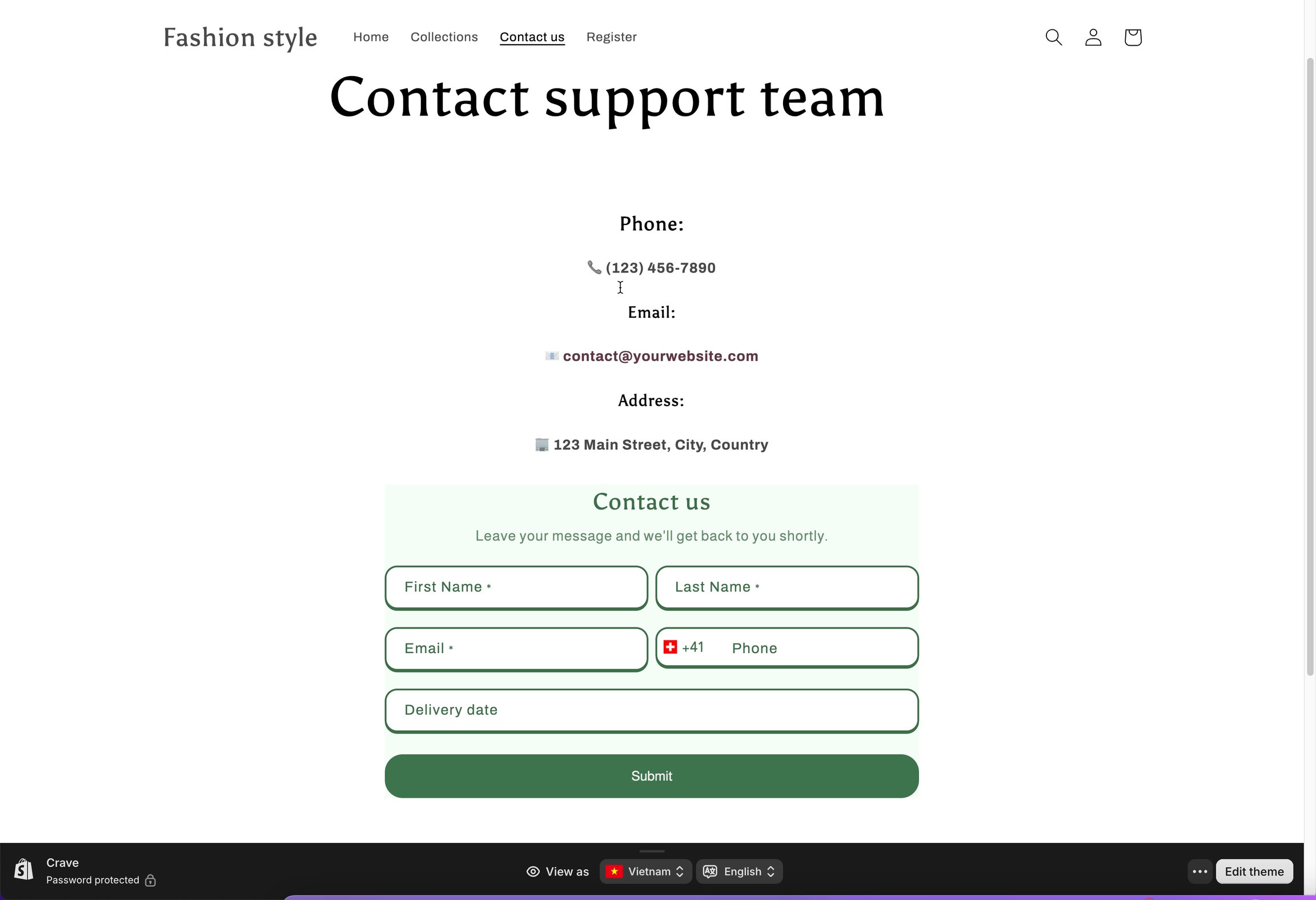
* Then click **View page** to see how it looks on the site

<figure><img src="https://2907469752-files.gitbook.io/~/files/v0/b/gitbook-x-prod.appspot.com/o/spaces%2FehM2rz7MmKkWcJmgvJOe%2Fuploads%2Fgit-blob-20498c18594faca484f72e5f25d8fc7518f5e8f4%2Fscreenshot-imported-display-and-placement-display-a-form-on-a-specific-page-9.png?alt=media" alt=""><figcaption></figcaption></figure>
{% endstep %}
{% endstepper %}

***

## 🎨 Method 3 — App Block (Theme Editor)

Use this when you want to insert the form as part of your theme layout — using Shopify’s theme editor. Good for themes with customizable sections or for repeating forms on multiple pages.

Learn more [add form with app block here](/display-and-placement/app-block.md)

{% stepper %}
{% step %}

### Copy the Form Shortcode

<figure><img src="https://2907469752-files.gitbook.io/~/files/v0/b/gitbook-x-prod.appspot.com/o/spaces%2FehM2rz7MmKkWcJmgvJOe%2Fuploads%2FXMt1VLRQVWIbbbkyAVyc%2F2026-10-21_17-56-29.png?alt=media&amp;token=3e87fe34-41bc-40d5-8c5a-fad2071c05cb" alt=""><figcaption></figcaption></figure>
{% endstep %}

{% step %}

### Add the Form as an App Block

<figure><img src="https://2907469752-files.gitbook.io/~/files/v0/b/gitbook-x-prod.appspot.com/o/spaces%2FehM2rz7MmKkWcJmgvJOe%2Fuploads%2Fgit-blob-093490f5541ed84dcfd3c0441d88404abc63313f%2Fimage%20(1)%20(1)%20(1).png?alt=media" alt=""><figcaption></figcaption></figure>
{% endstep %}
{% endstepper %}

## ▶️ Tutorial video

{% embed url="<https://www.youtube.com/watch?v=K6GS6QctAhk>" %}

## Next steps

* [Get embed code of a form](/display-and-placement/short-code.md) — where the code comes from.
* [Add a form with app block](/display-and-placement/app-block.md) — the app-block alternative.
* [Contact support](/help/contact-support.md) — if the form still does not appear.