> For the complete documentation index, see [llms.txt](https://docs.powerfulform.com/llms.txt). Markdown versions of documentation pages are available by appending `.md` to page URLs; this page is available as [Markdown](https://docs.powerfulform.com/customers-and-registration/customer-fields.md).

# Shopify Customers integration

Turn a form submission into a Shopify customer account. Map your form fields to Shopify's customer properties, then choose what happens when someone submits.

## **✅** Why use this feature

By linking your form fields to Shopify's customer fields, you can:

* Create a new customer account in Shopify Customers automatically.
* Update customer information automatically when the person already exists.
* Keep customer management in one place instead of copying data by hand.

All you do is link each form element to a customer property. The common ones are:

<table><thead><tr><th width="260">Shopify customer property</th><th>Typical form field</th></tr></thead><tbody><tr><td><strong>Email</strong> — required</td><td>Email</td></tr><tr><td>Phone</td><td>Phone</td></tr><tr><td>First name / Last name</td><td>Name</td></tr><tr><td>Address, Apartment, City, Province, Zip, Company, Country</td><td>Text or Country fields</td></tr></tbody></table>

Reference: [Customer · Shopify Help Center](https://help.shopify.com/en/api/reference/customers/customer#properties-2019-10).

## 🔧 Steps to map a form to Customers

{% stepper %}
{% step %}

#### Open the form

Open the app, click **Forms**, and open the form you want to edit.
{% endstep %}

{% step %}

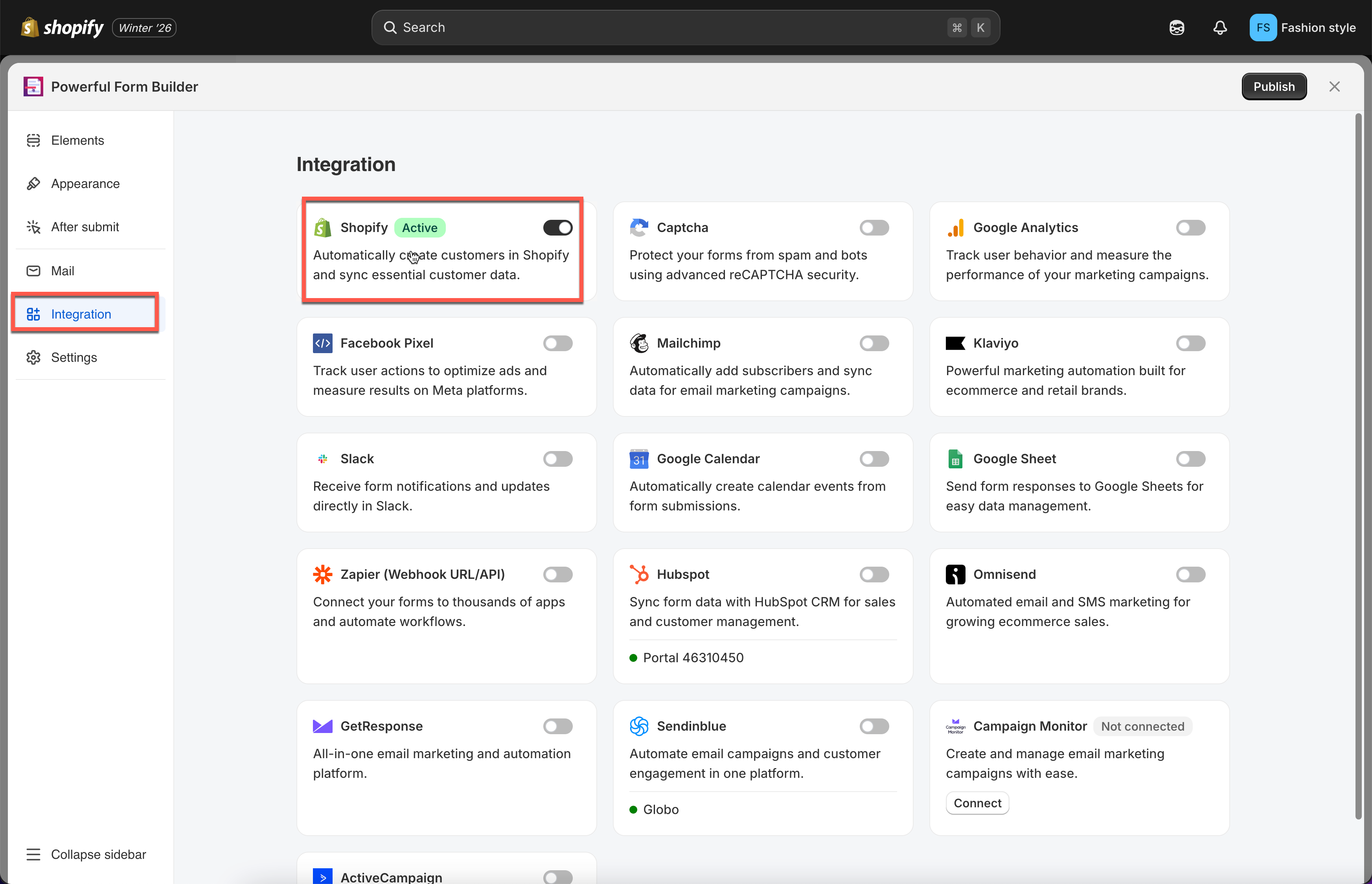
#### Enable the Shopify integration

Click the **Integration** icon in the left rail, enable **Shopify**, then click **Shopify** to open its settings.

<figure><img src="https://2907469752-files.gitbook.io/~/files/v0/b/gitbook-x-prod.appspot.com/o/spaces%2FehM2rz7MmKkWcJmgvJOe%2Fuploads%2Fgit-blob-930e99c825fc5532242eecffad1de59914dfa978%2Fcf-note-2.png?alt=media" alt=""><figcaption></figcaption></figure>
{% endstep %}

{% step %}

#### Choose the account options

Open **Shopify Account options**. There are three:

* Automatically create customer account
* Send email invitation
* Require account approval

Pick the one that matches how you want registrations handled .

<figure><img src="https://2907469752-files.gitbook.io/~/files/v0/b/gitbook-x-prod.appspot.com/o/spaces%2FehM2rz7MmKkWcJmgvJOe%2Fuploads%2Fgit-blob-baa87aa3e4b31f963eb41e78607d18e2eedae5a5%2Fcf-shopify-customers-2.png?alt=media" alt=""><figcaption></figcaption></figure>
{% endstep %}

{% step %}

#### Map the fields

Your form's fields are on the left, Shopify's customer attributes on the right. Pair them up: **Email** to Shopify **Email**, **First name** to Shopify **First name**, and so on.

{% hint style="warning" %}
Mapping the form's **Email** field to Shopify **Email** is required. Shopify cannot create a customer record without it.
{% endhint %}
{% endstep %}

{% step %}

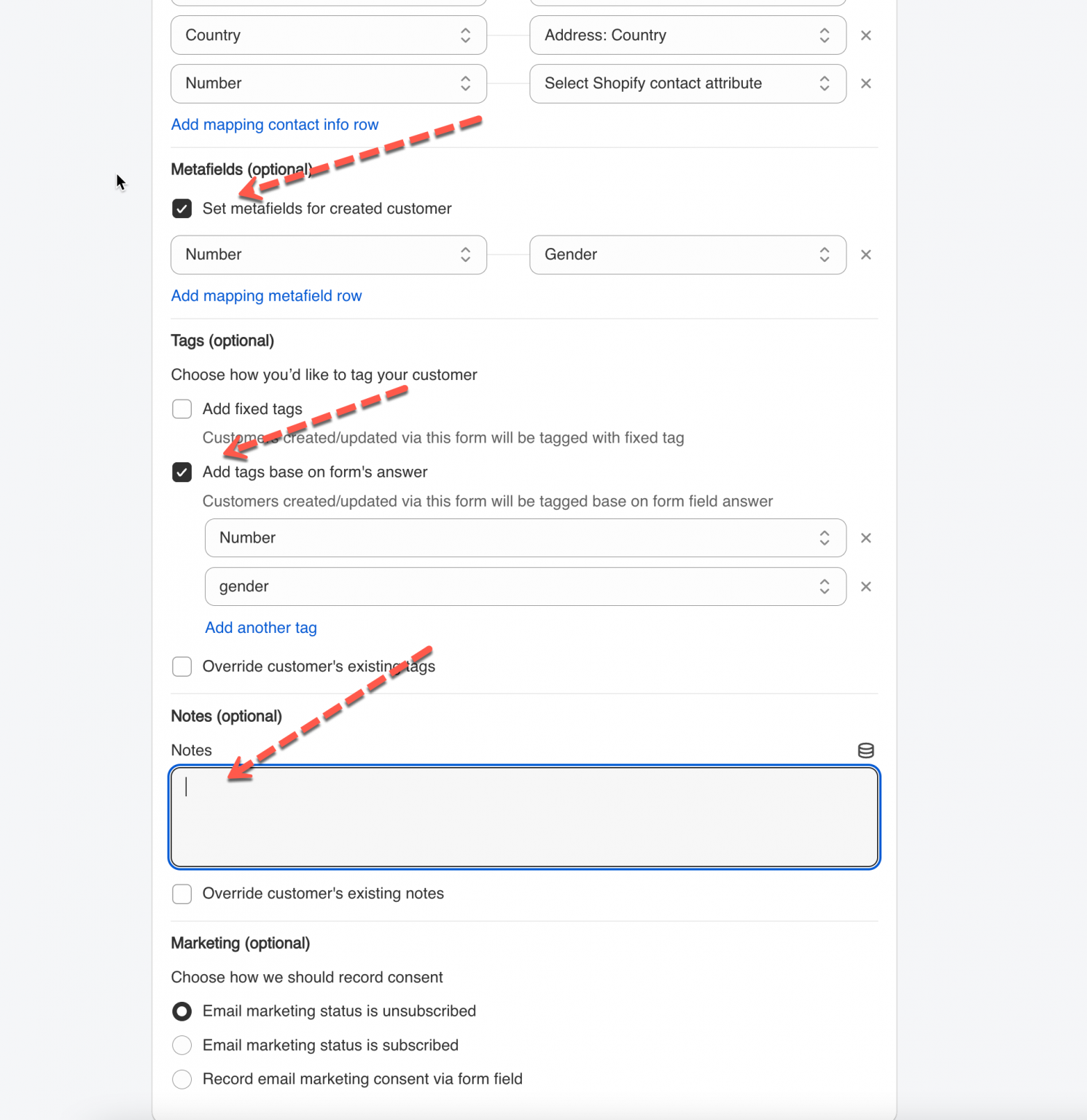
#### Add tags, notes or metafields

Anything that does not match a standard Shopify field goes into tags, notes or metafields.

<figure><img src="https://2907469752-files.gitbook.io/~/files/v0/b/gitbook-x-prod.appspot.com/o/spaces%2FehM2rz7MmKkWcJmgvJOe%2Fuploads%2Fgit-blob-dd519f855ae73869ddb68ce1fa5637feab77a5a0%2Fcf-create-customers-4.png?alt=media" alt=""><figcaption></figcaption></figure>
{% endstep %}

{% step %}

#### Save

Save the form.

From now on submissions create or update Shopify customer accounts, depending on the option you chose.

<figure><img src="https://2907469752-files.gitbook.io/~/files/v0/b/gitbook-x-prod.appspot.com/o/spaces%2FehM2rz7MmKkWcJmgvJOe%2Fuploads%2Fgit-blob-5fed0291518e8b5bd7e9a1403be479aee17975ca%2Fcf-shopify-customers-4.png?alt=media" alt=""><figcaption></figcaption></figure>
{% endstep %}
{% endstepper %}

## 📌 Good to Know

* **Email must be mapped.** Shopify requires it to create a customer record.
* **Only standard Shopify customer attributes are supported** — name, email, phone, address, password. Anything else belongs in [tags](/customers-and-registration/customer-tags.md), [notes](/customers-and-registration/customer-notes.md) or [metafields](/customers-and-registration/customer-metafields.md).

<figure><img src="https://2907469752-files.gitbook.io/~/files/v0/b/gitbook-x-prod.appspot.com/o/spaces%2FehM2rz7MmKkWcJmgvJOe%2Fuploads%2Fgit-blob-9cee64d19433643c353a66df45cde6135add07d0%2F2026-09-29_09-55-43.png?alt=media" alt=""><figcaption></figcaption></figure>

## ▶️ Tutorial video

{% embed url="<https://www.youtube.com/watch?v=CjjZYlhQkBo>" %}

## 🔄 How It Works

```
Customer submits form 
 →  Account created instantly  
 →  Data, tags, and notes added to the customer record
```

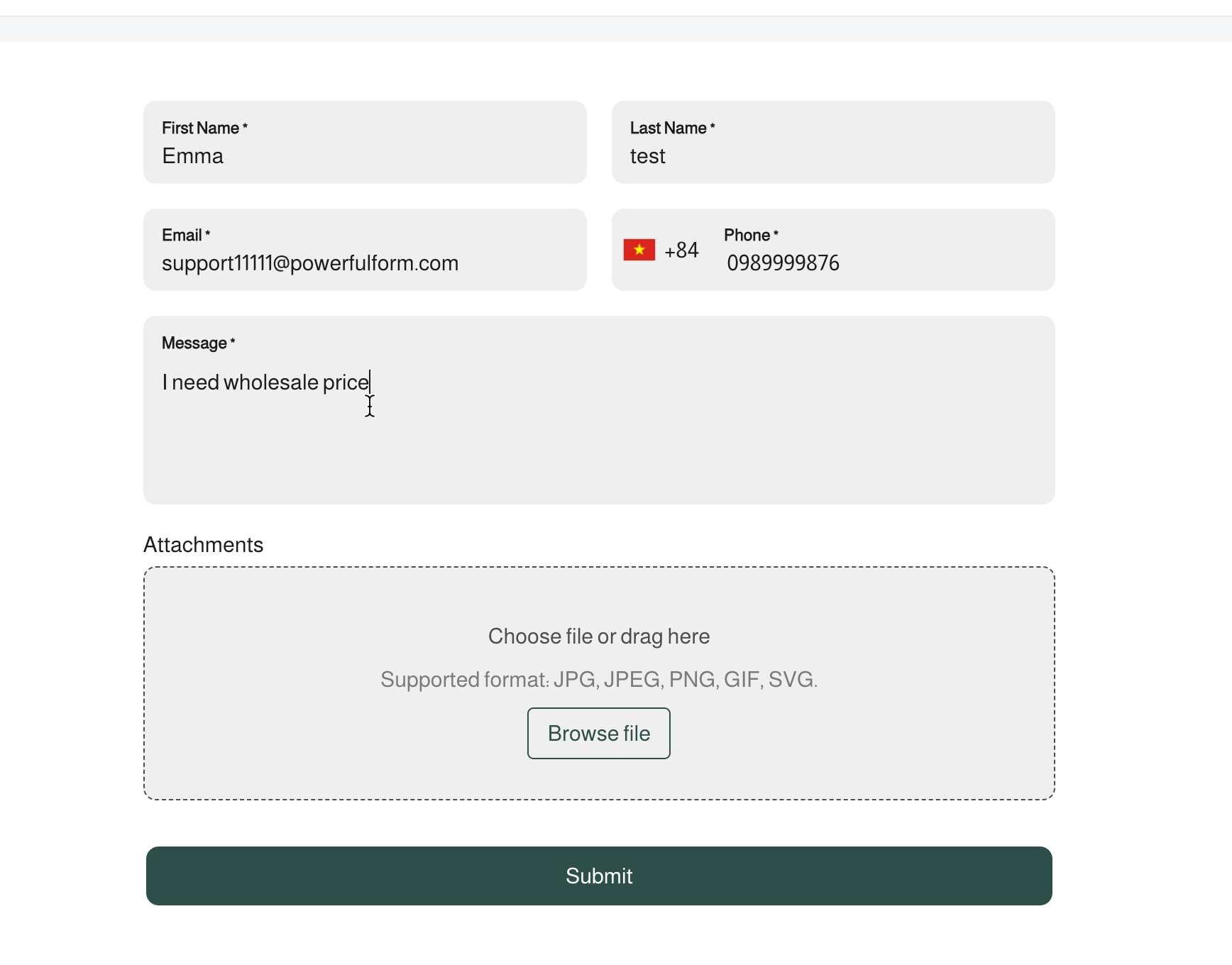
**Example:** A wholesale application form with Email, First Name, Last Name, Phone, and a Message field.

{% stepper %}
{% step %}

#### Customer submits the form

Fills in their name, email, phone, and a message, then submits.

<figure><img src="https://2907469752-files.gitbook.io/~/files/v0/b/gitbook-x-prod.appspot.com/o/spaces%2FehM2rz7MmKkWcJmgvJOe%2Fuploads%2Fgit-blob-38c0b67cad9f3bc5e30ea05ebeddfdd6f46070e9%2F2026-09-29_10-13-22.png?alt=media" alt=""><figcaption></figcaption></figure>
{% endstep %}

{% step %}

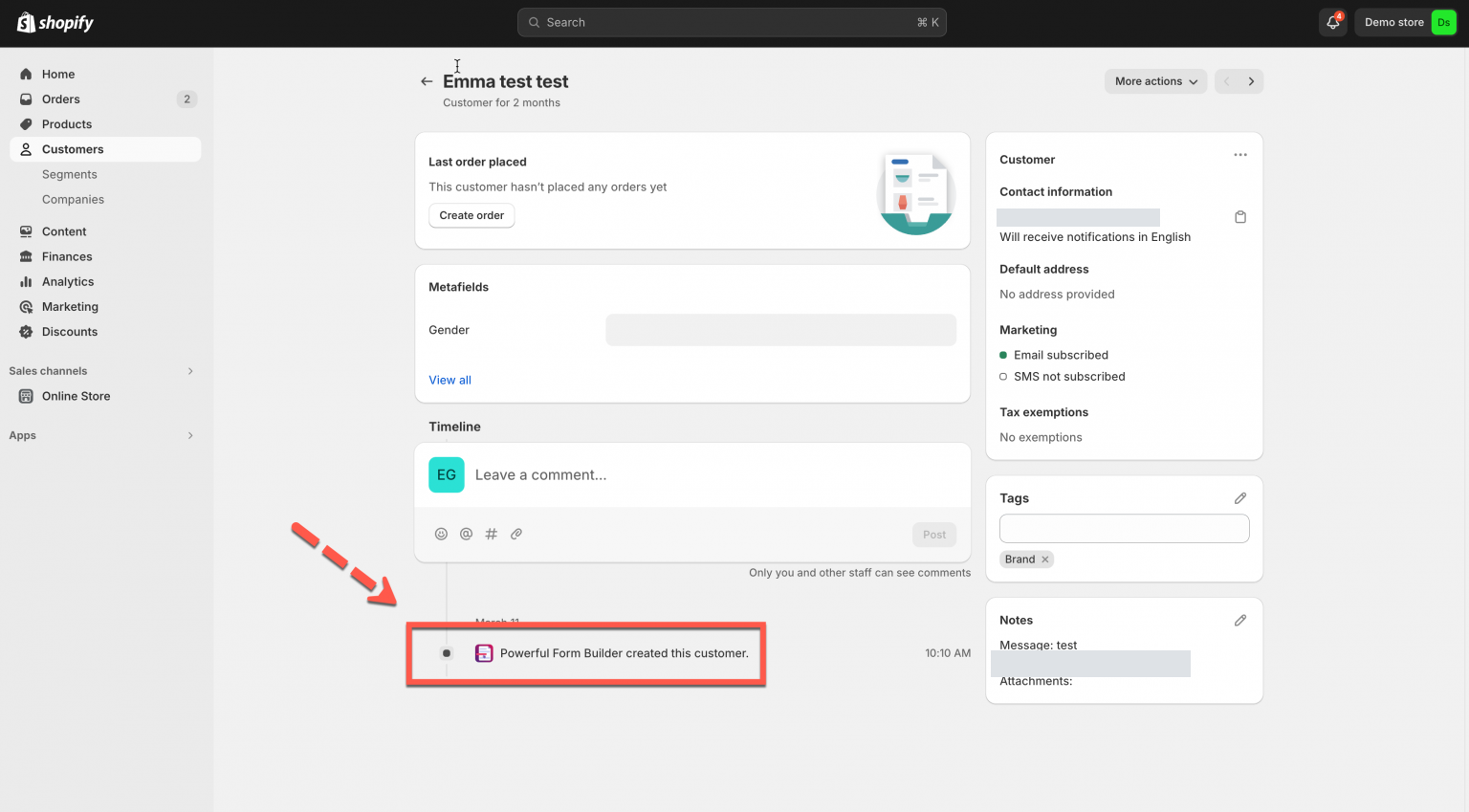
#### Account is created

Since **Automatically create customer** is selected, Shopify creates the account right away

<figure><img src="https://2907469752-files.gitbook.io/~/files/v0/b/gitbook-x-prod.appspot.com/o/spaces%2FehM2rz7MmKkWcJmgvJOe%2Fuploads%2Fgit-blob-560ac19a65cba6e70f9add6da9366fbf0fc31070%2F2026-09-29_10-14-07.png?alt=media" alt=""><figcaption></figcaption></figure>
{% endstep %}

{% step %}

#### Data is added to the customer's detail page

The mapped fields fill in her contact info under **Contact information**.

| Form field | Shopify field |
| ---------- | ------------- |
| Email      | Email         |
| First Name | First name    |
| Last Name  | Last name     |
| Phone      | Phone         |

Tag and note are added.

* **Tag:** Since **Add fixed tags** is set to `Wholesale`, her account is automatically tagged **Wholesale**, shown under **Tags** on her customer page.
* **Note:** Since **Set notes for created customer** uses `{{textarea}}`, her **Message** field answer is saved directly under **Notes**.

<figure><img src="https://2907469752-files.gitbook.io/~/files/v0/b/gitbook-x-prod.appspot.com/o/spaces%2FehM2rz7MmKkWcJmgvJOe%2Fuploads%2Fgit-blob-2ceaeb5ed44864792efab997590b686ce6098db3%2F2026-09-29_10-15-39.png?alt=media" alt=""><figcaption></figcaption></figure>
{% endstep %}
{% endstepper %}

## 🔀 Choose an Account option

A form uses exactly one option, set under **Account options**.

<figure><img src="https://2907469752-files.gitbook.io/~/files/v0/b/gitbook-x-prod.appspot.com/o/spaces%2FehM2rz7MmKkWcJmgvJOe%2Fuploads%2Fgit-blob-f3c006453becab1c575e2eb489fc8389c70b20a3%2F2026-09-29_10-24-02.png?alt=media" alt=""><figcaption></figcaption></figure>

<table><thead><tr><th width="202.3665771484375">Option</th><th width="317">What It Does</th><th>Best For</th></tr></thead><tbody><tr><td><strong>Automatically create customer</strong></td><td>Create a new customer account in Shopify <strong>Customers</strong> right after the form is submitted</td><td>Instant sign-up, simple registration</td></tr><tr><td><strong>Send email invite</strong></td><td>No account yet. Shopify emails an invite link. Customer clicks it to confirm and set a password.</td><td>Verifying real emails, fewer fake accounts</td></tr><tr><td><strong>Require account approval</strong></td><td>Submission is held as <strong>Pending</strong> in the app. You review it, then approve or reject. On approval, the account is created and invited.</td><td>Wholesale, B2B, membership, vetted access</td></tr></tbody></table>

> See each option's own guide for what happens step by step after submit:
>
> [Create Shopify Customers](https://globosoftware.gitbook.io/globosoftware-docs/customers-and-registration/create-shopify-customers)
>
> [Email verification](https://globosoftware.gitbook.io/globosoftware-docs/customers-and-registration/email-verification)
>
> [Customer account approval](https://globosoftware.gitbook.io/globosoftware-docs/customers-and-registration/approve-or-deny)

## Next steps

* [Create Shopify Customers](/customers-and-registration/create-shopify-customers.md) — create the account the moment the form is submitted.
* [Email verification](/customers-and-registration/email-verification.md) — make the customer confirm their address first.
* [Customer account approval](/customers-and-registration/approve-or-deny.md) — review registrations before an account exists.