> For the complete documentation index, see [llms.txt](https://docs.powerfulform.com/llms.txt). Markdown versions of documentation pages are available by appending `.md` to page URLs; this page is available as [Markdown](https://docs.powerfulform.com/customers-and-registration/create-shopify-customers.md).

# Create Shopify Customers

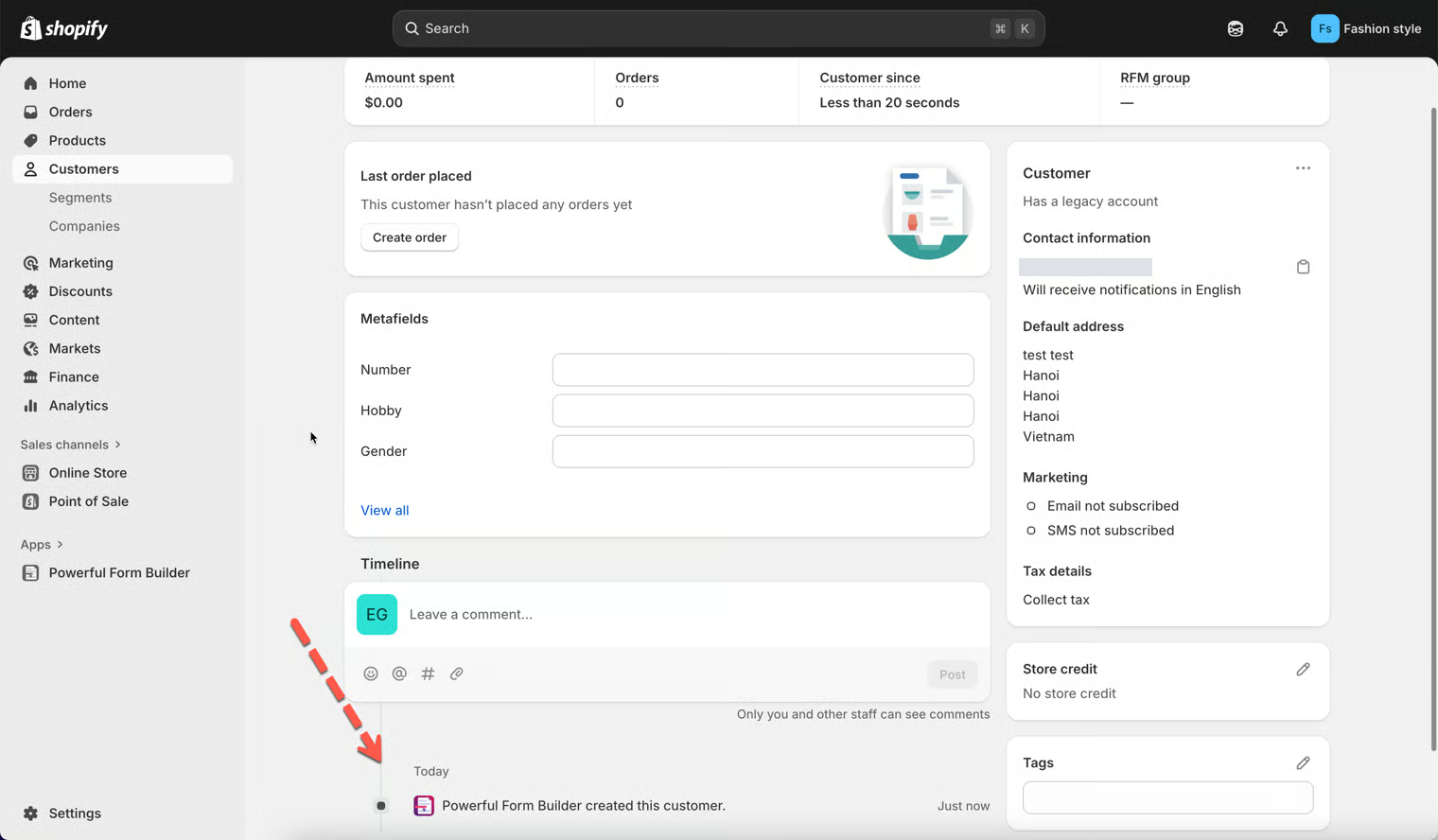
Turn every valid submission into a Shopify customer account automatically, creating a new one or updating the person who already exists.

When customers fill out your form, the submission can become a full Shopify customer account — no copying by hand, and no duplicate records.

## What this feature does

* Creates a new customer account in Shopify when a form is submitted.
* Transfers the answers — name, email, phone, address and so on — into the Shopify **Customers** database.
* Updates the existing customer instead of duplicating, when the email already exists.

<figure><img src="https://2907469752-files.gitbook.io/~/files/v0/b/gitbook-x-prod.appspot.com/o/spaces%2FehM2rz7MmKkWcJmgvJOe%2Fuploads%2Fgit-blob-4f9781c7c1e55a41700518c32db02f772f2208f9%2Fcf-account-approval-6.png?alt=media" alt=""><figcaption></figcaption></figure>

The customer properties you can map are Shopify's own: `first_name`, `last_name`, `email`, `phone`, `addresses.address1`, `addresses.address2`, `addresses.city`, `addresses.province`, `addresses.zip`, `addresses.country`, `addresses.company`, `note` and `tags`.

## Turn it on

{% stepper %}
{% step %}

### Open the Shopify integration

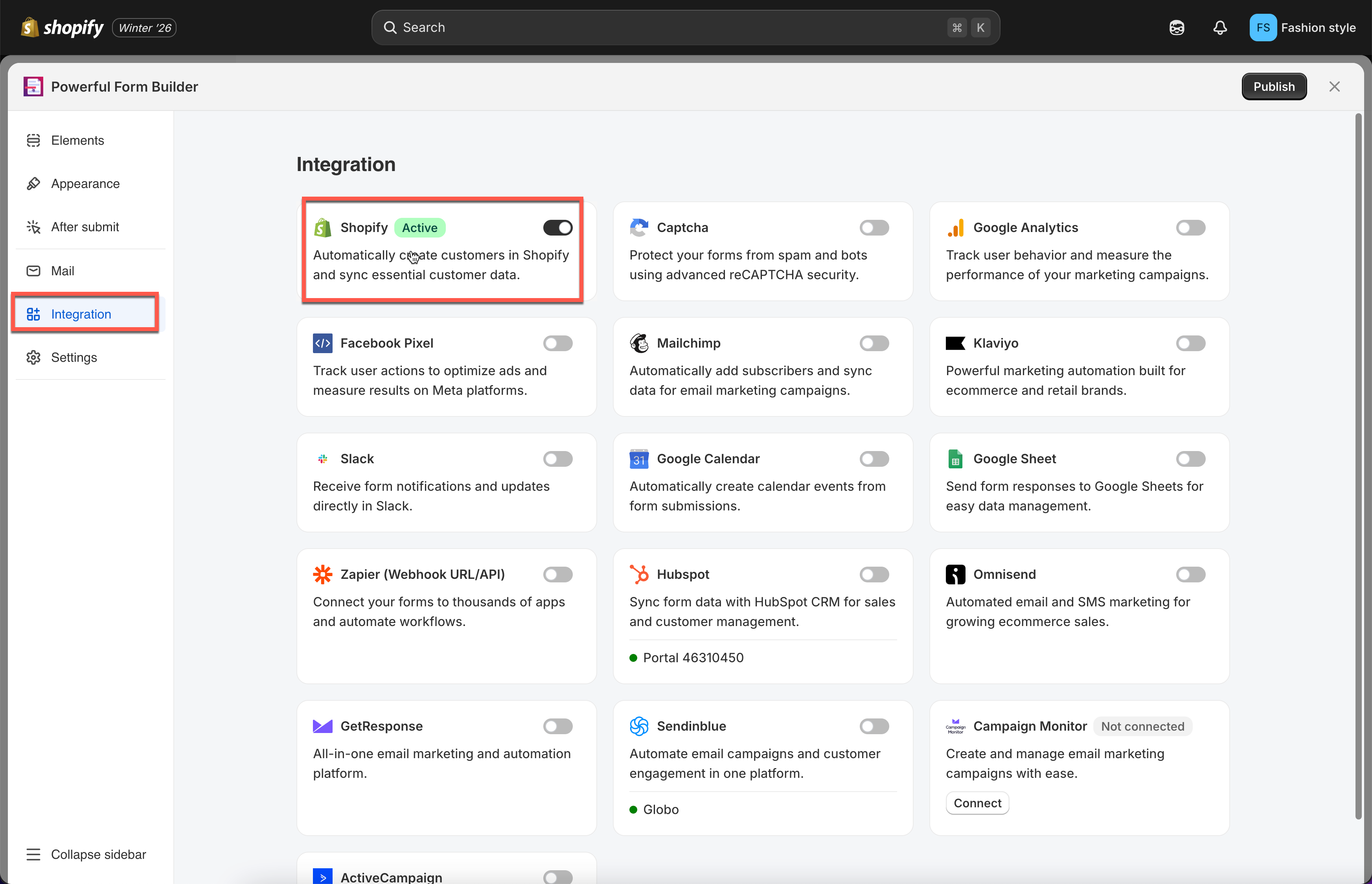
Open the app, click **Forms**, open your form, click the **Integration** icon in the left rail and enable **Shopify**.

<figure><img src="https://2907469752-files.gitbook.io/~/files/v0/b/gitbook-x-prod.appspot.com/o/spaces%2FehM2rz7MmKkWcJmgvJOe%2Fuploads%2Fgit-blob-930e99c825fc5532242eecffad1de59914dfa978%2Fcf-note-2.png?alt=media" alt=""><figcaption></figcaption></figure>
{% endstep %}

{% step %}

### Choose "Automatically create customer"

Open **Shopify Account options** and select **Automatically create customer**.

One extra checkbox appears: **Send an account invitation when the customer already exists**. Leave it off unless you want Shopify's invite email sent to existing customers.
{% endstep %}

{% step %}

### Map the fields

Pair each Shopify attribute on the right with a form field on the left — the form's **Last name** to Shopify's last name, and so on.

{% hint style="danger" %}
The **Email** field must be mapped. Shopify will not create a customer account without it.
{% endhint %}

<figure><img src="https://2907469752-files.gitbook.io/~/files/v0/b/gitbook-x-prod.appspot.com/o/spaces%2FehM2rz7MmKkWcJmgvJOe%2Fuploads%2Fgit-blob-c20f1a1add843ebccdb0d21ecca181d006465568%2Fcf-tag-fixed-2.png?alt=media" alt=""><figcaption></figcaption></figure>
{% endstep %}

{% step %}

### Decide what happens for an existing customer

**If customer already exist** controls what happens when the email already belongs to a customer.

| Choice                                      | What it does                                                                          |
| ------------------------------------------- | ------------------------------------------------------------------------------------- |
| **Return error message**                    | Blocks the submission with the form's **Customer already exists** error. The default. |
| **Continue and update customer infomation** | Updates the existing customer with the mapped answers.                                |
| **Continue and ignore the error**           | Leaves the existing customer untouched.                                               |

Two sub-options appear:

* With **Return error message**, tick **And show message** for your own wording in **Show message**, which starts as `You already registered. Click <a href="/account/login">here</a> to login`.
* With **Continue and update customer infomation**, tick **Prevent to update customer information if customer status is enabled** to spare activated records.
  {% endstep %}

{% step %}

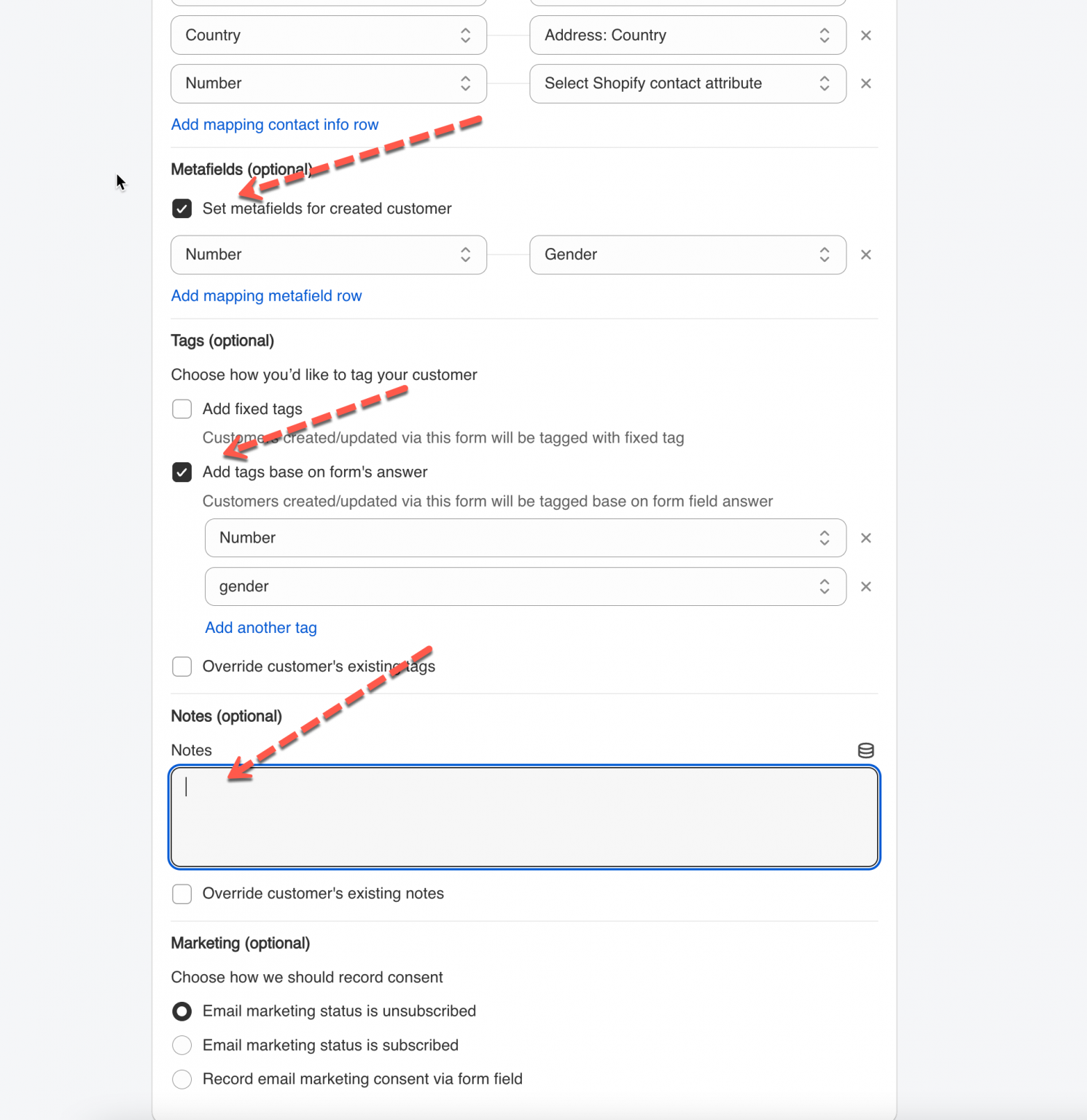
### Add tags, notes, metafields and marketing status

Optional, but this is where anything Shopify has no native field for belongs.

* **Metafields (optional)** — see [Customer metafield](/customers-and-registration/customer-metafields.md).
* **Tags (optional)** — see [Add Customer Tag](/customers-and-registration/customer-tags.md).
* **Notes (optional)** — see [Add Customer Note](/customers-and-registration/customer-notes.md).
* **Add to company** — pick a company under **Choose company**, then tick each location and choose the contact role.
* **Marketing (optional)** — tick **Set marketing for created customer**, then under **Choose how we should record consent** pick **Email marketing status is unsubscribed**, **Email marketing status is subscribed**, or **Record email marketing consent via form field**.

{% hint style="warning" %}
Only record marketing consent that the shopper actually gave.
{% endhint %}

<figure><img src="https://2907469752-files.gitbook.io/~/files/v0/b/gitbook-x-prod.appspot.com/o/spaces%2FehM2rz7MmKkWcJmgvJOe%2Fuploads%2Fgit-blob-dd519f855ae73869ddb68ce1fa5637feab77a5a0%2Fcf-create-customers-4.png?alt=media" alt=""><figcaption></figcaption></figure>
{% endstep %}

{% step %}

### Save

Save the form. Every valid submission now creates or updates a Shopify customer account.
{% endstep %}
{% endstepper %}

## Notes on field mapping

**Email is required.** Without it mapped to Shopify's `email` attribute, Shopify cannot create the profile.

**Other fields** — name, phone, address — map to their matching Shopify attributes. Only supported attributes appear in the dropdown.

**Only Shopify's fundamental customer properties are supported**: name, email, phone, address fields and the standard attributes. Those are the only ones Shopify lets the app write directly.

**Extra data** that Shopify has no native field for — membership level, preferred style, customer type — goes into [tags](/customers-and-registration/customer-tags.md), [notes](/customers-and-registration/customer-notes.md) or [metafields](/customers-and-registration/customer-metafields.md).

## What happens after setup

<figure><img src="https://2907469752-files.gitbook.io/~/files/v0/b/gitbook-x-prod.appspot.com/o/spaces%2FehM2rz7MmKkWcJmgvJOe%2Fuploads%2Fgit-blob-20c5636f431ac9bec63c075ec6bdce6247c041ff%2Fcf-create-customers-5.png?alt=media" alt=""><figcaption></figcaption></figure>

The visitor fills the form on your storefront and submits. Then:

<table><thead><tr><th width="230">If the email…</th><th>What happens</th></tr></thead><tbody><tr><td><strong>does not exist yet</strong></td><td>A new Shopify customer account is created, Shopify sends its <strong>Customer account welcome</strong> email, and the person can log in straight away.</td></tr><tr><td><strong>already exists</strong></td><td>What you chose under <strong>If customer already exist</strong> decides it. On the default, <strong>Return error message</strong>, the submission is blocked and the shopper sees the <strong>Customer already exists</strong> error. Switch to <strong>Continue and update customer infomation</strong> and the existing profile is updated instead — no duplicate is ever created.</td></tr></tbody></table>

## Things worth knowing

* The submission is stored under **Submissions** whether or not the customer record could be created, and only submissions received after you saved the form are processed.
* If Shopify rejects the phone number you mapped, the shopper sees the **Phone has already been taken** error. See [Error: phone has already been taken](/troubleshooting/phone-already-taken.md).

## When to use it

* Sign-up and registration forms.
* Wholesale or B2B registration.
* Lead capture, where you want every lead as a customer record.
* Event registration, service requests and bookings.

<br>

## Next steps

* [Email verification](/customers-and-registration/email-verification.md) — make people confirm their address before the account works.
* [Customer account approval](/customers-and-registration/approve-or-deny.md) — review registrations before an account exists.
* [Add Customer Tag](/customers-and-registration/customer-tags.md) — label the accounts this creates.
* [Customer metafield](/customers-and-registration/customer-metafields.md) — store the answers Shopify has no field for.
