> For the complete documentation index, see [llms.txt](https://docs.powerfulform.com/llms.txt). Markdown versions of documentation pages are available by appending `.md` to page URLs; this page is available as [Markdown](https://docs.powerfulform.com/customers-and-registration/account-submissions.md).

# Display submission list in account page

Show customers their past submissions, and let them edit chosen metafields, from inside their Shopify customer account.

The app can show form submissions and customer metafields directly in the Shopify **customer account page**, so customers can look back at what they sent you and edit the metafields you allow.

{% hint style="warning" %}
This works with [new customer accounts](https://help.shopify.com/en/manual/customers/customer-accounts/new-customer-accounts/migration) only, not [legacy customer accounts](https://help.shopify.com/en/manual/customers/customer-accounts/legacy-customer-accounts).
{% endhint %}

## 🛠️ Add the blocks to the account page

{% stepper %}
{% step %}

### Open the customer account page

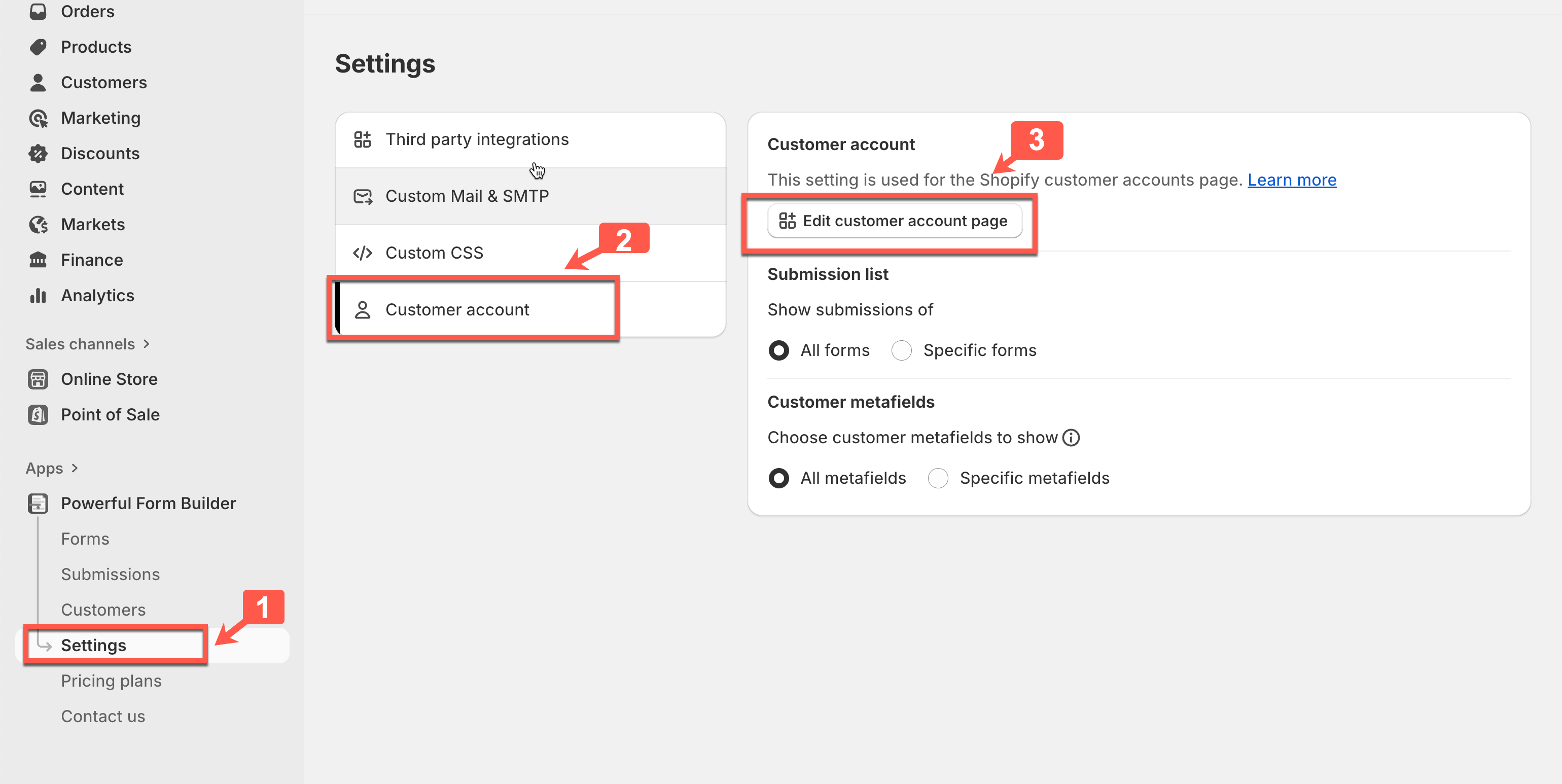
In the app, go to **Settings** > **Customer account** and click **Edit customer account page**.

<figure><img src="https://2907469752-files.gitbook.io/~/files/v0/b/gitbook-x-prod.appspot.com/o/spaces%2FehM2rz7MmKkWcJmgvJOe%2Fuploads%2Fgit-blob-24d5921cb4ee8ae50c317bf234ecbe71ece2714d%2Fcf-account-submissions-1.png?alt=media" alt=""><figcaption></figcaption></figure>

You can also reach it by opening the **Theme editor** and switching to the **Customer account** page.

<figure><img src="https://2907469752-files.gitbook.io/~/files/v0/b/gitbook-x-prod.appspot.com/o/spaces%2FehM2rz7MmKkWcJmgvJOe%2Fuploads%2Fgit-blob-60b20479cbacc5febb053fff47bad004a08ec757%2Fcf-account-submissions-2.png?alt=media" alt=""><figcaption></figcaption></figure>
{% endstep %}

{% step %}

### Add a block

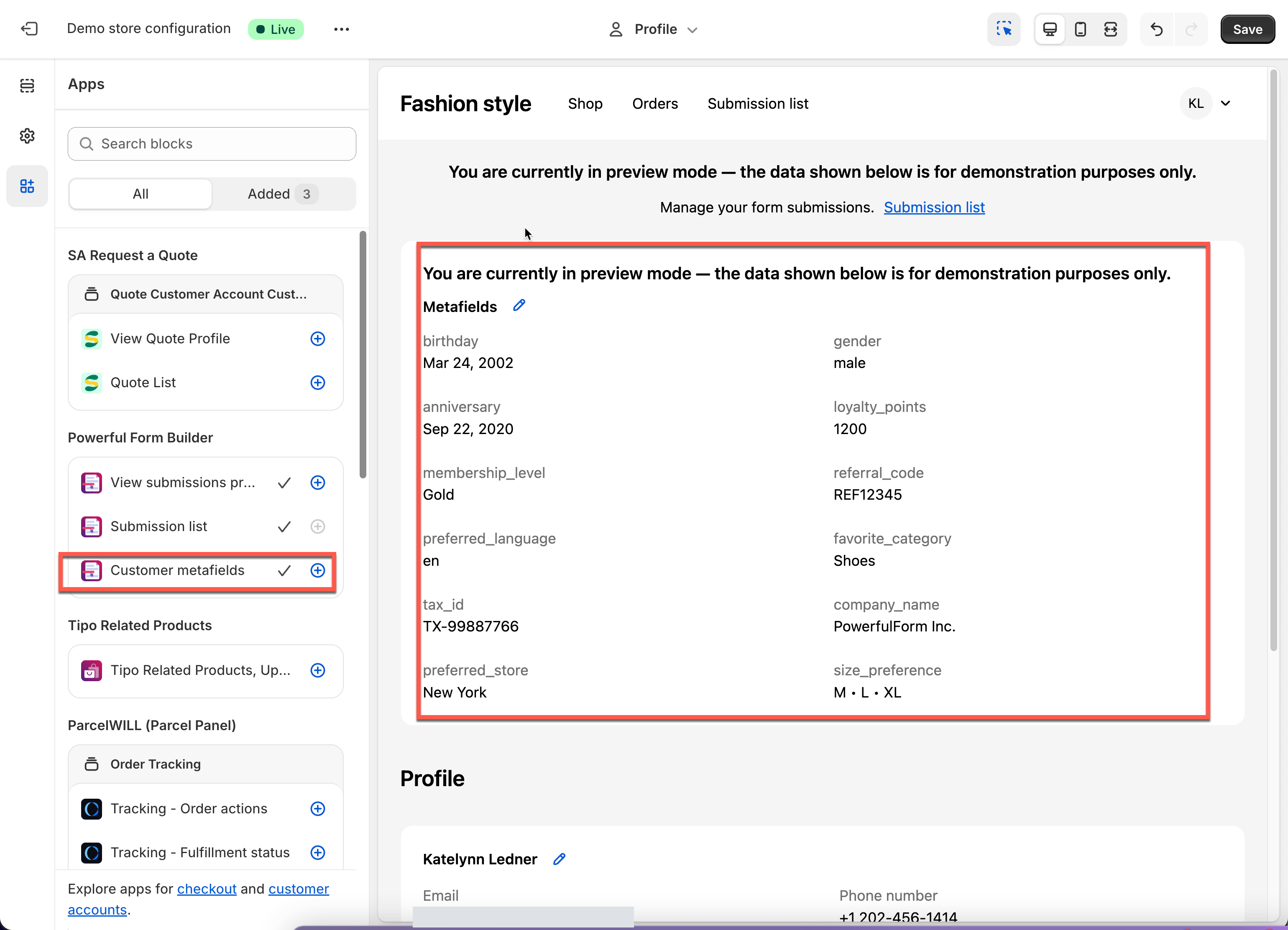
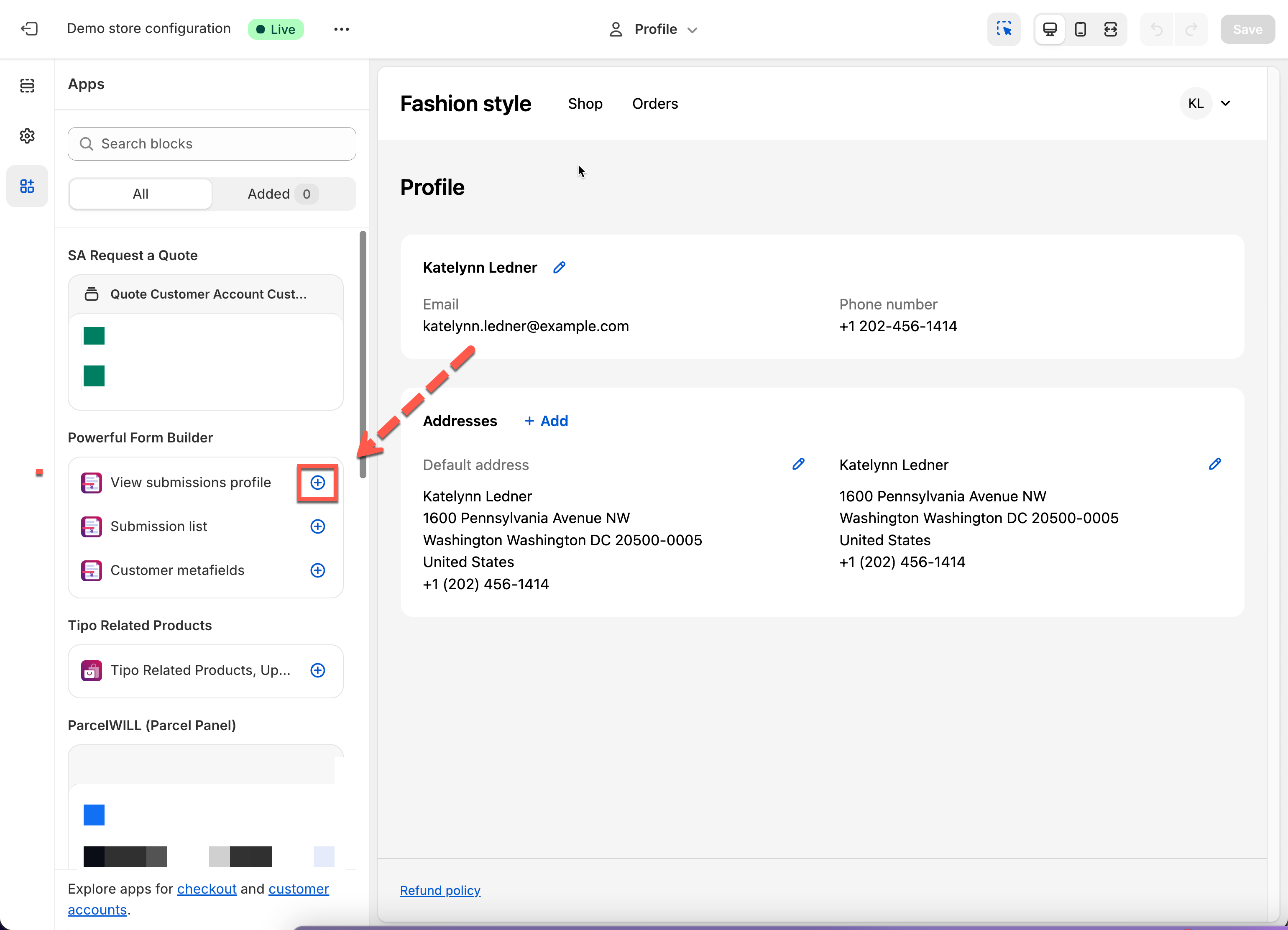
In the theme editor, click **Add block (+)** to insert an extension.

<figure><img src="https://2907469752-files.gitbook.io/~/files/v0/b/gitbook-x-prod.appspot.com/o/spaces%2FehM2rz7MmKkWcJmgvJOe%2Fuploads%2Fgit-blob-650b2099f592e35759b9b9e7cad957f78a6f62fc%2Fcf-account-submissions-3.png?alt=media" alt=""><figcaption></figcaption></figure>

There are three to choose from:

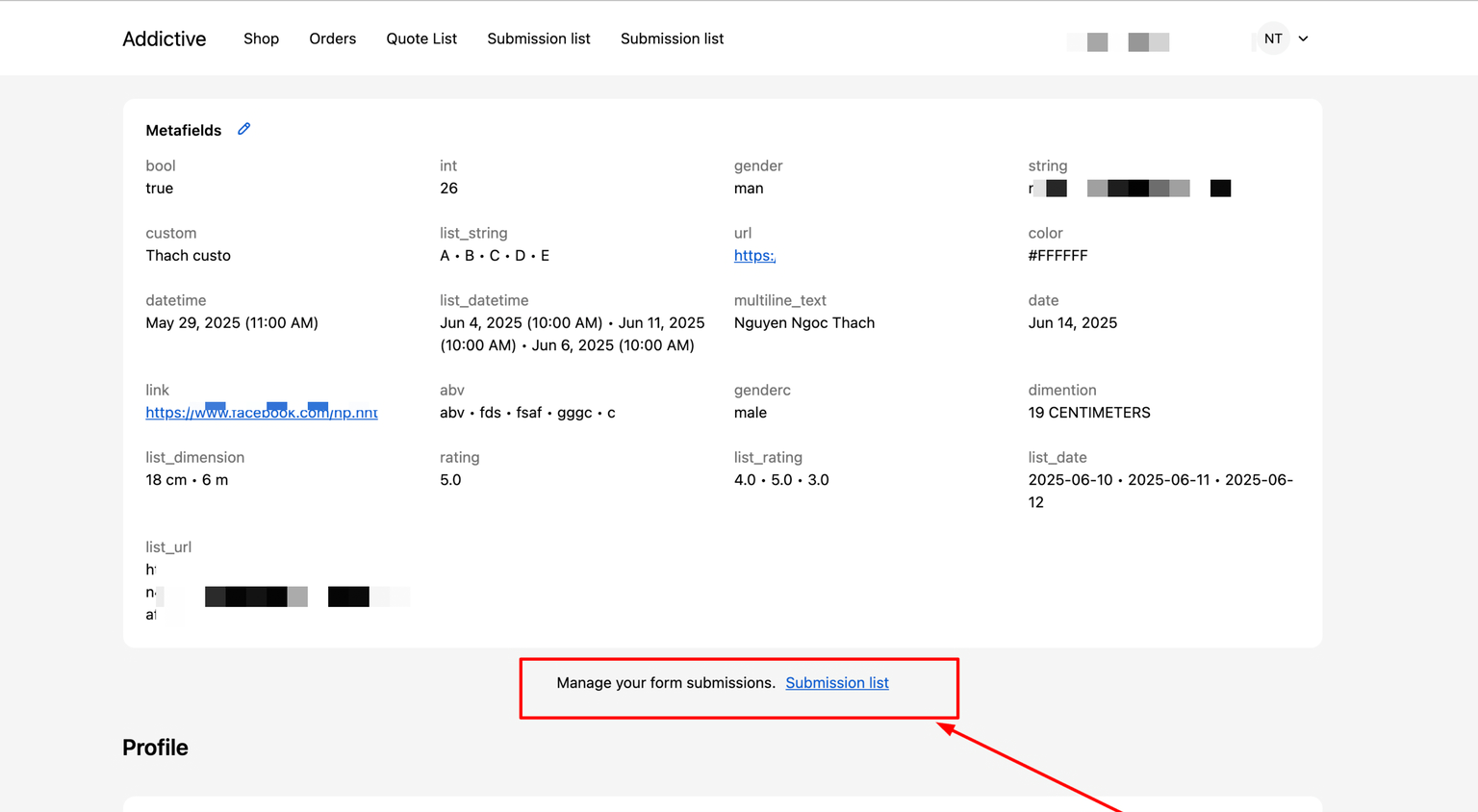
<table><thead><tr><th width="250">Block</th><th>What it does</th></tr></thead><tbody><tr><td><strong>Customer metafields</strong></td><td>Shows customer metafields on the Profile page.</td></tr><tr><td><strong>View submissions (profile)</strong></td><td>Adds a link on the Profile page that opens the submissions list.</td></tr><tr><td><strong>Submission list</strong></td><td>Creates a page showing every submission from that customer.</td></tr></tbody></table>

<figure><img src="https://2907469752-files.gitbook.io/~/files/v0/b/gitbook-x-prod.appspot.com/o/spaces%2FehM2rz7MmKkWcJmgvJOe%2Fuploads%2Fgit-blob-cef1eb99f364d797750810f4acb73cd905b09b37%2Fcf-account-submissions-4.png?alt=media" alt=""><figcaption></figcaption></figure>

<figure><img src="https://2907469752-files.gitbook.io/~/files/v0/b/gitbook-x-prod.appspot.com/o/spaces%2FehM2rz7MmKkWcJmgvJOe%2Fuploads%2Fgit-blob-102347bab9889bee543d2b7a527ed53932d977fb%2Fcf-account-submissions-5.png?alt=media" alt=""><figcaption></figcaption></figure>

<figure><img src="https://2907469752-files.gitbook.io/~/files/v0/b/gitbook-x-prod.appspot.com/o/spaces%2FehM2rz7MmKkWcJmgvJOe%2Fuploads%2Fgit-blob-3fa16a7262121a593068584fbc5f2a1f1bf2000b%2Fcf-account-submissions-6.png?alt=media" alt=""><figcaption></figcaption></figure>
{% endstep %}

{% step %}

### Save

Click **Save** in the theme editor.
{% endstep %}
{% endstepper %}

## 🛠️ Let customers edit metafields

In **Customer account settings** you choose which metafields appear and whether customers may change them.

<figure><img src="https://2907469752-files.gitbook.io/~/files/v0/b/gitbook-x-prod.appspot.com/o/spaces%2FehM2rz7MmKkWcJmgvJOe%2Fuploads%2Fgit-blob-ac9289e86151f6434ca0464f84bd1bbe013d10c8%2Fcf-account-submissions-7.png?alt=media" alt=""><figcaption></figcaption></figure>

* Tick **Allow edit** to let customers update that metafield from their profile.
* Leave it off and the metafield is still shown, but read-only.

**Example.** Turn **Allow edit** on for the `gender` metafield and customers see it in their profile and can change it themselves.

## ✅ How it works

The customer signs in and visits `/account`, then opens their account dashboard. The **Submission list** block shows:

* Every form they have submitted
* The submission dates
* A preview or details button, depending on your theme
* A tidy table of their past activity

<figure><img src="https://2907469752-files.gitbook.io/~/files/v0/b/gitbook-x-prod.appspot.com/o/spaces%2FehM2rz7MmKkWcJmgvJOe%2Fuploads%2Fgit-blob-5e6db35c989b3c6513d85c0cb54f464e3e5a7250%2Fcf-account-submissions-8.png?alt=media" alt=""><figcaption></figcaption></figure>

<br>

## Next steps

* [Edit customer account page](/customers-and-registration/account-page.md) — let them change their details, not just read them.
* [Customer metafield](/customers-and-registration/customer-metafields.md) — define the metafields this page can show.
* [Require login to submit](/customers-and-registration/require-login.md) — keep account-only forms private.