> For the complete documentation index, see [llms.txt](https://docs.powerfulform.com/llms.txt). Markdown versions of documentation pages are available by appending `.md` to page URLs; this page is available as [Markdown](https://docs.powerfulform.com/build-your-form/error-messages.md).
# Edit error messages
Reword every validation message your form can show a visitor.
Powerful Contact Form Builder lets you rewrite every validation message a visitor can see, in your own words and in every language you sell in.
## 📝 How to edit
{% stepper %}
{% step %}
#### Open the form
* In the app > click **Forms** > open the form
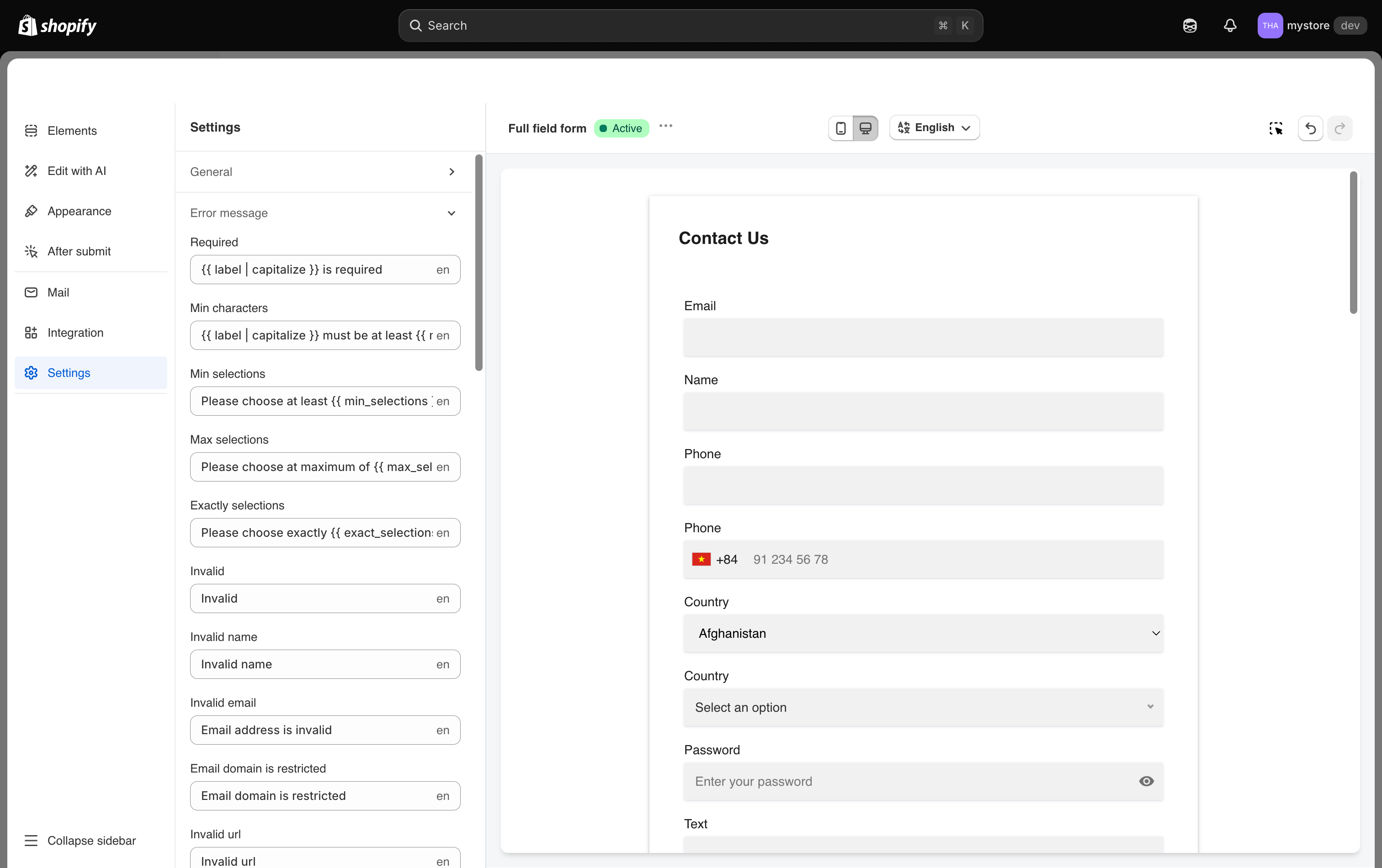
* Click **Settings** in the left icon rail
{% endstep %}
{% step %}
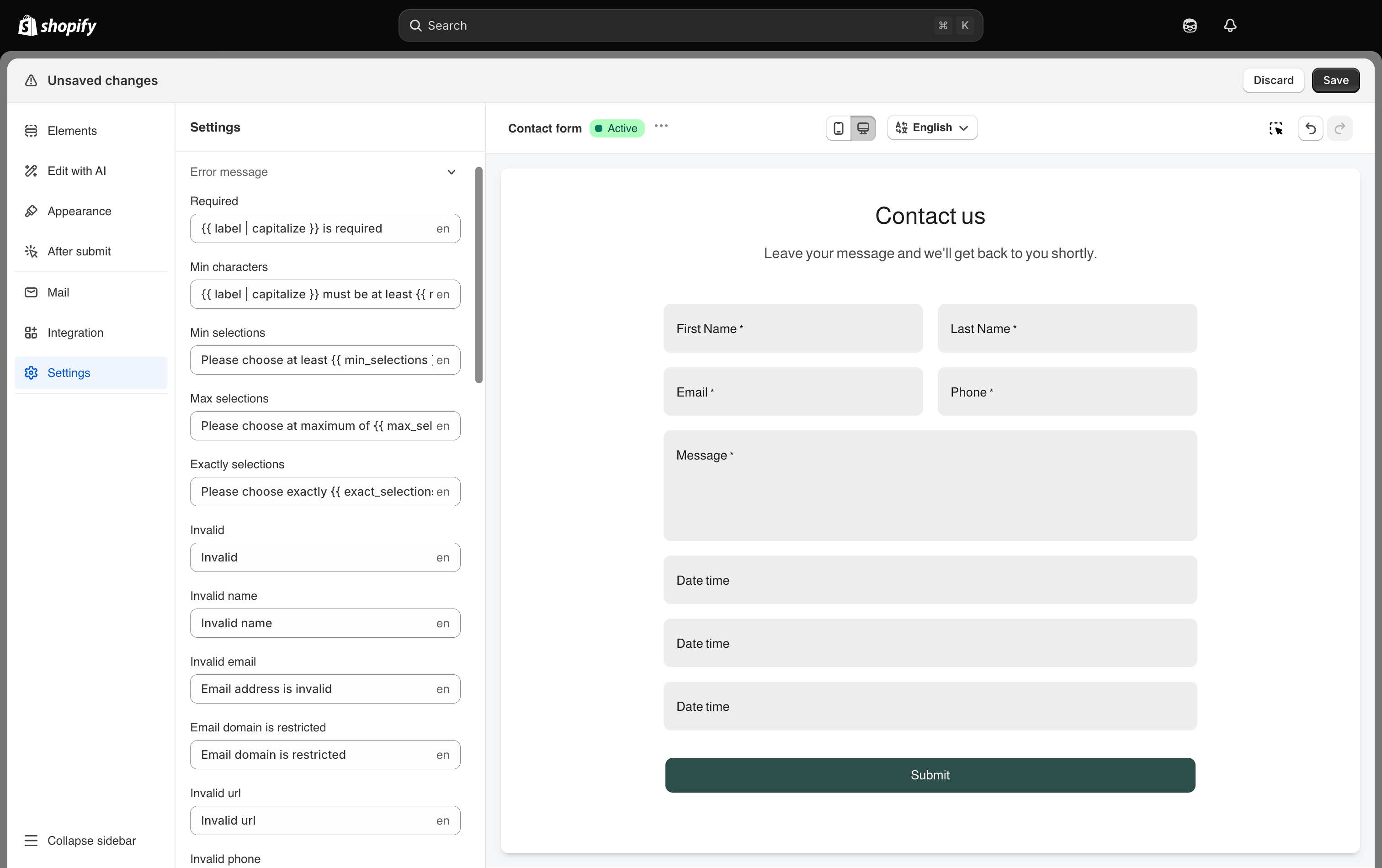
#### Expand Error message
Click **Error message** to expand it. Every message is listed as its own text box with its current wording.
{% endstep %}
{% step %}
#### Rewrite the ones you care about
Type over the wording in any box. Anything you leave alone keeps its standard wording.
{% endstep %}
{% step %}
#### Save the change
{% endstep %}
{% endstepper %}
Nothing is live until you click **Save** on the Shopify save bar at the top of the screen.
Every validation message a visitor can see is editable here.
## 📝 Placeholders
Some messages contain a placeholder in double braces, such as `{{ min_length }}`. The app replaces it with the real number, so *Please enter at least {{ min\_length }} characters* becomes *Please enter at least 8 characters*.
{% hint style="warning" %}
Keep the placeholder exactly as written, braces and all. Delete it and the message loses the number.
{% endhint %}
## 💡 Every message you can edit
Every validation message the form can show is editable here.
### Filling a field in
| Setting | What it is shown for | Default |
| ------------------ | --------------------------------------------------- | --------------------------------------------------------- |
| **Required** | A required field was left empty. | Required |
| **Min characters** | The answer is shorter than the minimum you set. | Please enter at least {{ min\_length }} characters |
| **Min selections** | Fewer options were chosen than the minimum you set. | Please choose at least {{ min\_selections }} options |
| **Max selections** | More options were chosen than the maximum you set. | Please choose at maximum of {{ max\_selections }} options |
### Field formats
| Setting | What it is shown for | Default |
| ----------------------------------- | ----------------------------------------------------------------------------------------- | -------------------------------- |
| **Invalid email** | The Email field is not a valid email address. | Invalid email |
| **Invalid phone** | The Phone field is not a valid number for the selected country. | Invalid phone |
| **Invalid number** | The Number field is not a valid number, or falls outside the minimum and maximum you set. | Invalid number |
| **Invalid password** | The Password field does not meet the strength rule you chose. | Invalid password |
| **Confirmed password does't match** | The two password boxes do not match. | Confirmed password doesn't match |
### Duplicates and restrictions
| Setting | What it is shown for | Default |
| ------------------------------ | --------------------------------------------------------------------------------------------------------- | -------------------------- |
| **Email domain is restricted** | The email address uses a domain you blocked in **Settings** > **General** > **Restricted email domains**. | Email domain is restricted |
| **Customer already exists** | A Shopify customer with that email address is already in your store. | Customer already exists |
| **Data already exists** | The value repeats one already used, when **Limit to one submit per user** is on. | Data already exists |
### File uploads
| Setting | What it is shown for | Default |
| -------------------- | ------------------------------------------------------ | ---------------- |
| **File size limit** | The attached file is larger than the size you allowed. | File size limit |
| **File not allowed** | The attached file is of a type you did not allow. | File not allowed |
### Spam protection
| Setting | What it is shown for | Default |
| -------------------- | ------------------------------ | ---------------- |
| **Required captcha** | The captcha was not completed. | Required captcha |
### Products and quantities
These messages apply to forms with a **Product** field or a bulk order table.
| Setting | What it is shown for | Default |
| -------------------- | --------------------------------------------------- | ------------------------------------------------------ |
| **Required product** | No product was selected. | Please select product |
| **Limit quantity** | The requested quantity is more than the stock left. | The number of products left in stock has been exceeded |
## 💡 Writing better messages
* Say what to do, not what went wrong. *Enter an email we can reply to* beats *Invalid email*.
* Keep the message short enough to read at a glance under the field.
## 📝 Translating error messages
Every message is translatable. Switch the editor to another language from the top bar and type the translated wording into the same boxes.
{% hint style="info" %}
Editing a second language requires a plan that includes multiple languages. See [Plans and billing](/settings/plans-and-billing.md).
{% endhint %}
The app also provides the Auto-translate function. [Lean more](https://globosoftware.gitbook.io/globosoftware-docs/build-your-form/translate-a-form)
## Next steps
* [Prevent spam submissions](/troubleshooting/prevent-spam.md) for the captcha behind the **Required captcha** message.
* [Error: customer already exists](/troubleshooting/customer-already-exists.md) if that message keeps appearing.